

Storyboarding is frequently connected to the motion picture industry. Rightfully so, you may picture the brilliant and imaginative minds of your favorite writers, producers, and artists bent over actual storyboards, outlining their ideas for forthcoming film production. Before starting the expensive process of filming and production, filmmakers have utilized storyboards to outline the intended plot of a film throughout history. Before spending money on the film, this makes sure that everyone is on board with the overall look and feel. It also enables the best possible teamwork. Before anything is decided, everyone can provide ideas.
However, storyboarding is now utilized by anyone other than only filmmakers. Storyboards are another tool that web designers and developers use to describe a project proposal. It can be useful to comprehend what a website storyboard is and how a storyboard design is employed in the process of developing a website if you are thinking about updating the website for your business. By learning storyboard design, you can work with your design team to ensure the website you pay for is the ideal representation of your requirements.
Table of Contents
What is a Storyboard in Web Design?
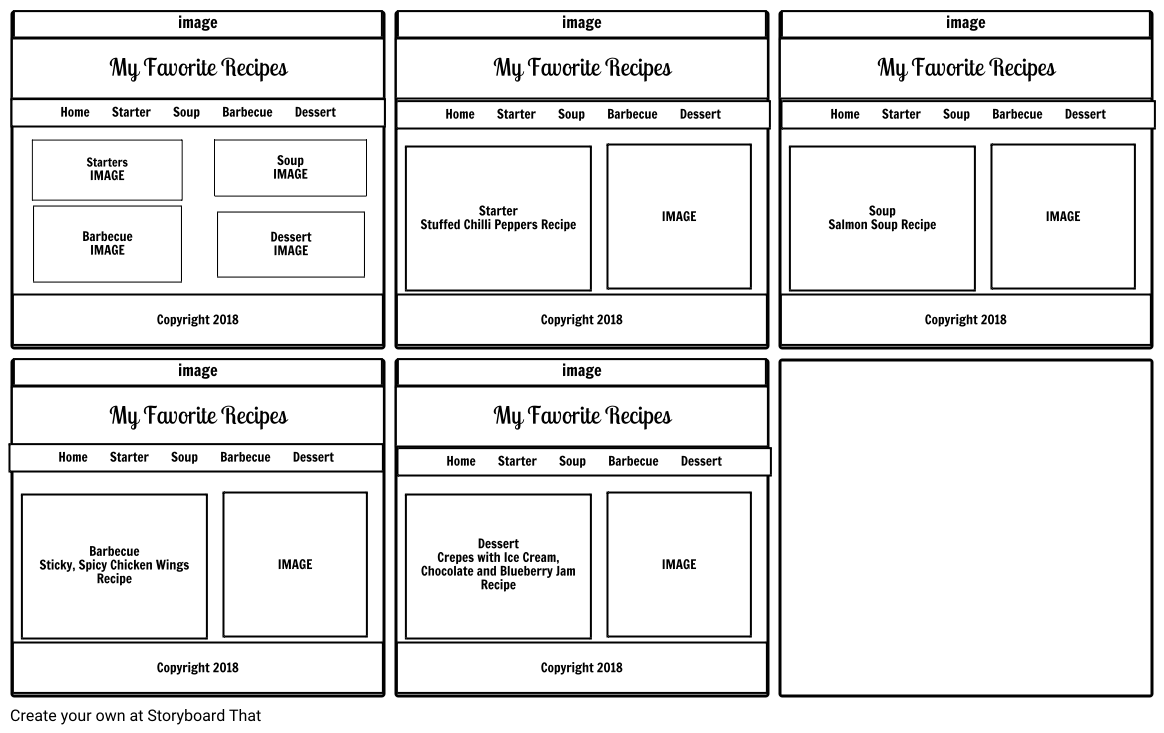
A storyboard is a straightforward illustration of a design undertaking. Storyboards can be used by any designer, including those in the film, fashion, design, and digital development industries. What exactly does a storyboard in web design mean? A storyboard website design is a fast digital rendering of the appearance and behavior of a website.
A storyboard design consists of a lot of different components, and the particular style your designer will provide to you will depend on how they work. Usually, after your initial meeting, where you discuss the objectives of your website, a storyboard will be sent to you. A designer will use this data to create a rough mock-up of your website’s appearance and feel.
You will probably get revised versions of the storyboard as the design process progresses, reflecting requested changes and enhanced procedures. A storyboard is typically displayed digitally. It might be a static presentation or an interactive, click-through experience.
What Components Go Into a Storyboard?
Knowing what to expect from the design process can be useful as you sit down to study a website storyboard. This will enable you to plan ahead, take notes, and consider your company’s unique requirements. Always be sure to express any queries or worries as soon as you can. This will give your design team a chance to make changes before devoting excessive effort to developing and building your website.
The Wireframe
Most of the time, your web design team will give you a wireframe that contains more specifics about the structure and flow of your website as they develop a more thorough grasp of your business goals for your website. The navigation of your website may often be understood by clicking through objects in a wireframe, which is frequently interactive.
A wireframe can help you better understand how much room each component of your website will occupy and frequently contains information about the menus on your website. A wireframe would display the precise suggested location of the contact form on each page, for instance, if you asked for a contact form on your home page.
One of the first peeks of your new website design is browsing wireframes. This calls for careful consideration of how each component appears in relation to the webpage. This is the ideal moment to enquire about other options if you don’t like the location of anything.
Content Ideas
How material and information are presented to users is a crucial component of any website design. A good site designer should be able to hold a reader’s interest and provide information in a way that is simple to understand.
A website storyboard will provide you with an idea of how much information your website designer intends to include on each page, even if it won’t show you the copy and graphics that will be used on your website. Be mindful of the placement of text boxes and how your brand’s narrative is presented.
A Simple Format
Typically, a storyboard will start with a suggestion for the basic structure of your website. This format is frequently represented using straightforward boxes and rectangular elements. This will serve as the starting point for your website’s general appearance and feel, according to your web design team.
Do not get distracted by the intricacies when you first view the basic layout of your website storyboard. Later, visual components with aspects unique to the business will be introduced. The objective at this early stage is to simply learn the format you favor for your website design.
An Illustration of Suggested Website Behavior
A designer will frequently collaborate with their user experience (UX) team to define the website’s intended behavior and use wireframes to aid in storyboarding. They will demonstrate how they anticipate a user engaging with your website in this storyboard section.
You’ll frequently look at various options that a user might consider. This part of the storyboard may be shown to you in clickable workflows or in parts.
You’ll be checking to see if the navigation encourages users to execute your desired activities as you go through how a website should operate. For instance, you should consider how the proposed behavior of the website may influence a user to sign up for a consultation if your company is redesigning its website to boost the number of leads who do so.
Do you ever need a Storyboard, and if so, when?
You might be wondering when and why you would need a storyboard made for your business if you are paying to have a new website developed if you are. A storyboard should ideally be requested as early in the website design process as possible. A storyboard’s objective is to provide you the opportunity to offer suggestions before designers and developers begin working on the specific code of your website. This can aid in improving the coherence of the website design process.
A storyboard additionally indicates the caliber of the team you are working with. A web designer won’t need to spend much time discussing a storyboard with you if they are only giving you a templated website design. Nevertheless, if they are creating a website, especially for your company, a storyboard is a useful tool for ensuring that everyone is on the same page.
Set up a meeting with all team members who might have significant input on your website design if your web designer used a storyboard as part of the website design process. This should ideally include members of your marketing, sales, products, and customer support teams in addition to your business leadership. This can ensure that all of the needs of both customers and employees are addressed.
Conclusion
Working on a website design project outside of your comfort zone can feel daunting, but using a storyboard can help make the process more manageable. Always confirm in advance with a team you employ whether they will give you the opportunity to study designs in storyboard style. Connect with SaaSworthy to know all about it.
