

For cloud-based collaboration and storage solutions, Microsoft offers two prominent platforms: OneDrive and SharePoint. Both serve distinct purposes yet are interconnected, catering to diverse organizational needs. Understanding their features, advantages, disadvantages, and how they complement each other is crucial for businesses aiming to optimize their digital workflows.
Here is a comprehensive comparison of OneDrive and SharePoint, exploring their capabilities, benefits, drawbacks, and synergies to help you make informed decisions in aligning these platforms with your organization’s goals and requirements.
Table of Contents
What is OneDrive?
OneDrive is a cloud storage service by Microsoft that allows users to store, sync, and share files across devices. It is designed for personal and small-scale file management, offering seamless integration with Microsoft Office applications.
What is SharePoint?
SharePoint is a collaboration platform by Microsoft that enables teams to share and manage content, documents, and projects within an organization. It offers advanced features for document management, workflow automation, and team collaboration.
OneDrive vs SharePoint

OneDrive and SharePoint serve different purposes within the Microsoft ecosystem. While OneDrive is ideal for personal file storage and sharing, SharePoint is tailored for team collaboration, document management, and project coordination.
| Features | OneDrive | SharePoint |
| Storage Capacity | Personal storage with limited space | Organization-wide storage with scalable capacity |
| File Sharing & Collaboration | Collaboration with limited sharing options | Extensive collaboration features with customizable sharing settings |
| Document Management | Basic document management for individual use | Advanced document management with version control, metadata, and workflows |
| Team Sites & Portals | Not designed for team sites or portals | Provides team sites and portals for departmental collaboration |
| Workflow Automation | Limited workflow capabilities for personal use | Robust workflow automation for business processes |
| Integration with Microsoft 365 | Seamless integration with Office apps | Deep integration with Office 365, Teams, and other Microsoft tools |
| Customization & Development | Limited customization options for personal accounts | Extensive customization and development capabilities for business use |
| Security & Compliance | Standard security measures for personal files | Advanced security features with compliance controls |
| Pricing | Included with Microsoft 365 subscription | Included with Microsoft 365 subscription, additional costs for advanced features |
Als0 Read: From Google Drive to Microsoft’s OneDrive, Here are the Top Alternatives to Dropbox
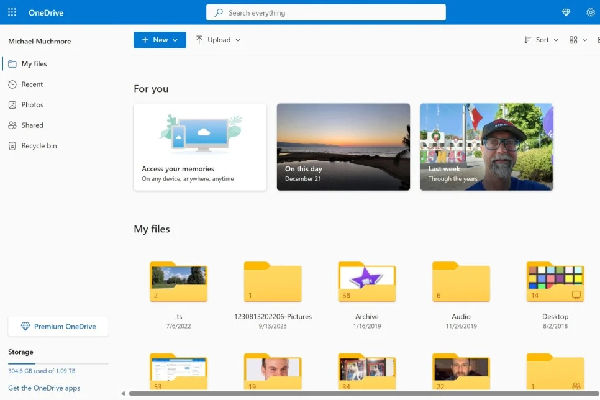
OneDrive focuses on personal file storage, easy file sharing, version history, and integration with Microsoft Office applications like Word, Excel, and PowerPoint.
Features of SharePoint
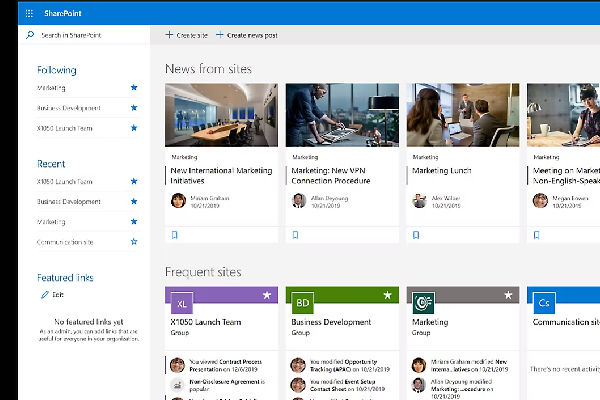
SharePoint offers advanced document management, team collaboration, workflow automation, customizable portals, integration with Microsoft 365 apps, and robust security features.
Advantages and Disadvantages of OneDrive
Advantages of OneDrive
- Seamless integration with Microsoft Office apps.
- Easy file sharing and collaboration for personal use.
- Version history for tracking changes in files.
Disadvantages of OneDrive
- Limited storage space for personal accounts.
- Basic document management features compared to SharePoint.
- Not suitable for organization-wide collaboration and workflow automation.
Advantages and Disadvantages of SharePoint
Advantages of SharePoint
- Advanced document management with version control and metadata.
- Extensive collaboration features with team sites and portals.
- Workflow automation for business processes.
Disadvantages of SharePoint
- The steeper learning curve for customization and development.
- Requires additional training for effective use in organizations.
- Costs may increase with advanced features and customization.
Also read: https://dev.saasworthy.com/blog/top-alternatives-to-dropbox
OneDrive vs SharePoint: Which one should you choose?hR
The choice between OneDrive and SharePoint depends on your specific needs and the scale of collaboration within your organization. If you require personal file storage, easy sharing, and integration with Office apps, OneDrive is suitable. However, for team collaboration, advanced document management, workflow automation, and organization-wide portals, SharePoint is the recommended choice.
FAQs Related to OneDrive and SharePoint
Has OneDrive replaced SharePoint?
No, OneDrive and SharePoint serve different purposes and are designed for personal and organizational use, respectively.
Is SharePoint the back end of OneDrive?
SharePoint provides the backend infrastructure for document management and collaboration in OneDrive for Business accounts.
Is OneDrive free to use?
OneDrive offers a limited free storage option with Microsoft accounts, but larger storage capacities require a subscription.
How much storage do I get with SharePoint?
SharePoint storage capacity depends on your Microsoft 365 subscription plan, with options for scalable storage.
Can I share files with people who don’t have a Microsoft account using OneDrive?
Yes, OneDrive allows sharing files with non-Microsoft account users through secure links.
Can I collaborate on documents with others in real time using SharePoint?
Yes, SharePoint supports real-time collaboration on documents, allowing multiple users to edit and work together simultaneously.
Is my data more secure in OneDrive or SharePoint?
Both OneDrive and SharePoint offer robust security measures, including encryption, access controls, and compliance features.
Can I access my OneDrive files offline on my phone?
Yes, OneDrive provides offline access to files on mobile devices through the OneDrive mobile app.
