

Construction estimating software is a specialized tool designed to help construction professionals accurately estimate the costs associated with building projects. It integrates various elements of project planning, cost analysis, and resource management, enabling contractors, estimators, and project managers to streamline their estimating processes. This article explores the features, benefits, and types of construction estimating software, as well as its role in the modern construction industry.
Table of Contents
What is Construction Estimating Software?
Construction estimating software simplifies the complex process of creating accurate and reliable cost estimates for construction projects. It combines multiple functions such as cost calculation, material takeoff, labor cost estimation, and project management into a single platform. These tools are essential for ensuring that projects are completed within budget and on time, minimizing the risk of cost overruns and financial losses.
Key Features Construction Estimating Software
Cost Calculation
- Automated calculations for materials, labor, equipment, and subcontractor expenses.
- Customizable cost databases that can be tailored to specific project needs.
Material Takeoff
- Tools for quantifying the amount of materials needed from blueprints or digital plans.
- Integration with CAD and BIM software for accurate takeoff processes.
Labor Cost Estimation
- Estimation of labor hours and rates based on project scope and complexity.
- Consideration of local wage rates and labor availability.
Project Management Integration
- Scheduling tools to plan project timelines and resource allocation.
- Real-time tracking and updates to manage project progress and budgets.
Reporting and Analysis
- Generation of detailed reports for cost breakdowns, bid proposals, and project forecasts.
- Analytical tools for comparing estimates with actual project costs to identify discrepancies and areas for improvement.
Benefits
Accuracy and Efficiency
- Reduces human error in calculations, leading to more accurate estimates.
- Speeds up the estimating process, allowing for quicker bid submissions.
Cost Control
- Helps maintain control over project budgets by providing detailed cost breakdowns.
- Enables early identification of potential cost overruns and financial risks.
Improved Collaboration
- Facilitates better communication and collaboration among project stakeholders.
- Centralized data storage ensures all team members have access to up-to-date information.
Competitive Advantage
- Enhances the ability to create competitive bids with precise cost estimates.
- Increases chances of winning contracts by demonstrating professionalism and accuracy.
Types of Construction Estimating Software
Desktop-Based Software
- Installed on individual computers and often used by small to mid-sized firms.
- Offers robust features but may lack the scalability of cloud-based solutions.
Cloud-Based Software
- Accessible from anywhere with an internet connection, supporting remote work.
- Scalable and often includes collaborative features for large teams.
Integrated Suites
- Combines estimating with other construction management tools such as scheduling, accounting, and project management.
- Provides a comprehensive solution for managing all aspects of construction projects.
Popular Construction Estimating Software
ProEst
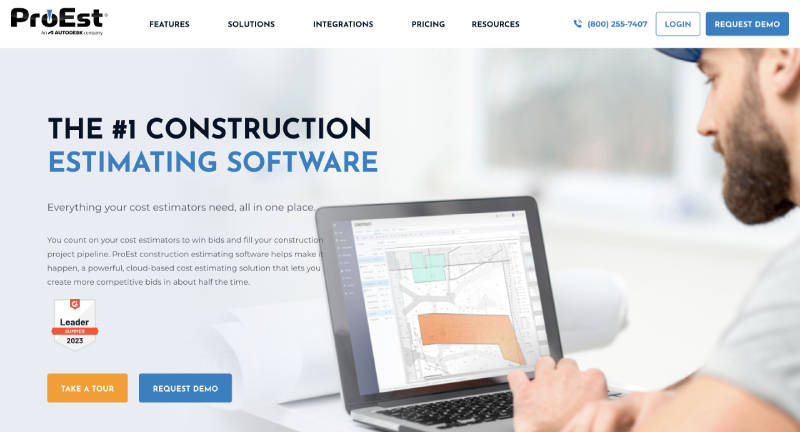
ProEst is a comprehensive construction estimating software known for its detailed cost databases and seamless integration with popular project management tools. Here’s a deeper look into its features:
- Detailed Cost Databases: ProEst includes extensive cost databases that provide accurate pricing for materials, labor, equipment, and subcontractor expenses. These databases are regularly updated to reflect current market conditions, ensuring that estimates are always based on the latest cost information.
- Integration with Project Management Tools: ProEst integrates with widely-used project management platforms like Procore and Microsoft Project. This integration allows for the smooth transfer of estimate data into project schedules and budgets, enhancing overall project planning and execution.
- User-Friendly Interface: The software boasts an intuitive interface that simplifies the estimating process, making it accessible even for users with limited technical expertise.
- Cloud-Based Accessibility: As a cloud-based solution, ProEst allows users to access their estimates from anywhere with an internet connection, promoting collaboration and flexibility.
Buildertrend
Buildertrend is an all-in-one construction management software that combines estimating, project management, and client communication features. Here’s a detailed breakdown:
- Estimating: Buildertrend offers robust estimating tools that help users create detailed and accurate cost estimates. The software supports quick bid creation and management, ensuring that contractors can respond to bid requests efficiently.
- Project Management: Beyond estimating, Buildertrend includes comprehensive project management features such as scheduling, task management, and resource allocation. These tools help keep projects on track and ensure efficient use of resources.
- Client Communication: Buildertrend excels in facilitating communication between contractors and clients. The platform includes client portals, where clients can view project updates, approve change orders, and communicate directly with the project team.
- Mobile App: The software also offers a mobile app, enabling users to manage their projects on the go. This feature is particularly useful for field personnel who need access to project information while on-site.
Sage Estimating

Sage Estimating is renowned for its robust cost databases and integration with Sage’s accounting software, making it a powerful tool for construction professionals. Here are its key aspects:
- Robust Cost Databases: Sage Estimating comes with extensive, customizable cost databases that provide detailed pricing information for various construction elements. These databases help ensure that estimates are comprehensive and precise.
- Integration with Sage Accounting Software: One of Sage Estimating’s standout features is its integration with Sage’s accounting software. This integration streamlines the flow of financial data between estimating and accounting, improving overall financial management and reporting.
- Scalability: Sage Estimating is scalable, making it suitable for small businesses as well as large enterprises. Its flexibility allows it to grow with the needs of a business.
- Advanced Reporting: The software includes powerful reporting tools that enable users to generate detailed cost analyses and project forecasts. These reports aid in decision-making and project planning.
Bluebeam Revu

Bluebeam Revu is widely appreciated for its powerful material takeoff capabilities and integration with digital plans. Here’s a closer look:
- Material Takeoff: Bluebeam Revu offers sophisticated material takeoff tools that allow users to quickly and accurately measure materials directly from digital blueprints. These tools reduce the time and effort required for manual takeoffs and enhance accuracy.
- Integration with Digital Plans: The software seamlessly integrates with various digital plan formats, including PDF. Users can mark up plans, perform takeoffs, and share annotated documents with team members, all within the same platform.
- Collaboration Tools: Bluebeam Revu includes features that facilitate real-time collaboration. Team members can view, edit, and comment on plans simultaneously, improving communication and coordination.
- Document Management: The software also provides robust document management capabilities, enabling users to organize, store, and retrieve project documents efficiently.
Implementation and Best Practices
Training and Support
- Invest in proper training for your team to maximize the software’s potential.
- Choose software providers that offer comprehensive support and resources.
Customization
- Tailor the software to match your specific business needs and project requirements.
- Regularly update cost databases to reflect current market prices.
Integration
- Integrate the estimating software with other tools you use, such as project management and accounting software.
- Ensure seamless data flow between different systems to enhance efficiency.
Investing in construction estimating software can transform how construction projects are planned and executed. By embracing these tools, companies can ensure they remain competitive, agile, and capable of meeting the demands of modern construction projects. Whether you are a small contractor or a large construction firm, the right estimating software can make a substantial difference in your project outcomes and overall business success.
FAQs
How does construction estimating software integrate with other project management tools?
Construction estimating software integrates with project management tools like Procore and Microsoft Project by allowing seamless data transfer, real-time updates, and enhanced reporting, which streamline workflows and ensure consistency across all project phases.
