Close Menu
  • Categories
    • Top Software
    • Statistics
    • Research Reports
    • Guides
    • Software Reviews
    • SaaS Talks
  • Resources
    • SW Score Methodology
    • SaaS Terms Glossary
  • Browse Software
Facebook X (Twitter) Instagram
SaaSworthy Blog | Top Software, Statistics, Insights, Reviews & Trends in SaaSSaaSworthy Blog | Top Software, Statistics, Insights, Reviews & Trends in SaaS
  • Categories
    • Top Software
    • Statistics
    • Research Reports
    • Guides
    • Software Reviews
    • SaaS Talks
  • Resources
    • SW Score Methodology
    • SaaS Terms Glossary
  • Browse Software
SaaSworthy Blog | Top Software, Statistics, Insights, Reviews & Trends in SaaSSaaSworthy Blog | Top Software, Statistics, Insights, Reviews & Trends in SaaS
Home»Guides»How to Use Connecteam – A Simple Guide
Guides

How to Use Connecteam – A Simple Guide

Saurabh YadavBy Saurabh Yadav4 Mins ReadSeptember 2, 2024
Facebook Twitter LinkedIn Reddit Email
Table of Contents
  1. Getting Started with Connecteam
  2. Key Features and How to Use Them
  3. Key Takeaway
  4. FAQs

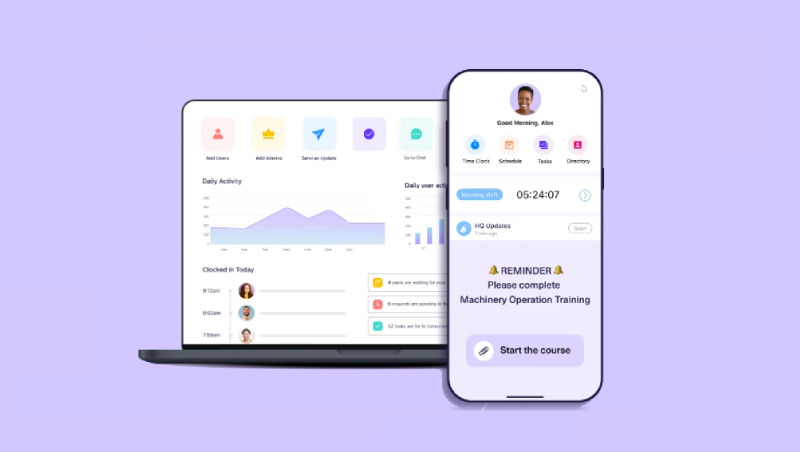
Connecteam is a powerful all-in-one employee management solution designed to simplify communication, boost engagement, and enhance operational efficiency for businesses of all sizes. From small startups to large enterprises, Connecteam provides a comprehensive suite of tools to centralize your workforce management efforts. Here’s how you can get started and make the most of Connecteam.

Table of Contents

  • Getting Started with Connecteam
    • Sign Up and Create Your Account:
    • Set Up Your Company Profile:
    • Invite Your Team Members:
  • Key Features and How to Use Them
    • Communication:
    • Scheduling & Time Tracking:
    • Tasks & Checklists:
    • Training & Onboarding:
    • Additional Tips for Using Connecteam
  • Key Takeaway
  • FAQs
    • How do I reset my Connecteam password?
    • Can I integrate Connecteam with other software applications?
    • How can I add or remove team members from Connecteam?
    • What types of training courses can I create with Connecteam?
    • How do I manage employee time-off requests in Connecteam?

Getting Started with Connecteam

  1. Sign Up and Create Your Account:

  • Go to the Connecteam website and click on “Sign Up” or “Get Started.”
  • Enter your details, including your name, company name, email address, and password.
  • Complete the registration process by verifying your account through the confirmation email you’ll receive.
  1. Set Up Your Company Profile:

  • After logging in, you’ll be guided to set up your company profile.
  • Provide details such as your company name, industry, number of employees, and location.
  • Upload your company logo and add a brief description to personalize your profile.
  1. Invite Your Team Members:

  • Invite team members to join Connecteam by entering their email addresses manually or uploading a CSV file.
  • Your team will receive an email with instructions to create their accounts and join the platform.

Also read: GoToWebinar: A Guide to Using It Effectively

Key Features and How to Use Them

Communication:

  • Newsfeed: Share company updates, announcements, and key information with your team.
  • Chat: Enable real-time communication through individual or group chats.
  • Surveys & Polls: Collect feedback and insights from employees on various topics.

Scheduling & Time Tracking:

  • Employee Scheduling: Easily create and manage schedules to ensure optimal staffing.
  • Time Clock: Allow employees to clock in and out via mobile devices or computers to track work hours accurately.
  • Time Off: Manage time-off requests for vacations, sick leaves, and personal days.

Tasks & Checklists:

  • Task Management: Assign tasks to employees or teams, set deadlines, and monitor progress.
  • Checklists: Develop checklists for recurring tasks to maintain consistency and quality.

Training & Onboarding:

  • Training Courses: Create and deliver training programs to enhance employee skills and knowledge.
  • Onboarding: Streamline the onboarding process for new hires with the necessary information and resources.
  1. Employee Recognition:
  • Rewards & Recognition: Celebrate and acknowledge employee achievements with rewards and recognition programs.

Additional Tips for Using Connecteam

  • Mobile App: Encourage team members to download the Connecteam mobile app for easy access on their smartphones or tablets.
  • Integrations: Integrate Connecteam with third-party applications like payroll systems and HR software to streamline workflows.
  • Customization: Customize Connecteam’s appearance and features to better suit your needs.
  • Support: Contact Connecteam’s support team if you encounter any issues or need assistance.

Key Takeaway

Connecteam is a versatile platform that empowers businesses to manage their workforce efficiently, foster effective communication, and boost productivity. By following this guide and exploring Connecteam’s features, you can fully leverage the platform to achieve your organizational goals.

FAQs

How do I reset my Connecteam password?

To reset your password, go to the Connecteam login page and click on “Forgot Password.” Follow the prompts to enter your email address and receive a password reset link.

Can I integrate Connecteam with other software applications?

Yes, Connecteam offers integrations with various third-party applications, including payroll systems and HR software. Check the Connecteam integrations page for a list of supported applications and instructions on how to connect them.

How can I add or remove team members from Connecteam?

To add team members, go to the “Team” section in your Connecteam dashboard, click on “Invite Members,” and enter their email addresses. To remove team members, select their profile, and choose the option to delete or deactivate their account.

What types of training courses can I create with Connecteam?

Connecteam allows you to create various types of training courses, including onboarding programs, skills development, compliance training, and more. You can use Connecteam’s course creation tools to design and deliver training tailored to your needs.

How do I manage employee time-off requests in Connecteam?

Navigate to the “Time Off” section in Connecteam, where you can view and manage employee time-off requests. You can approve or deny requests, track accrued leave balances, and set up automated notifications for upcoming time off.

Previous Article10 Best Email Campaign Management Software (2024)
Next Article Davinci Resolve vs Premiere Pro: A Detailed Comparison
Saurabh Yadav

Saurabh is a seasoned SaaS expert with over eight years of experience, specializing in HR technology, payroll, and workforce management solutions. A PMP-certified professional and an alumnus of XLRI, he has collaborated with leading industry publishers, sharing his insights on ATS, payroll, employee engagement, HR software, benefits administration, compensation management, interview scheduling software, performance management systems, and employee recognition. With a deep understanding of SaaS trends, Saurabh continues to shape the future of HR tech through his thought leadership and expertise.

Related Posts

Advanced Security in eSignature Platforms: How SignNow Implements AES-256 Encryption, SOC 2, and HIPAA Compliance

October 6, 2025

Enterprise Grade Document Security in PDF Tools: How pdfFiller Handles Encryption, Access Controls, and Compliance

October 1, 2025

Nano Banana Trend: How to Make 3D Figurines with AI (2025)

September 16, 2025

How to Use Integrated Risk Management to Improve Cybersecurity Posture

September 15, 2025
Editor's Picks

Freshdesk Pricing Plans 2025: Which Plan Is Right for Your Support Team

September 24, 2025

Best Employer of Record (EOR) Services for September 2025

September 2, 2025

Top 50 Onboarding Statistics for 2025

July 31, 2025

Comet vs Dia: The Rise of AI Browsers

July 21, 2025

NinjaOne Acquires Dropsuite to Unify Backup and Endpoint Management

July 15, 2025

Talkroute Review 2025: Is This the Virtual Phone System Your Business Needs?

July 10, 2025

Employer of Record vs PEO: Which Service Is Right for You?

July 7, 2025

ClickUp Pricing Plans & Features (2025): Is It Still the Best All-in-One Work Platform?

June 19, 2025

SaaS Pricing Models Explained: 7 Strategies to Maximize Revenue in 2025

June 11, 2025

Gusto Pricing Explained: Which Plan Is Right for Your Business in 2025?

June 9, 2025
Recent Posts

Top 11 Cloud-Based CRM Software in 2025

March 16, 2026

10 Best Cloud Accounting Software in 2025

October 10, 2025

OpenAI Launches Apps Inside ChatGPT, Pushing Towards a New Platform Future

October 9, 2025

8 Best Self-Employed Accounting Software for 2025

October 7, 2025

Advanced Security in eSignature Platforms: How SignNow Implements AES-256 Encryption, SOC 2, and HIPAA Compliance

October 6, 2025

Enterprise Grade Document Security in PDF Tools: How pdfFiller Handles Encryption, Access Controls, and Compliance

October 1, 2025

Nano Banana Trend: How to Make 3D Figurines with AI (2025)

September 16, 2025

How to Use Integrated Risk Management to Improve Cybersecurity Posture

September 15, 2025

Patriot Pricing Plans 2025: Tiers, Plans, Discounts, and Features Explained

September 12, 2025

Market Size & Growth Trends in Resource Management Software

September 11, 2025

Subscribe now!

Power up your business growth through innovation! Subscribe to our monthly newsletter for cutting-edge SaaS insights and to stay ahead of the curve with the latest trends in software

About
  • Home
  • All Categories
  • Blog
  • SW Score Methodology
  • SaaS Terms Glossary
Vendors
  • Get Listed
Legal
  • Privacy Policy
  • Terms of Use
  • Cookie Policy
SaaSworthy
Facebook X (Twitter) LinkedIn Instagram

feedback@saasworthy.com

©2026 SaaSworthy.com

Type above and press Enter to search. Press Esc to cancel.