

At SaaSworthy, we’ve analyzed and tested countless project management tools, and monday.com consistently stands out as one of the most versatile platforms on the market. Its visually appealing interface, combined with a robust feature set, caters to teams of all sizes and industries. But does it live up to its reputation? In this review, we’ll break down the strengths, limitations, and use cases of monday.com to help you decide if it’s the right solution for your team.
Table of Contents
First Impressions of monday.com as a Project Management Tool
Monday.com’s design and visual appeal are immediately apparent the moment you log in. The platform is vibrant, organized, and easy to navigate, creating a professional yet approachable environment. It is color-coded elements and clean layout make managing tasks and tracking progress straightforward, even for users who are new to project management tools.
What Makes monday.com Tick: Key Features
Here’s where monday.com truly shines—its features aren’t just abundant; they’re well-thought-out and adaptable. Whether you’re juggling a small project or managing an enterprise-level operation, monday.com has tools to help. Here are some of the key features of monday.com –
Custom Workflows
Every team works differently, and monday.com gets that. You can set up boards to mirror your exact process, whether it’s campaign planning for a marketing team, sprint tracking for developers, or customer relations for Sales teams. The ability to customize almost every aspect of your workflow is a game-changer.
Task Dependencies
For projects with complex workflows, this feature is a lifesaver. It lets you define which tasks need to be completed before others can start. This clarity ensures no one on your team is waiting around or inadvertently skipping steps.
Multiple Views
Not everyone processes information the same way, and monday.com caters to this with multiple views:
- Kanban: Great for visual task tracking.
- Gantt: Perfect for timeline planning and spotting bottlenecks.
- Calendar: Ideal for deadline-focused teams.
- Table: A no-nonsense, spreadsheet-like view for detailed data entry.
Having the flexibility to switch between these views ensures that every team member can work in a way that feels natural to them.
Automations
We can’t talk about monday.com without mentioning its automations. Think of them as little assistants that handle repetitive tasks for you. For instance, you can set up rules like:
- Notifying team members when a task’s status changes.
- Moving tasks to a different board when they’re completed.
- Sending reminders as deadlines approach.
These automations not only save time but also minimize the risk of human error. And who doesn’t love the idea of reducing busy work?
Templates and Pre-Built Solutions
monday.com offers an extensive library of templates tailored to specific industries and use cases. From sales pipelines and product roadmaps to content calendars and event schedules, these templates provide a strong starting point for teams. They are fully customizable, ensuring they fit seamlessly into existing processes.
Unlock the Full Potential of Your Workflow. Explore how monday.com’s features can streamline your projects! – Sign Up Now
Use Cases: How Teams Are Using monday.com
Here are a few examples of how teams are putting monday.com to work:
- Campaign Management: From planning campaigns to managing content calendars and tracking social media deadlines, monday.com helps marketers stay organized and on schedule. Bonus: they can track approvals and feedback without jumping between tools.
- Developers: Dev teams love using Gantt charts and task dependencies to manage sprints. Bugs, feature requests, and updates all live in one place, making collaboration a breeze.
- Sales and CRM: Sales teams use monday.com to manage their pipelines, track leads, and follow up with prospects. With built-in automation, they can automatically assign leads, send reminders, or update deal statuses, reducing manual work and improving response times.
- Project Management: From startups to enterprise-level organizations, project managers rely on monday.com to break down complex projects into manageable tasks, assign responsibilities, and monitor progress through dashboards, timelines, and visual tracking boards.
- HR and Recruitment: HR teams streamline recruitment processes by tracking applicants, interview stages, and onboarding tasks in one place. They can also manage internal processes like performance reviews, employee engagement, and team events.
- Customer Support: Support teams organize tickets, track customer inquiries, and monitor response times with monday.com. Integrations with tools like Zendesk or Slack make it easy to escalate issues and ensure resolutions are delivered promptly.
- Operations and Logistics: Operations teams leverage monday.com to manage supply chains, track inventory, and optimize workflows. Real-time updates and integrations with tools like Excel and QuickBooks help keep operations running smoothly.
- Creative Teams: Designers, writers, and video teams collaborate seamlessly by centralizing briefs, feedback, and deliverables. With custom workflows, they can easily manage revisions and meet deadlines without missing a beat.
What We Loved (and What We Didn’t)
What We Loved:
- The Interface: It’s colorful, engaging, and surprisingly fun to use.
- Flexibility: You can use it for almost any workflow, from Agile development to simple to-do lists.
- Collaboration Tools: Comments, tagging, and file sharing are built right in, so everything stays in context.
- Integrations: Tools like Slack, Zoom, and Google Workspace integrate seamlessly, making monday.com a true hub for productivity.
- Scalability: Whether you’re a team of 5 or 500, monday.com grows with you.
What Could Be Better:
- Learning Curve: With so many features, beginners might feel a little lost.
- Pricing: The tiered plans are great, but they can feel pricey, especially for smaller teams.
- Offline Functionality: Need to work without Wi-Fi? You’re out of luck.
Pricing: Breaking It Down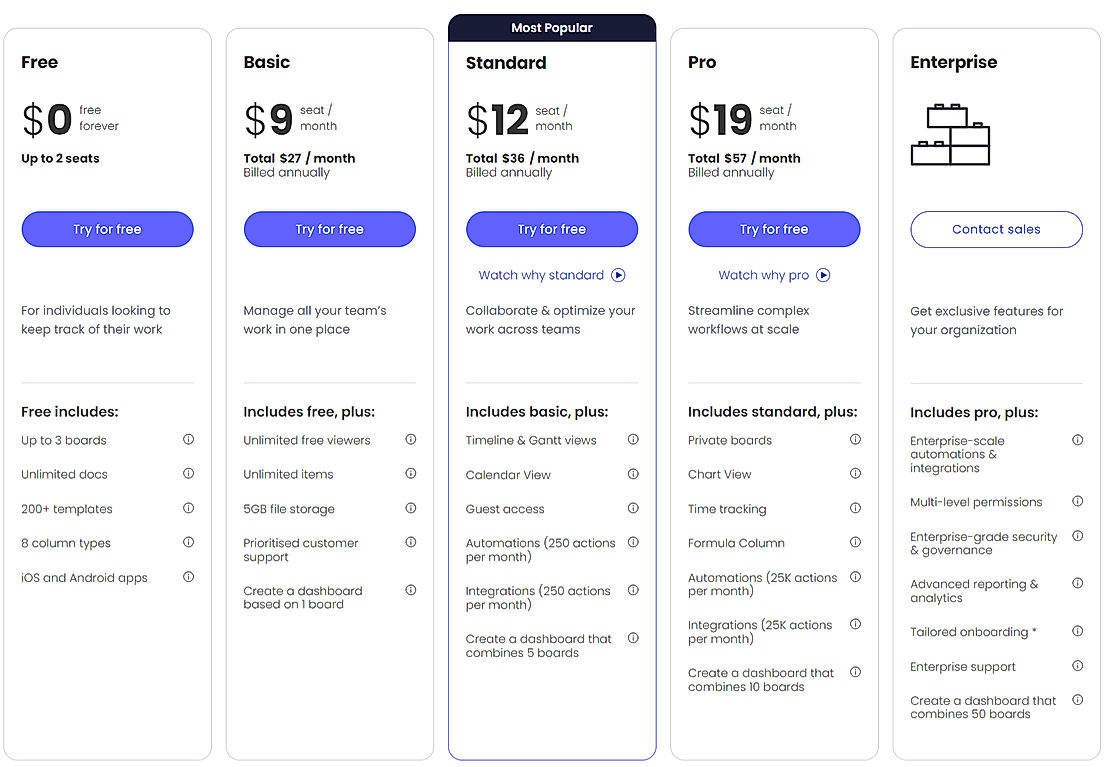
https://www.saasworthy.com/product/monday-com#pricing
monday.com isn’t the cheapest tool out there, but it offers different pricing plans for different needs:
- Free Plan: Good for small teams testing the waters.
- Basic Plan: Unlimited boards and templates, but lacks advanced features like automations.
- Standard Plan: Adds timeline views and integrations, ideal for growing teams.
- Pro Plan: Includes automations, time tracking, and custom views—great for larger teams.
- Enterprise Plan: Custom features, enhanced security, and dedicated support for big organizations.
While the pricing might make you hesitate, many users find the time saved through automations and the improved team coordination more than justify the cost.
Have You Tried monday.com Yet? Experience the difference—sign up today and get started now! – Sign Up
Final Thoughts: Is monday.com Worth It?
monday.com is one of those tools that grows on you the more you use it. Yes, it has a learning curve, and yes, the pricing can feel like a hurdle. But once you get past those initial bumps, you’ll find a platform that’s powerful, flexible, and genuinely enjoyable to use.
Whether you’re managing a small project or coordinating across multiple departments, monday.com has the tools to help you stay organized, save time, and collaborate more effectively. It’s not just a project management tool; it’s a solution that adapts to your team’s unique needs—and in today’s fast-paced work environment, that’s invaluable.
So, is it perfect? No. But is it worth trying? Absolutely. At SaaSworthy, we’d recommend it for teams looking to level up their project management game. And if you’ve used it before, we’d love to hear your thoughts—what worked, what didn’t, and how it’s helped your team.
