

IT management has evolved. What used to be a collection of disconnected tools is now expected to work as a unified, efficient system. This is exactly where NinjaOne stands out. Rather than adding more layers of complexity, NinjaOne focuses on simplifying how IT teams operate. The platform brings together endpoint management, automation, and visibility into a single, streamlined experience that is easy to adopt and scale. There are no bloated interfaces or steep learning curves. Just a clean, intuitive system that helps teams get work done faster.
In 2026, this approach matters more than ever. IT teams are under pressure to do more with less, manage distributed environments, and reduce tool sprawl. NinjaOne addresses this by going beyond traditional RMM, positioning itself as a unified IT operations platform built for both MSPs and internal IT teams.
Table of Contents
How NinjaOne Compares to the Alternatives
95 % SW Score The SW Score ranks the products within a particular category on a variety of parameters, to provide a definite ranking system. Read more

What is NinjaOne (NinjaRMM) and how does it work?
NinjaOne automates the hardest parts of IT, delivering visibility, security, and control over all endpoints for more than 20,000 customers. The NinjaOne platform increases productivity while reducing risk and IT costs. Organizations use NinjaOne, including its wide range of IT and security integrations, for use cases such as endpoint management, patch management, mobile device management, software deployment, remote access, endpoint backup, and more.
Read moreSW Score Breakdown
- Features 100%
- Reviews 60%
- Momentum 60%
- Popularity 70%
- Free Trial Available
- Offers Custom plan.
Let’s be honest—there are plenty of RMM tools out there. Tools like ConnectWise Automate, Kaseya VSA, and Datto RMM have their strengths, but they also come with their fair share of concerns. Here’s how NinjaOne stacks up:
| Feature | NinjaOne | ConnectWise Automate | Kaseya VSA | Datto RMM |
|---|---|---|---|---|
| Ease of Use | Highly intuitive, modern UI with fast onboarding and minimal training required | Powerful but complex, steep learning curve and legacy UI challenges | Moderate complexity, improved UI but still requires training | Clean, modern UI optimized for MSP workflows |
| Automation | Strong automation with scripting, policy-based workflows, and auto-remediation focus | Highly advanced automation with deep scripting and customization capabilities | Robust automation engine with extensive policy and scripting control | Reliable automation with strong patching and alert-based workflows |
| Remote Access | Native remote tool + integrations (Splashtop, TeamViewer), seamless experience | Requires ConnectWise Control (separate product integration) | Integrated remote access with enterprise-grade control options | Built-in remote access with tight MSP workflow integration |
| Patch Management | Automated OS + third-party patching with strong reliability and ease of use | Highly granular patch control, but requires configuration effort | Comprehensive patching with strong compliance capabilities | Automated patching for OS and third-party apps, MSP-friendly |
| Security Features | Strong integrations with endpoint security tools, growing security ecosystem | Advanced security add-ons via ecosystem integrations | Security-focused platform with integrated compliance and security modules | Security policies, ransomware detection, and backup-first approach |
| Third-Party Integrations | Strong and expanding integrations (PSA, security, backup); supports ServiceNow, Zendesk, etc. | Deep ConnectWise ecosystem with extensive integrations | Broad IT operations integrations across Kaseya ecosystem | Tightly integrated within Datto + Kaseya ecosystem (backup, PSA, networking) |
| Pricing | Subscription-based, per-device pricing with transparent and scalable model | Per-agent pricing with add-ons, can become complex | Modular pricing, often bundled within Kaseya ecosystem | Subscription-based, often bundled with Datto/Kaseya offerings |
| Scalability | Highly scalable across SMB to mid-market and increasingly enterprise use cases | Best suited for large enterprises needing deep customization | Scales well for MSPs and enterprise environments | Best for SMBs and MSPs, especially within Datto ecosystem |
| Customer Support | Consistently highly rated, fast and responsive support | Mixed feedback, depends on tier and complexity | Historically mixed reviews, improving in recent years | Strong MSP-focused support, generally well-rated |
| Best For | MSPs and IT teams seeking unified IT operations and tool consolidation | Enterprises needing deep customization and advanced automation | MSPs needing an all-in-one IT management ecosystem | MSPs invested in Datto/Kaseya ecosystem and backup-first strategies |
1. Ease of Use
Many RMM tools suffer from overly complex interfaces that require extensive training to master. NinjaOne, on the other hand, prides itself on its simplicity. The dashboard is clean, intuitive, and designed to get you up and running quickly. You don’t need to be a tech wizard to figure it out—it just works. This low learning curve is increasingly critical as IT teams face talent shortages and need faster onboarding in 2026.
2. Performance and Reliability
One of the biggest pain points with some RMM tools is sluggish performance or frequent downtime. NinjaOne is built on a modern architecture that ensures fast, reliable performance. Whether you’re managing 50 devices or 5,000, NinjaOne delivers consistent results without hiccups. Its cloud-native infrastructure also supports distributed teams and hybrid environments, which are now standard across enterprises.
3. All-in-One Functionality
While some tools require you to juggle multiple platforms for patch management, remote access, and reporting, NinjaOne brings everything under one roof. Its comprehensive feature set includes:
- Patch Management: Automate updates for Windows, Mac, and Linux devices.
- Remote Access: Securely connect to endpoints with just a few clicks.
- Scripting: Automate repetitive tasks with ease.
- Reporting: Generate detailed, customizable reports in seconds.
Additionally, NinjaOne now positions itself as a unified IT operations platform, reducing vendor sprawl and tool fragmentation—a key priority for IT leaders in 2026.
4. Scalability
Whether you’re a small business or a large enterprise, NinjaOne grows with you. Its flexible pricing and scalable architecture make it a great fit for organizations of all sizes. Plus, its cloud-based nature means you don’t have to worry about maintaining on-premise infrastructure. This scalability now extends to managing tens of thousands of endpoints across hybrid and multi-location environments.
5. Customer Support
Let’s face it! Great software is only as good as the support behind it. NinjaOne’s customer support is consistently praised for being responsive, knowledgeable, and genuinely helpful. Unlike some competitors, where support feels like an afterthought, NinjaOne treats it as a priority. In G2 and peer reviews, support quality continues to be a major differentiator for NinjaOne in 2026.
Experience IT Management Without the Headaches — Try NinjaOne Today
Cut through the clutter with a platform that’s built for speed, simplicity, and scalability.

Where NinjaOne Truly Outshines the Competition

While the above points highlight how NinjaOne compares to its alternatives, there are a few areas where it truly excels. Here’s a detailed breakdown of its feature set and solutions:
1. Monitoring and Alerting
NinjaOne provides real-time monitoring of devices, ensuring you’re always aware of their health and performance. The system automatically notifies technicians when issues arise, enabling faster remediation and minimizing the impact on end-users. Modern alerting capabilities now support smarter prioritization, reducing alert fatigue for IT teams.
Why it matters:
Proactive monitoring means fewer surprises, reduced downtime, and happier end-users.
2. Automated Patching
NinjaOne automates the patching process for Windows, macOS, and Linux operating systems, as well as over 6000 third-party applications. This ensures vulnerabilities are addressed promptly, reducing security risks.
This is increasingly important as patch velocity and vulnerability exposure windows continue to shrink in 2026.
Why it matters:
Automated patching saves time, improves compliance, and keeps your systems secure without manual intervention.
3. One-Click Device Actions
With just one click, technicians can initiate actions, deploy remediations, stop tasks, or start terminal sessions—all in the background without disrupting end-users. This enables faster mean time to resolution (MTTR), a key KPI for modern IT teams.
Why it matters:
This feature streamlines IT management, allowing technicians to resolve issues quickly and efficiently.
4. Secure Remote Access
NinjaOne offers four remote access solutions, including its native tool, NinjaOne Remote, and integrations with TeamViewer and Splashtop. These options support both attended and unattended access.
This flexibility is critical for supporting hybrid workforces and distributed endpoints.
Why it matters:
Secure remote access ensures technicians can resolve issues from anywhere, without compromising security.
5. Endpoint Task Automation
Automate repetitive endpoint tasks such as application installs, patching, device setup, and maintenance. This standardization improves device stability and frees up technicians for more strategic work.
Automation is no longer optional; it’s foundational for scaling IT operations efficiently.
Why it matters:
Automation reduces human error, saves time, and ensures consistent outcomes across all devices.
6. Auto-Remediation
NinjaOne fully automates the detection and resolution of common endpoint issues using condition-based script deployments. This shift toward proactive and autonomous IT operations is a defining trend in 2026.
Why it matters:
Auto-remediation minimizes downtime and ensures systems are always running optimally.
7. Mobile Application
With NinjaOne’s mobile app, technicians can view device details, remediate issues, and manage endpoints on the go. Mobile-first IT workflows are becoming more common, especially for MSP field teams.
Why it matters:
Mobile management ensures IT teams can stay productive and responsive, even when they’re away from their desks.
8. Self-Service Portal
Empower end-users with a self-service portal that includes tools for remote access, file restores, and ticket management. This reduces ticket volume and improves end-user satisfaction—both critical IT success metrics.
Why it matters:
A self-service portal reduces the burden on IT teams by allowing end-users to resolve simple issues on their own.
9. Native Documentation
NinjaOne includes a built-in IT documentation solution for documenting processes, credentials, and device relationships. Centralized knowledge management is essential for reducing dependency on individual technicians.
Why it matters:
Centralized documentation ensures critical information is always accessible, improving efficiency and reducing knowledge gaps.
10. Unlimited Scalability
Whether you’re managing 50 or 150,000 endpoints, across Windows, Mac, Linux, or cloud-based devices, NinjaOne’s infrastructure is fast, secure, and scalable. This makes it suitable not just for SMBs and MSPs, but increasingly for enterprise IT environments.
Why it matters:
Scalability ensures NinjaOne grows with your business, no matter how large or complex your IT environment becomes.
11. Fast, Intuitive UI
NinjaOne’s user interface is designed to be intuitive and easy to navigate, centralizing actions and reducing unnecessary clicks. This directly impacts technician productivity and operational efficiency.
Why it matters:
A fast, user-friendly UI boosts technician productivity and reduces the learning curve for new users.
12. Warranty Tracking
Simplify asset management by automating warranty monitoring and alerts. This helps IT teams shift from reactive spending to proactive budget planning.
Why it matters:
Warranty tracking ensures you’re always aware of asset statuses, helping you avoid unexpected costs and plan budgets effectively.
Reddit Insights (Real User Sentiment)
Discussions across IT communities on Reddit highlight consistent patterns in how users evaluate NinjaOne vs competitors:
“I can get things done in Ninja in a few clicks… UI is very fast, fluid, and intuitive.” (Source)
“Ninja is much more user friendly… VSA feels more enterprise focused.” (Source)
“Does not have the advanced feature set of CW… but easier to onboard and configure.” (Source)
Common Positives:
- Ease of deployment and onboarding
- Cleaner UI compared to legacy RMM tools
- Reliable patching and automation workflows
- Responsive customer support experience
Common Concerns:
- Less flexibility for highly customized enterprise workflows
- Advanced automation may require scripting knowledge
- Feature depth in niche use cases can lag behind older, more complex tools
Overall Sentiment:
NinjaOne is widely seen as a modern, efficiency-focused alternative to traditional RMM platforms. While power users may still prefer tools like Kaseya or ConnectWise for deep customization, most IT teams favor NinjaOne for its speed, simplicity, and lower operational overhead.
SaaSworthy Insights
Based on aggregated analyst evaluation and buyer behavior trends, NinjaOne consistently stands out for its ease of use, fast onboarding, and strong customer support experience. Compared to tools like ConnectWise Automate and Kaseya VSA, which often prioritize depth and customization, NinjaOne focuses on usability and operational efficiency.
From a buyer-fit perspective:
- Best suited for: MSPs, SMBs, and mid-market IT teams looking to consolidate tools
- Key strength: Clean UI, automation-first workflows, and quick deployment
- Trade-off: May offer less deep customization compared to legacy enterprise-heavy tools
A key trend observed in 2026 is the shift toward tool consolidation. Buyers increasingly prefer platforms that reduce vendor sprawl, and NinjaOne aligns well with this need by positioning itself as a unified IT operations platform rather than just an RMM tool.
SaaSworthy Verdict:
For teams prioritizing speed, simplicity, and operational efficiency, NinjaOne delivers the best balance of functionality and usability among leading RMM solutions.
See Why IT Teams Are Switching to NinjaOne
No bloat. No steep learning curve. Just powerful, intuitive RMM that works.

The Verdict: Why NinjaOne is the Better Choice
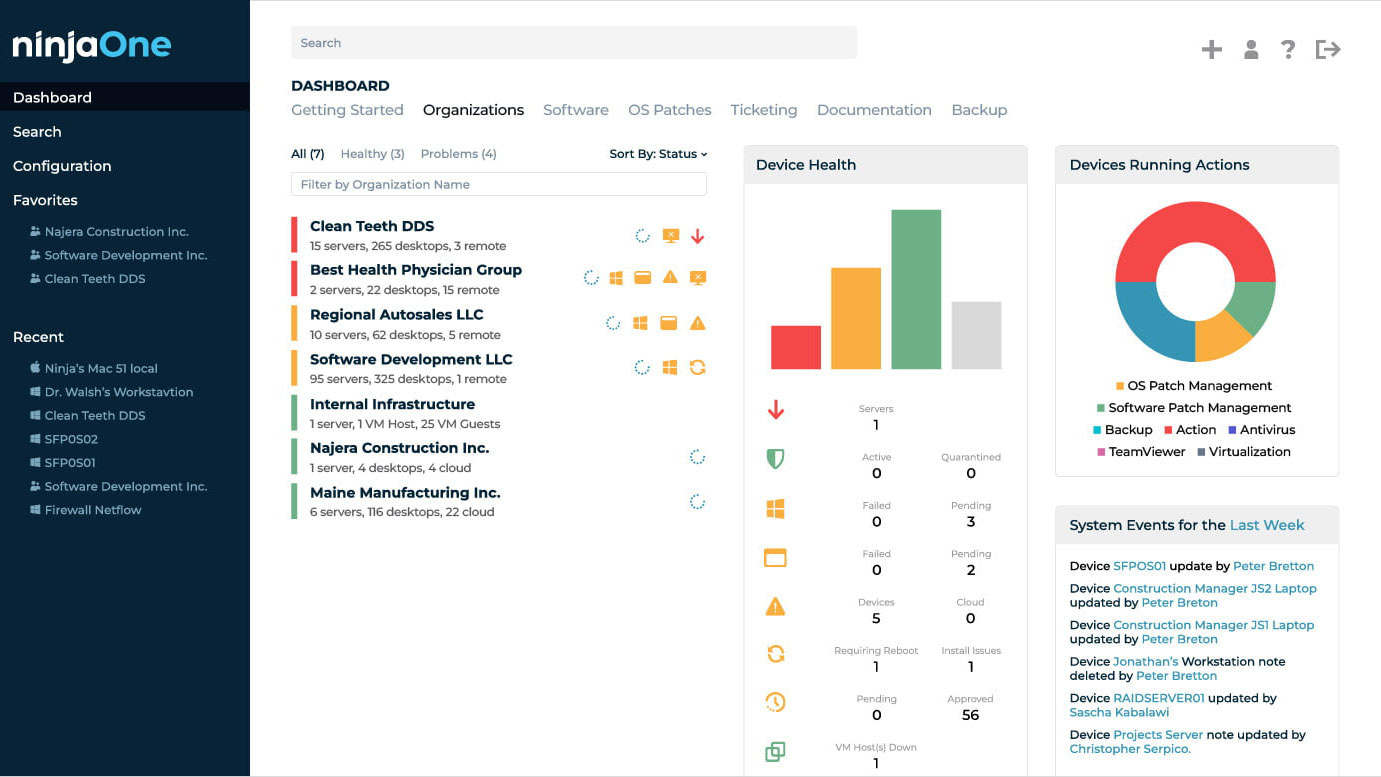
NinjaOne manages to stand out by focusing on what really matters: simplicity, performance, and reliability. It is not just another RMM tool. It is a partner that helps you streamline your IT operations, reduce downtime, and deliver better outcomes.
In 2026, its biggest advantage is clear: NinjaOne is evolving from a traditional RMM tool into a unified IT operations platform, helping teams consolidate tools, automate workflows, and improve visibility across their entire IT environment. While alternatives like ConnectWise Automate, Kaseya VSA, and Datto RMM have their merits, they often come with steep learning curves or fragmented ecosystems. NinjaOne, on the other hand, strikes the right balance between power and usability.
So, if you are looking for an IT management platform that just works without the headaches, NinjaOne is worth a closer look. It is not just keeping up with the market. It is aligning with where IT operations are heading.
FAQs
What features does NinjaOne offer that eliminate the need for multiple IT tools?
NinjaOne provides a unified IT operations platform that includes patch management, remote access, automation, scripting, documentation, backup, and reporting. This reduces the need for multiple standalone tools and helps IT teams consolidate their tech stack.
What makes NinjaOne easier to use compared to other RMM tools?
NinjaOne is designed with a clean, intuitive interface that requires minimal training. Unlike complex tools like ConnectWise Automate or Kaseya VSA, it enables faster onboarding and day-to-day usability for IT teams and MSPs.
Which types of businesses is NinjaOne best suited for?
NinjaOne is best suited for MSPs, SMBs, and mid-market IT teams looking to simplify operations and reduce tool sprawl. It is also increasingly used by enterprise teams that prioritize ease of use and fast deployment over deep customization.
Can NinjaOne replace multiple IT management tools?
Yes, NinjaOne can replace several tools by combining RMM, patching, remote access, automation, and documentation into a single platform. This consolidation helps reduce costs, improve efficiency, and simplify IT workflows.
How does NinjaOne compare to ConnectWise and Kaseya in terms of usability?
NinjaOne is generally easier to use and faster to deploy, while ConnectWise Automate and Kaseya VSA offer deeper customization but come with higher complexity and longer learning curves.
Does NinjaOne support automation and proactive IT management?
Yes, NinjaOne supports automation through scripting, policy-based workflows, and auto-remediation. This allows IT teams to proactively resolve issues, reduce manual effort, and improve system reliability.
Is NinjaOne a scalable solution for growing IT environments?
Yes, NinjaOne is highly scalable and supports environments ranging from small businesses to large organizations managing thousands of endpoints across distributed and hybrid setups.
Does NinjaOne integrate with other IT tools like PSA and helpdesk systems?
Yes, NinjaOne integrates with major PSA, helpdesk, security, and backup tools, including platforms like ServiceNow and Zendesk, enabling centralized IT operations.
Can NinjaOne help reduce IT operational costs?
Yes, by consolidating multiple tools and automating repetitive tasks, NinjaOne reduces software spend, lowers manual workload, and improves technician productivity, leading to lower overall IT costs.
Does NinjaOne support remote and hybrid IT environments?
Yes, NinjaOne is built for modern IT environments and supports remote and hybrid work through cloud-based management and secure remote access capabilities.
