

The construction industry doesn’t forgive inefficiencies. Bluebeam, a platform that quietly revolutionized digital construction documentation over the past decade, continues to power through job sites, architect offices, and project trailers. But as cloud adoption deepens across AEC (Architecture, Engineering, Construction), its subscription-first pricing model has raised questions and eyebrows. So, is Bluebeam still the best value in 2026? And which plan gives you the most bang for your buck?
Table of Contents
What is Bluebeam?

What is Bluebeam Revu and how does it work?
Bluebeam Revu is a digital workflow management solution that helps construction companies gain access to a variety of accurate tools they need to keep their team members in sync and get jobs completed in the right way. Supervisors get to invite their team members to a single place, no matter where they are in the world and collaborate with each other in real-time. It also includes ‘Live Activity Feeds’ that helps in improving communication across teams. Bluebeam Revu comes as a centralised location for construction companies to create, annotate and share documents with multiple members present in a team. This way they also get to ensure that the projects always stay on track. Team members even get to track edits in project-specific designs and easily share and discuss changes, facilitating accurate and quality reviews. Further, Bluebeam Revu allows users to get access to documents stored in Sharepoint and open, view and edit them from any browser in a protected way. Intuitive measurement tools present within the same helps with improving the accuracy levels of individual designs besides allowing designers to draw faster.
Read more- Free Trial Available
Bluebeam began as a robust PDF editing and markup solution tailored for the architecture, engineering, and construction (AEC) industry. Today, it’s a fully cloud-connected platform enabling real-time communication between teams in the field and office.
With tools like Bluebeam Revu (desktop) and Bluebeam Cloud (web/iOS), it allows construction professionals to:
-
Redline plans
-
Perform quantity takeoffs
-
Share revisions instantly
-
Collaborate live via Studio Sessions
In SaaSworthy’s 2026 Construction Collaboration Tools Grid, Bluebeam:
-
Scored 92/100 overall
-
Was rated #1 for usability in PDF workflows
-
Saw 88% user recommendation across small and mid-sized AEC firms
Bluebeam Pricing Plans (2026)
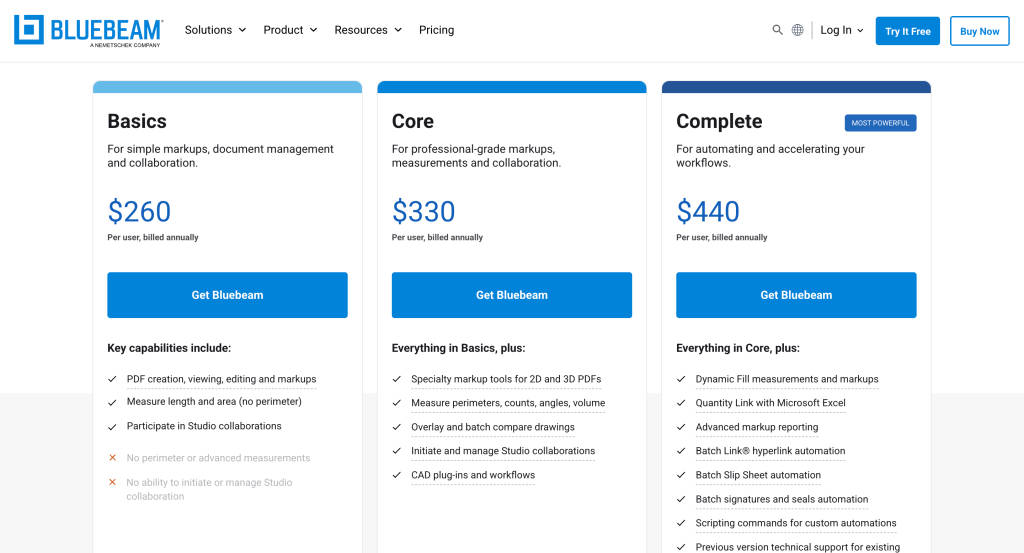
Since retiring its perpetual licenses, Bluebeam now offers three streamlined subscription tiers.
This transition reflects a broader industry shift toward cloud-first collaboration, giving teams regular feature updates, improved support, and seamless access across devices. For AEC professionals who move between job sites and offices, this model supports more connected, agile workflows.
Bluebeam Basics
Bluebeam Basics is ideal for users who need lightweight tools to mark up and manage construction documents on the go. It focuses on core functionality, making it a practical entry point for teams working in the field who don’t need the deeper analytics or automation of higher plans.
Price: $260/user/year
Best for: Field staff, foremen, and light reviewers
Included Features:
-
PDF creation, markups, and annotations
-
Measurement tools (length, area, volume)
-
Access to Bluebeam Cloud (Web & iOS)
-
Bluebeam Studio for collaboration
-
Basic file management
Bluebeam Core
Bluebeam Core bridges field and office workflows, empowering project managers to compare drawings, collaborate live, and handle essential documentation more efficiently. It’s the plan where teams often find the most bang for their buck without overcommitting to features they won’t fully use.
Price: $330/user/year
Best for: Project managers, estimators, and mid-sized contractors
Included Features (everything in Basics +):
-
Document overlays and comparisons
-
Quantity takeoffs with visual markups
-
Studio Sessions for real-time markup collaboration
-
Digital signatures, custom columns, and status tracking
-
Enhanced document organization
Bluebeam Complete
Designed for heavy-duty users, Bluebeam Complete unlocks powerful automation and scripting capabilities. If your team handles complex, repetitive workflows or needs seamless integration with Excel and batch tools, this is the tier that saves serious time and reduces manual errors.
Price: $440/user/year
Best for: BIM coordinators, architects, and enterprise users
Included Features (everything in Core +):
-
Batch link, batch slip sheet automation
-
Scripting tools for repetitive tasks
-
Quantity Link (Excel integration)
-
Dynamic fill, custom tools, and forms
-
Complete cloud and desktop feature parity
Bluebeam for Enterprise
Bluebeam’s enterprise offerings are tailored to large contractors and AEC firms managing hundreds of seats. The added support, security, and control make scaling smoother, while Studio Prime ensures admin teams maintain visibility and governance across teams and regions.
For large-scale deployments (50+ users), Bluebeam offers:
-
Volume licensing discounts
-
SSO (Single Sign-On)
-
Bluebeam Studio Prime (advanced admin controls)
-
Dedicated account managers
-
Onboarding support
To access these options, organizations need to request custom quotes directly from Bluebeam’s enterprise sales team.
Bluebeam vs. Competitors: How It Really Stacks Up
In 2026, Bluebeam holds its ground against industry giants like Procore, PlanGrid, and Adobe Acrobat Pro, especially in document-first workflows.
Bluebeam vs. Procore
Procore is the go-to for end-to-end project management, but it comes with a steeper learning curve and cost. Bluebeam, while not a full project management suite, shines when it comes to drawing-based workflows, making it the better choice for teams primarily focused on documents and field collaboration. Let’s compare:
| Feature | Bluebeam | Procore |
|---|---|---|
| PDF Markup | Best-in-class | ⚠️ Limited tools |
| Project Management | ❌ | ✅ Full suite |
| Collaboration | ✅ (Studio) | ✅ |
| Price | $240–$400/year | $$$ (custom pricing) |
Bluebeam vs. PlanGrid (Autodesk Build)
While both tools are mobile-friendly, Bluebeam offers more advanced markup and measurement tools critical to preconstruction and design review. PlanGrid integrates neatly within the Autodesk ecosystem but is often viewed as lighter in feature depth compared to Bluebeam’s robust document-handling capabilities. Lets’ compare:
| Feature | Bluebeam | PlanGrid |
|---|---|---|
| Sheet Viewing | ✅ | ✅ |
| Markups & Takeoffs | ✅ Advanced | ⚠️ Basic |
| Ecosystem | ✅ Microsoft/Dropbox | ✅ Autodesk tools |
| Mobile Access | ✅ iOS + Web | ✅ iOS + Android |
Bluebeam vs. Adobe Acrobat Pro
Adobe Acrobat Pro is a strong generalist but wasn’t built for AEC needs. Bluebeam’s construction-specific features, such as measurement tools and batch processing, are essential for industry professionals. While Acrobat may win on cost, it can’t replace Bluebeam when it comes to real jobsite use cases. Lets compare:
| Feature | Bluebeam | Acrobat Pro |
|---|---|---|
| AEC Focus | ✅ Built for construction | ❌ General PDF use |
| Takeoff Tools | ✅ | ❌ |
| Collaboration | ✅ Studio + Cloud | ❌ |
| Price | $240–$400/year | ~$180/year |
What Plan Should You Choose?
Choosing the right Bluebeam plan depends entirely on the complexity of your workflows and the size of your team. If you’re just marking up PDFs and need mobility, Basics is enough. But as soon as you introduce estimating, team collaboration, or process automation, stepping up to Core or Complete ensures efficiency gains. For large firms, Enterprise gives you control and support at scale. Here’s a simplified decision table based on SaaSworthy user patterns:
| Use Case | Recommended Plan |
|---|---|
| Basic markup & review | Basics |
| Estimating, takeoffs, and field-office sync | Core |
| Automation, Excel, form building | Complete |
| Managing 50+ seats | Enterprise Quote |
SaaSworthy’s Verdict: Is Bluebeam Worth It?
If your team works deeply with PDFs, marking up plans, doing takeoffs, redlining revisions, and collaborating across locations, Bluebeam is hard to beat.
Its Core plan is the sweet spot for most AEC teams. But Complete gives power users the edge with batch processing and advanced automation. Compared to its more expensive competitors, Bluebeam offers excellent value with surgical focus on construction documentation.
SaaSworthy says it best: “If documents are your primary workflow, Bluebeam outperforms platforms that try to do it all.”
Frequently Asked Questions (FAQs)
Can I still buy Bluebeam as a one-time license?
No. Bluebeam fully shifted to a subscription-only model in 2023.
Is there a free trial available?
Yes! All three plans offer a 14-day free trial with full access—no credit card required.
Can Bluebeam run on Mac?
-
No native Mac support.
-
Mac users can:
-
Use Bluebeam Cloud in browser
-
Use Parallels or Boot Camp for desktop Revu
-
What’s the main difference between Core and Complete?
Complete unlocks batch tools, Excel linking, and scripting, making it essential for power users or large design teams. Core suffices for most mid-sized project workflows.
What does SaaSworthy say about Bluebeam’s usability?
SaaSworthy ranks Bluebeam:
-
4.6/5 in usability
-
Top 3 in collaboration tools for AEC
-
#1 in markup and document review precision
What integrations does Bluebeam offer?
-
Microsoft SharePoint
-
Dropbox
-
OneDrive
-
Procore (via Studio Prime)
-
Excel (via Quantity Link in Complete)
