
Close Menu
  • Categories
    • Top Software
    • Statistics
    • Research Reports
    • Guides
    • Software Reviews
    • SaaS Talks
  • Resources
    • SW Score Methodology
    • SaaS Terms Glossary
  • Browse Software
Facebook X (Twitter) Instagram
SaaSworthy Blog | Top Software, Statistics, Insights, Reviews & Trends in SaaSSaaSworthy Blog | Top Software, Statistics, Insights, Reviews & Trends in SaaS
  • Categories
    • Top Software
    • Statistics
    • Research Reports
    • Guides
    • Software Reviews
    • SaaS Talks
  • Resources
    • SW Score Methodology
    • SaaS Terms Glossary
  • Browse Software
SaaSworthy Blog | Top Software, Statistics, Insights, Reviews & Trends in SaaSSaaSworthy Blog | Top Software, Statistics, Insights, Reviews & Trends in SaaS
Home»Guides»How to Compress Video Without Losing Quality: 3 Simple Ways
Guides

How to Compress Video Without Losing Quality: 3 Simple Ways

Saurabh YadavBy Saurabh Yadav5 Mins ReadJune 3, 2024
Facebook Twitter LinkedIn Reddit Email
Table of Contents
  1. Method 1: By Compressing it into Zip files
  2. Method 2: Video Trimming
  3. Method 3: Changing the Resolution
  4. Best Tips to Compress Video Without Losing Quality
  5. FAQs

Trying to compress a video but have no idea, well, then we have got you covered. Whether you are editing a YouTube video, designing a trailer, or uploading a video on a social media platform, video compression is highly needed, and if you know the tricks to it, the work gets done pretty well and fast. One of the key problems that users experience while compressing videos is the received quality, it is known that the quality of videos might get compromised in the process. So the best way to avoid this trouble is to make use of the appropriate tools and methods. Further, In the article, we have provided a step-by-step procedure by which we can compress a video without compromising its quality.

Table of Contents

  • Method 1: By Compressing it into Zip files
  • Method 2: Video Trimming
  • Method 3: Changing the Resolution
  • Best Tips to Compress Video Without Losing Quality
  • FAQs
    • What is the best method to compress a video for email?
    • How can the MBs and GBs of a video be reduced?
    • Can I compress videos on iPhones?
    • Name a few video editing applications for MAC users

Method 1: By Compressing it into Zip files

The best way to compress a video is by reducing it into ZIP files. The overall process is pretty simple, whether you are using MAC or Windows.

On Mac:

  • Step 1: Right-click on the file that you are trying to compress.
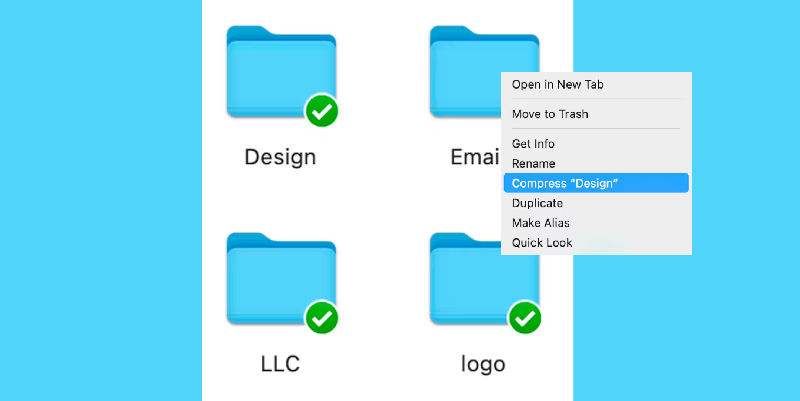
  • Step 2: A drop-down menu will appear, select “Compress (filename)”

On Windows:
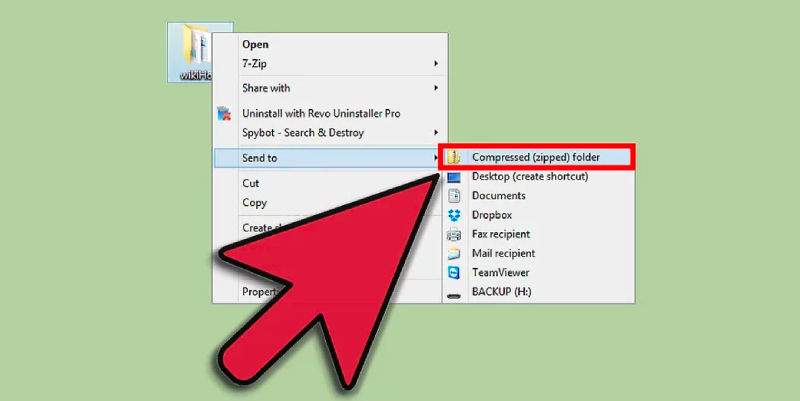
  • Step 1: Right-click on the file that you are trying to compress.
  • Step 2: Next click on “Send to”
  • Step 3: Further click, “Compress (zip) folder”

Method 2: Video Trimming

Video trimming is yet another simple way to compress a video. It can be done by several built in tools that are available on both MAC and Windows users. For Mac users, the built-in application is iMovie and QuickTime, and for Windows users, Video Editor is the application.

Step 1: Launch the built-in tool.

Step 2: Select the video that you are trying to compress.

Step 3: Reduce the length of the video by removing the unwanted parts by selecting the available tools.

Also read: How to Do Screen Recording in Windows 11

Method 3: Changing the Resolution

You can also compress a video by changing its resolution, which can also be done by taking the help of these built-in applications on both Windows and Mac systems.

  • Step 1: Launch the application by clicking on it.
  • Step 2: Select the video.
  • Step 3: Click on the “Change resolution” option.
  • Step 4: Select the resolution of your choice and make the necessary changes.

Best Tips to Compress Video Without Losing Quality

Compressing videos without losing quality is crucial for efficient storage and sharing. Here are the best tips to achieve high-quality compression:

  1. Choose the Right Codec:
    • Use advanced codecs like H.264 or H.265 (HEVC). These codecs offer high compression efficiency and maintain video quality.
  2. Adjust Resolution:
    • Lower the resolution slightly if the original resolution is higher than needed. For instance, converting 4K videos to 1080p can significantly reduce file size without noticeable quality loss for most viewers.
  3. Bitrate Management:
    • Control the bitrate to balance quality and file size. Use variable bitrate (VBR) instead of constant bitrate (CBR) to allocate more bits to complex scenes and fewer to simpler ones, optimizing file size without sacrificing quality.
  4. Use Professional Software:
    • Utilize professional video editing and compression tools like HandBrake, Adobe Premiere Pro, or Final Cut Pro. These tools offer advanced settings for optimizing video compression.
  5. Optimize Audio:
    • Compress audio tracks separately using efficient audio codecs like AAC. Reducing audio bitrate can also help decrease overall file size.
  6. Remove Unnecessary Elements:
    • Trim unnecessary parts of the video and remove unused audio tracks or subtitles to reduce file size.
  7. Profile and Presets:
    • Use appropriate profiles and presets for the intended playback device or platform. Many professional tools offer presets optimized for different devices, ensuring compatibility and quality.
  8. Two-Pass Encoding:
    • Use two-pass encoding for better quality. The first pass analyzes the video, while the second pass compresses it more efficiently based on the analysis.
  9. Frame Rate Adjustment:
    • Lower the frame rate if the original is higher than necessary. For example, reducing from 60fps to 30fps can reduce file size significantly without noticeable quality loss for many types of content.
  10. Test and Compare:
    • After compressing, compare the compressed video with the original. Make adjustments if necessary to ensure the best balance between quality and file size.

By following these tips, you can effectively compress videos while maintaining their quality, making them easier to store and share.

FAQs

What is the best method to compress a video for email?

The best method to compress a video for email is to compress it into a zip file.

How can the MBs and GBs of a video be reduced?

There are several methods by which the MBs and GBs of a video can be reduced. Some of these are:

  • Changing the file type
  • Trimming the length of the video
  • Compressing it into a zip file

Can I compress videos on iPhones?

There are no built-in features in iPhones that support video compression. However, there are several third-party applications such as Video Compress, Compress Videos and Resize, and many more.

Name a few video editing applications for MAC users

A few video editing applications for MAC users are:

  • iMovie
  • QuickTime
Previous ArticleTop 5 Marketing Automation Tools in 2024: Mastering Efficiency and Engagement
Next Article 5 Best Robotic Process Automation Software in 2024
Saurabh Yadav

Saurabh is a seasoned SaaS expert with over eight years of experience, specializing in HR technology, payroll, and workforce management solutions. A PMP-certified professional and an alumnus of XLRI, he has collaborated with leading industry publishers, sharing his insights on ATS, payroll, employee engagement, HR software, benefits administration, compensation management, interview scheduling software, performance management systems, and employee recognition. With a deep understanding of SaaS trends, Saurabh continues to shape the future of HR tech through his thought leadership and expertise.

Related Posts

Advanced Security in eSignature Platforms: How SignNow Implements AES-256 Encryption, SOC 2, and HIPAA Compliance

October 6, 2025

Enterprise Grade Document Security in PDF Tools: How pdfFiller Handles Encryption, Access Controls, and Compliance

October 1, 2025

Nano Banana Trend: How to Make 3D Figurines with AI (2025)

September 16, 2025

How to Use Integrated Risk Management to Improve Cybersecurity Posture

September 15, 2025
Editor's Picks

Freshdesk Pricing Plans 2025: Which Plan Is Right for Your Support Team

September 24, 2025

Best Employer of Record (EOR) Services for September 2025

September 2, 2025

Top 50 Onboarding Statistics for 2025

July 31, 2025

Comet vs Dia: The Rise of AI Browsers

July 21, 2025

NinjaOne Acquires Dropsuite to Unify Backup and Endpoint Management

July 15, 2025

Talkroute Review 2025: Is This the Virtual Phone System Your Business Needs?

July 10, 2025

Employer of Record vs PEO: Which Service Is Right for You?

July 7, 2025

ClickUp Pricing Plans & Features (2025): Is It Still the Best All-in-One Work Platform?

June 19, 2025

SaaS Pricing Models Explained: 7 Strategies to Maximize Revenue in 2025

June 11, 2025

Gusto Pricing Explained: Which Plan Is Right for Your Business in 2025?

June 9, 2025
Recent Posts

Top 11 Cloud-Based CRM Software in 2025

March 16, 2026

10 Best Cloud Accounting Software in 2025

October 10, 2025

OpenAI Launches Apps Inside ChatGPT, Pushing Towards a New Platform Future

October 9, 2025

8 Best Self-Employed Accounting Software for 2025

October 7, 2025

Advanced Security in eSignature Platforms: How SignNow Implements AES-256 Encryption, SOC 2, and HIPAA Compliance

October 6, 2025

Enterprise Grade Document Security in PDF Tools: How pdfFiller Handles Encryption, Access Controls, and Compliance

October 1, 2025

Nano Banana Trend: How to Make 3D Figurines with AI (2025)

September 16, 2025

How to Use Integrated Risk Management to Improve Cybersecurity Posture

September 15, 2025

Patriot Pricing Plans 2025: Tiers, Plans, Discounts, and Features Explained

September 12, 2025

Market Size & Growth Trends in Resource Management Software

September 11, 2025

Subscribe now!

Power up your business growth through innovation! Subscribe to our monthly newsletter for cutting-edge SaaS insights and to stay ahead of the curve with the latest trends in software

About
  • Home
  • All Categories
  • Blog
  • SW Score Methodology
  • SaaS Terms Glossary
Vendors
  • Get Listed
Legal
  • Privacy Policy
  • Terms of Use
  • Cookie Policy
SaaSworthy
Facebook X (Twitter) LinkedIn Instagram

feedback@saasworthy.com

©2026 SaaSworthy.com

Type above and press Enter to search. Press Esc to cancel.