Close Menu
  • Categories
    • Top Software
    • Statistics
    • Research Reports
    • Guides
    • Software Reviews
    • SaaS Talks
  • Resources
    • SW Score Methodology
    • SaaS Terms Glossary
  • Browse Software
Facebook X (Twitter) Instagram
SaaSworthy Blog | Top Software, Statistics, Insights, Reviews & Trends in SaaSSaaSworthy Blog | Top Software, Statistics, Insights, Reviews & Trends in SaaS
  • Categories
    • Top Software
    • Statistics
    • Research Reports
    • Guides
    • Software Reviews
    • SaaS Talks
  • Resources
    • SW Score Methodology
    • SaaS Terms Glossary
  • Browse Software
SaaSworthy Blog | Top Software, Statistics, Insights, Reviews & Trends in SaaSSaaSworthy Blog | Top Software, Statistics, Insights, Reviews & Trends in SaaS
Home»Guides»How to Use Connecteam – A Simple Guide
Guides

How to Use Connecteam – A Simple Guide

Saurabh YadavBy Saurabh Yadav4 Mins ReadAugust 21, 2024
Facebook Twitter LinkedIn Reddit Email
Table of Contents
  1. Getting Started with Connecteam
  2. Key Features and How to Use Them
  3. Key Takeaway
  4. FAQs

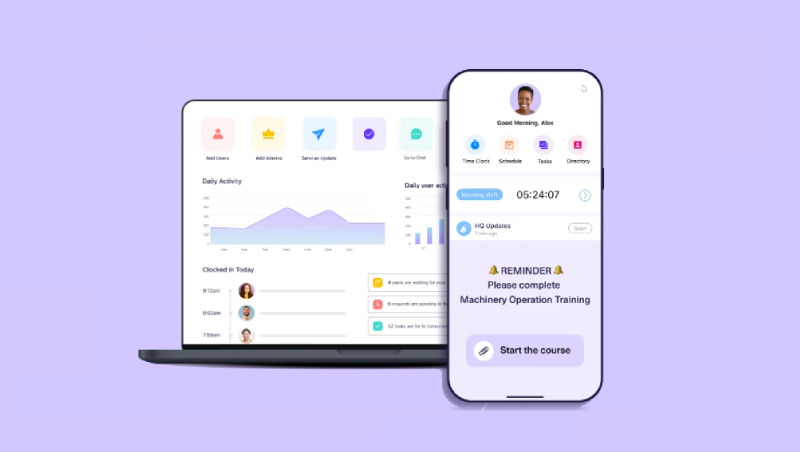
Connecteam is a powerful all-in-one employee management solution designed to simplify communication, boost engagement, and enhance operational efficiency for businesses of all sizes. From small startups to large enterprises, Connecteam provides a comprehensive suite of tools to centralize your workforce management efforts. Here’s how you can get started and make the most of Connecteam.

Table of Contents

  • Getting Started with Connecteam
    • Sign Up and Create Your Account:
    • Set Up Your Company Profile:
    • Invite Your Team Members:
  • Key Features and How to Use Them
    • Communication:
    • Scheduling & Time Tracking:
    • Tasks & Checklists:
    • Training & Onboarding:
    • Additional Tips for Using Connecteam
  • Key Takeaway
  • FAQs
    • How do I reset my Connecteam password?
    • Can I integrate Connecteam with other software applications?
    • How can I add or remove team members from Connecteam?
    • What types of training courses can I create with Connecteam?
    • How do I manage employee time-off requests in Connecteam?

Getting Started with Connecteam

  1. Sign Up and Create Your Account:

  • Go to the Connecteam website and click on “Sign Up” or “Get Started.”
  • Enter your details, including your name, company name, email address, and password.
  • Complete the registration process by verifying your account through the confirmation email you’ll receive.
  1. Set Up Your Company Profile:

  • After logging in, you’ll be guided to set up your company profile.
  • Provide details such as your company name, industry, number of employees, and location.
  • Upload your company logo and add a brief description to personalize your profile.
  1. Invite Your Team Members:

  • Invite team members to join Connecteam by entering their email addresses manually or uploading a CSV file.
  • Your team will receive an email with instructions to create their accounts and join the platform.

Also read: GoToWebinar: A Guide to Using It Effectively

Key Features and How to Use Them

Communication:

  • Newsfeed: Share company updates, announcements, and key information with your team.
  • Chat: Enable real-time communication through individual or group chats.
  • Surveys & Polls: Collect feedback and insights from employees on various topics.

Scheduling & Time Tracking:

  • Employee Scheduling: Easily create and manage schedules to ensure optimal staffing.
  • Time Clock: Allow employees to clock in and out via mobile devices or computers to track work hours accurately.
  • Time Off: Manage time-off requests for vacations, sick leaves, and personal days.

Tasks & Checklists:

  • Task Management: Assign tasks to employees or teams, set deadlines, and monitor progress.
  • Checklists: Develop checklists for recurring tasks to maintain consistency and quality.

Training & Onboarding:

  • Training Courses: Create and deliver training programs to enhance employee skills and knowledge.
  • Onboarding: Streamline the onboarding process for new hires with the necessary information and resources.
  1. Employee Recognition:
  • Rewards & Recognition: Celebrate and acknowledge employee achievements with rewards and recognition programs.

Additional Tips for Using Connecteam

  • Mobile App: Encourage team members to download the Connecteam mobile app for easy access on their smartphones or tablets.
  • Integrations: Integrate Connecteam with third-party applications like payroll systems and HR software to streamline workflows.
  • Customization: Customize Connecteam’s appearance and features to better suit your needs.
  • Support: Contact Connecteam’s support team if you encounter any issues or need assistance.

Key Takeaway

Connecteam is a versatile platform that empowers businesses to manage their workforce efficiently, foster effective communication, and boost productivity. By following this guide and exploring Connecteam’s features, you can fully leverage the platform to achieve your organizational goals.

FAQs

How do I reset my Connecteam password?

To reset your password, go to the Connecteam login page and click on “Forgot Password.” Follow the prompts to enter your email address and receive a password reset link.

Can I integrate Connecteam with other software applications?

Yes, Connecteam offers integrations with various third-party applications, including payroll systems and HR software. Check the Connecteam integrations page for a list of supported applications and instructions on how to connect them.

How can I add or remove team members from Connecteam?

To add team members, go to the “Team” section in your Connecteam dashboard, click on “Invite Members,” and enter their email addresses. To remove team members, select their profile, and choose the option to delete or deactivate their account.

What types of training courses can I create with Connecteam?

Connecteam allows you to create various types of training courses, including onboarding programs, skills development, compliance training, and more. You can use Connecteam’s course creation tools to design and deliver training tailored to your needs.

How do I manage employee time-off requests in Connecteam?

Navigate to the “Time Off” section in Connecteam, where you can view and manage employee time-off requests. You can approve or deny requests, track accrued leave balances, and set up automated notifications for upcoming time off.

Previous Article10 Best Email Campaign Management Software (2024)
Next Article Davinci Resolve vs Premiere Pro: A Detailed Comparison
Saurabh Yadav

Saurabh is a seasoned SaaS expert with over eight years of experience, specializing in HR technology, payroll, and workforce management solutions. A PMP-certified professional and an alumnus of XLRI, he has collaborated with leading industry publishers, sharing his insights on ATS, payroll, employee engagement, HR software, benefits administration, compensation management, interview scheduling software, performance management systems, and employee recognition. With a deep understanding of SaaS trends, Saurabh continues to shape the future of HR tech through his thought leadership and expertise.

Related Posts

Advantages of Computerized Accounting: Benefits, Features & Best Practices in 2026

July 23, 2026

How Contractor Management Software Handles Scheduling, Payments, and Worker Classification

July 23, 2026

How Performance Management Software Replaces Annual Reviews With Continuous Feedback

July 19, 2026

How 360-Degree Feedback Software Improves Manager Effectiveness and Employee Growth

July 18, 2026
Editor's Picks

Talkroute Review 2025: Is This the Virtual Phone System Your Business Needs?

July 10, 2025

5 Best Visitor Management Software for 2025

January 16, 2025

Troubleshooting Common Issues in Panopto: A Practical Guide

November 14, 2024

NinjaOne Acquires Dropsuite to Unify Backup and Endpoint Management

July 11, 2025

Gusto Pricing Explained: Which Plan Is Right for Your Business in 2026?

April 7, 2026

ClickUp Pricing Plans & Features (2026): Is It Still the Best All-in-One Work Platform?

April 6, 2026

Top 50 Onboarding Statistics for 2026

March 11, 2026

45 Key Remote Work Statistics To Look Out For

March 12, 2026

Best Employer of Record (EOR) Services for February 2026

February 18, 2026

Freshdesk Pricing Plans 2026: Which Plan Is Right for Your Support Team

February 3, 2026
Recent Posts

Advantages of Computerized Accounting: Benefits, Features & Best Practices in 2026

July 23, 2026

How Contractor Management Software Handles Scheduling, Payments, and Worker Classification

July 23, 2026

Top 10 HR Software for Small Businesses in 2026

July 22, 2026

Top 10 Free and Open Source HR Management Software in 2026

July 21, 2026

Best Web Hosting Services in 2026

July 20, 2026

How Performance Management Software Replaces Annual Reviews With Continuous Feedback

July 19, 2026

How 360-Degree Feedback Software Improves Manager Effectiveness and Employee Growth

July 18, 2026

How Modern Payroll Software Automates Tax Filing, Compliance, and Employee Payments

July 17, 2026

Best AI Agents for Content Creation, Sales, Marketing, and Customer Support in 2026

July 17, 2026

Shopify Alternatives in 2026: Best Platforms for Scalable Online Stores

July 15, 2026

Subscribe now!

Power up your business growth through innovation! Subscribe to our monthly newsletter for cutting-edge SaaS insights and to stay ahead of the curve with the latest trends in software

About
  • Home
  • All Categories
  • Blog
  • SW Score Methodology
  • SaaS Terms Glossary
Vendors
  • Get Listed
Legal
  • Privacy Policy
  • Terms of Use
  • Cookie Policy
SaaSworthy
Facebook X (Twitter) LinkedIn Instagram

[email protected]

©2026 SaaSworthy.com

Type above and press Enter to search. Press Esc to cancel.