

ETL is a tool that is utilized by businesses for extracting and transforming data from different sources into a centralized repository. ETL stands for Extract, Transform, and Load therefore, it is a three-step data management process that retrieves and streamlines data from multiple structured and unstructured sources.
ETL technology is a part of data integration tools. Over the years, these tools have increased in market value that is expected to reach $US$ 20,044.9 Million by 2026 exhibiting a CAGR of 12.5\%. ETL tools benefit businesses in many ways. It is especially useful for multinational businesses that receive data such as product names, customer IDs in varied formats. ETL platforms offer in-built tools that can process complex, intricate, and diverse data and convert them into easy-to-use readable format.
Table of Contents
Why do Businesses need ETL Tools?
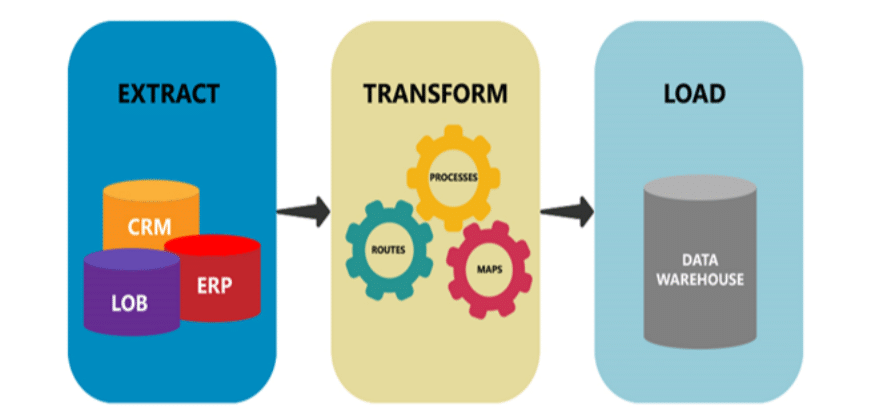
ETL tools being an automated platform reduce the probability of errors significantly by minimizing manual intervention. Process efficacy achieved with ETL tools further improves business intelligence and ROI for better returns on sales. ETL software is a must-have software in large-scale enterprises that deals with a lot of data daily. Small businesses and startups, on the other hand, can customize the features and services based on their needs. This will save from unwanted expenses and process complexity.
There are several ETL software that offers paid and free services. If you are a beginner, it is better to start by exploring free software to understand its functionality and feasibility in business. Large enterprises and professionals can choose advanced plans to suit their business needs. In this article, we will discuss top ETL tools that can be used for businesses of all sizes. We will also discuss their features, pricing, pros, and cons to help you make an informed decision.
What features should users look for in ETL tools?
Mentioned below are the features that are a must for ETL tools to provide optimum results.
- Data mapping
Data mapping is a graphical representation of data sets, their sources, and target destination that helps analysts ensure accurate data analysis. It also provides valuable insights about data flow and checkpoints in the system that guarantee its integrity throughout the process. ETL tools can be used to automate data mapping tasks. It supports transformation features where it can be used to merge, normalize, and group data in the form of tables, graphs, and charts for better data visualization.
- Connectivity
ETL tools act as a central platform that connects to all data sources including databases and sales & marketing applications. It creates a centralized data hub and helps in maintaining consistent file format throughout.
- Data synchronization
In addition to data integration, ETL tools also facilitate data synchronization across departments. It ensures that the data is synchronized among related systems in real-time and the database automatically updates whenever changes are made.
ETL tools maintain data quality throughout the process. Users can simultaneously perform data synchronization during data stream, batch processing, and data integration. This improves overall process efficiency and reduces manual error significantly.
- Workflow automation
ETL tools allow users to schedule individual tasks. This facilitates process automation where users can plan a workflow once and then schedule it for execution on predefined intervals. At every execution ETL, in-built tools automatically update databases in all connected systems.
- Business analytics and reporting
ETL tools are capable of performing regular analytics and generating process reports. Users can utilize these reports to monitor operations in real-time and perform root cause analysis in case of any issues. This also helps users to understand their business needs better so that they can take appropriate action and optimize strategies for maximum returns.
Which are the top ETL tools for business in 2022?
Following are the top ETL tools, both paid and free, that users can explore for business in 2022.
Informatica PowerCenter
Informatica PowerCenter is one of the free ETL tools. It offers powerful data integration capabilities for accelerating overall business value. It is a robust tool that can be easily deployed for all-sized businesses include large enterprises with a complex workflow. Informatica supports zero downtime with powerful grid computing and pushdown optimization features. This facilitates advanced data transformation through detailed parsing of IoT, XML, and JSON machine data.
Informatica PowerCenter can be used to load, extract, and transform business-relevant data. It can also perform high-grade on-premise data integration functions like data analytics and warehousing. Informatica supports universal data formats for all the integrated data received from different sources. It also allows users to deploy role-based tools sophisticated connectivity and secured data delivery across organizations.
Key features of Informatica PowerCenter include:
- Data analysis
- Metadata management
- Data integration
- Data synchronization
- Match and merge
- Data filtering
- Data quality control
- API integration
- Data transformation
- Compliance tracking
- Data extraction
- Master data management
- Data mapping
- Workflow automation
- Analytics and reporting
Technical details
| Customer Support | Online customer support during business hours |
| API integration | Yes |
| Deployment | Web/Cloud |
| Scalability | Suitable for large enterprises, medium businesses, and small businesses |
| SW score | 98\% |
Pros and cons
| Pros | Simplified operation, Cost-effective, User-friendly UI |
| Cons | It offers limited scheduling options. |
Pricing
Informatica PowerCenter offers a free trial on all its paid subscription plans that start at $325/month. It also offers separate plans for business and enterprise-scale operations.
Fivetran
Fivetran is a simplified and reliable ETL platform. It can be used for analyzing, replicating, and configuring business data. It also consists of an automated pipeline with robust features that can be used to maintain and monitor system operations.
Fivetran allows users to edit the data sources that are accepted by the central system. It also works in integration with cloud-based warehouses like Redshift, Snowflake, Azure, and BigQuery to improve the scalability of the software. In addition, Fivetran offers data security through encryption. Data security features offered by the software comply with SOC2 and GDPR.
Key features of Fivetran include:
- Data analysis
- Managed file transfer
- Data synchronization
- Metadata management
- Data integration
- Compliance tracking
- Data extraction
- API integration
- Data transformation
- Master data management
- Workflow automation
- Match and merge
- Data filtering
- Data quality control
- Analytics and reporting
- Data mapping
Technical details
| Customer Support | Online customer support during business hours |
| API integration | Yes |
| Deployment | Web/Cloud |
| Scalability | Suitable for large enterprises, medium businesses, and small businesses |
| SW score | 86\% |
Pros and cons
| Pros | Intuitive UIAutomated backup, Active user support, Seamless integration |
| Cons | Data extraction cannot be automated. Hence, users have to manually extract and retrieve data from individual systems. |
Pricing
Fivetran offers a free trial on all its subscription plans. A quotation has to be requested from the vendor for the pricing details of the same. Users can also customize their subscription modules based on the deployment scale. It offers separate plans for enterprise and business scale.
Improvado
Improvado offers an organized platform for advanced data centralization. It can be used to accumulate marketing and sales data in one location. It also allows users to organize multiple business-relevant data to identify actionable insights. Improvado comes with API support that can be used to connect multiple platforms and streamline routine maintenance tasks.
Improvado offers a specialized cross-device resolution mechanism to collect ROI data on a single dashboard. This facilitates fast data analysis and improved decision-making. In addition, Improvado works in integration with MCDM which is a marketing common data model. It functions as a data normalization layer and simplifies marketing analytics.
Key features of Improvado include:
- Workflow automation
- Match and merge
- Data filtering
- Data synchronization
- Metadata management
- Data analysis
- Managed file transfer
- Data extraction
- Data integration
- Analytics and reporting
- Data mapping
- Compliance tracking
- API integration
- Data transformation
- Master data management
- Data quality control
Technical details
| Customer Support | Online customer support |
| API integration | NA |
| Deployment | Web/Cloud |
| Scalability | Suitable for businesses of all sizes |
| SW score | NA |
Pros and cons
| Pros | Active customer support and follow-up, Reliable ETL solution for marketing and advertising professionals.Seamless integration, User-friendly UI |
| Cons | Subscription plans can be a little expensive as compared to other similar software. |
Pricing
Improvado offers customized plans where users can choose a subscription plan more tailored to their needs. A quotation has to be requested for pricing details of the same.
Xplenty
Xplenty is a cloud-based platform for ETL operations. It has multiple in-built tools for creating simplified and visual data pipelines. It offers a comprehensive solution for automating data replication and transformation tasks. Users can utilize this software for analyzing complex data sets and monitoring updates which saves both time and effort.
With Xplenty, users easily perform tasks like job scheduling, data output sampling, and more. Xplenty supports both public and private cloud. It can be used to configure data from different sources in a company’s infrastructure. It even supports an on-premise setup and delivers efficient output.
Key features of Xplenty include:
- Analytics and reporting
- Data mapping
- Compliance tracking
- Workflow automation
- Match and merge
- Metadata management
- Master data management
- Data quality control
- Data analysis
- Data filtering
- Data synchronization
- Managed file transfer
- Data extraction
- Data integration
- API integration
- Data transformation
Technical details
| Customer Support | 24X7 live online customer support |
| API integration | Yes |
| Deployment | Web/Cloud |
| Scalability | Well-suited for large enterprises, medium businesses, and small businesses |
| SW score | 92\% |
Pros and cons
| Pros | Enhanced user experience, Active customer support and follow-upIntuitive UI |
| Cons | Xplenty operation can be a little complex which makes it difficult to debug errors in case of any issues. |
Pricing
Xplenty offers a free trial on all its subscription plans. Users are allowed to customize subscription modules based on their business needs. A quotation has to be requested to get pricing details for the same.
Alooma
Alooma is one of the top ETL tools. It is well-suited for large-scale data analysis on an enterprise level. It can be used for streamlining data warehouses in a hassle-free manner. It allows enterprises to have better data visibility and improved control over transactional databases.
Alooma can be used for sales and marketing services. It is capable of tracking real-time changes in business-relevant data. This minimizes data loss incidents and ensures that users do not miss any event. Users can automate data monitoring tasks where the server immediately notifies the user if any changes are required. Alooma works in integration with Eu-US privacy shield that guarantees data security. It also supports SOC2, BigQuery, and HIPAA that facilitates secure data transfer from different platforms.
Key features of Alooma include:
- Version control
- Compliance tracking
- Workflow automation
- Match and merge
- Data transformation
- Analytics and reporting
- Data mapping
- Data integration
- API integration
- Metadata management
- Master data management
- Data quality control
- Data analysis
- Data filtering
- Data synchronization
- Managed file transfer
- Data extraction
Technical details
| Customer Support | 24X7 live online customer support |
| API integration | Yes |
| Deployment | Web/Cloud |
| Scalability | Suitable for businesses of all sizes |
| SW score | 93\% |
Pros and cons
| Pros | Efficient user support , Enhanced user experience, Quick and automatic data transformation, Intuitive UI |
| Cons | Alooma processing can become slow with complex data sets. |
Pricing
Alooma offers a free trial on all its subscription plans. Users can customize subscription features in their plans and request a quotation for pricing details of the same.
Conclusion
ETL tools are essential for businesses that deal with large amounts of data on a daily basis as it is responsible for managing a central repository database of all data formats extracted or received from different sources. It offers a range of in-built tools that automates data integration and transformation tasks and also allows users to schedule repetitive tasks on predefined intervals. This helps in keeping the system database up-to-date and reduces the chances of error or data loss significantly.
In this article, out of all the options available in the market, we shortlisted and discussed in detail the top 5 ETL tools that can be used for businesses and enterprises in 2022. In case you have any further queries or you wish to explore more options, kindly visit us at SaaSworthy.
Also Read
Top File Sync Software In 2022
5 Best Free and Open-Source Network Monitoring Software in 2022
