

Videos are a crucial part of business marketing campaigns. To meet the needs of their target audience, numerous internet businesses produce video content. We’ll talk about practical video editing advice for your social media strategy in this article. A social networking video could be a fantastic way to promote your business and the services it provides. 61\% of CEOs, it has been found, view video as being “very significant or extremely vital” to their marketing strategy.
Unlike other forms of marketing, video content has a universal appeal. Your target market may consist of individuals with a range of backgrounds, ages, and interests that cover the entire gamut of human experience.
And if data research employing web search inquiries can’t help you locate your ideal customer in the actual world, it’s time to try your hand at producing some excellent movies.
This post tries to give you advice on how to edit your videos for success on social media, often with the aid of video trimmers.
Let’s talk about useful video editing advice for your social media plan.
Table of Contents
Video Editing Tips for Your Social Media
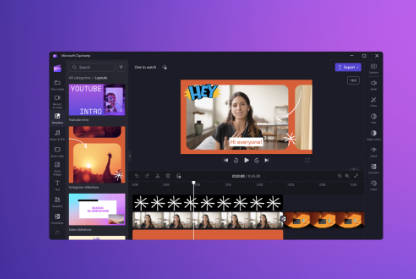
Effective Video Editing Tips For Your Social Media Strategy and Why You Need To Know Them?
Here are the top social media strategy recommendations for effective video editing.
1. Grab the reader’s attention right away.
Literary techniques called hooks (or narrative hooks) assist authors in creating an engaging first sentence or paragraph to grab readers’ attention. A strong hook will hold readers’ attention, usually by placing them in the middle of some dramatic occurrence or by piquing their interest in an intriguing character, unusual situation, or significant topic. Businesses struggle to capture consumers’ attention because they have unrestricted discretion over what they see. The sooner you can communicate with and catch an audience’s attention during the initial few seconds, the more likely it is that your video will do so. These prevent people from swiping away in favor of something more fascinating or thrilling. To make an engaging and seamless transition between two clips, you might want the assistance of a video trimmer. For social media videos to be successful, the audience’s interest must be captured and maintained.
Short movies with sights and visuals, such as people or beautiful graphics, are a great way to pique viewers’ interest right away. They are much less likely to scroll without halting because of these traits.
The easiest method to do this is to have the most interesting part come first while arousing their curiosity. For example, if you’re making an advertisement, start with the text or a title that explains what they can expect from your movie; this will keep them interested for a longer time.
2. Verify the duration is correct
Fast-paced movies are really popular right now! Nowadays, individuals have shorter attention spans, thus it is preferable if your movie is no more than a minute.
Online video trimmers can be quite helpful in this situation so that you can cut out the unnecessary portions of the footage and create a shorter, much more accurate video. Twitter, LinkedIn, and Facebook all have a one-minute time limit for videos.
YouTube, however, only permits ten minutes of recording. You can quickly modify the length of the video using a video trimmer depending on the social media platform you are publishing to Instagram – Instagram is changing the face of social media by offering more options for video length. The newsfeed and reels are currently 60 seconds long. Each video that is uploaded to a story can be up to 15 seconds long.
Twitter: Twitter users prefer videos that are no longer than 45 seconds.
3. Make sure it’s an intriguing tale.
Every video must have a compelling narrative. It makes it more captivating and interesting. Whether you’re using your content for business objectives or just to capture people’s life events on video, using stories in it may help you grab their attention.
Use multiple story strands in your films to keep viewers engaged and on the edge of their seats if you want to be successful with this method! Using video editors and trimmers, connect them flawlessly with jump cuts and other transitions.
This won’t give off a commercial vibe about your business. Instead, it will hold viewers’ interest and establish connections with various types of people, opening up new opportunities.
4. Make a voice
The video needs to have something in it to grab viewers’ attention right away. This will keep them interested in watching it all the way through, and you’ll be able to give the audience a memorable takeaway.
In a commercial or movie, getting the atmosphere and tone correct is crucial. The voiceover is today’s equivalent of the storyteller in a book of fairy tales. A voice has been used to narrate a story using a production technique called a voiceover, commonly referred to as off-camera commenting. Using visuals like color graphics is one way to achieve your goals; another is to employ audio tracks or sound effects, which give a video life and hold the audience’s attention. Avoid making a video where you just converse till the end because it will get quite boring very quickly!
The video will come to life and become more pertinent through editing, such as the addition of background music and dialogue snippets. Here is yet another useful piece of advice regarding video editing.
5. Analyze the appropriateness
Many social networking platforms offer a wide variety of video formats. Videos might be horizontal, square, or vertical in shape. Mobile devices play square video well.
Since it may be seen without clicking on a separate thumbnail like with horizontally oriented movies (unless you’re viewing YouTube), straight in the feed.
Square videos display properly on most newsfeeds, including Facebook, when viewed from mobile devices, but understanding what display layout would show them best before uploading can bring you spectacular results.
You can either use a video trimmer or directly shoot the square-format film on your phone or camera. Before posting to any social networking platform, make sure the file is in the proper size, format, and aspect ratio.
Conclusion
It is undeniable that making content requires a lot of time. On the other hand, using a straightforward and efficient video trimmer and editor may help you quickly spread the news to those who want to see what you have in store for them!
If you have the desire and the creativity, learning how and where to edit independently won’t be difficult. Think of them as suggestions rather than rigid rules, and never be afraid to use your imagination when thinking of fresh approaches to film editing.
Hopefully, you now have a firm understanding of some useful video editing advice. You may now use these suggestions to alter your videos and increase traffic to your website.
Read More
What are the Advantages and Disadvantages of ERP System in 2023
