

Oxylabs, one of the leading web intelligence collection platforms, enables businesses to enhance their ability to gather required data and access top-notch web intelligence insights. With their aim to create a future where businesses of all sizes can access big data and business intelligence, Oxylabs recently launched a new feature called OxyCopilot.
OxyCopilot harnesses the power of AI and is a first-of-a-kind AI web scraper assistant built to reduce manual coding. With the help of this free AI-based web scraper, users can now quickly generate instant data scrapers for public data extraction purposes from any website. In this comprehensive guide, you can delve deeper into what OxyCopilot is and follow a step-by-step guide on how to use this new feature.
Table of Contents
What is OxyCopilot?
OxyCopilot is an AI tool that has been designed to help users generate scraping codes and parsing templates by providing prompts in simple English. This eliminates the need for the users to possess manual coding skills and knowledge. Instead, they can now quickly find workable solutions for complex cases by simply putting in some basic prompts.
Apart from easily building web scrapers and parsers, you can use OxyCopilot to:
- Generate ready-to-use codes within seconds,
- Parse complex HTML layouts with the help of AI,
- Scale easily through the Web Scraper API platform.
As long as you can provide your target URLs and prompts in simple English, OxyCopilot will get the job done for you. You can get started with the free AI assistant by visiting the Oxylabs dashboard and selecting the Scraper API Playground option to access OxyCopilot.
OxyCopilot – How Does it Work?
The usage of digital data has multiplied tremendously over the years; however, not every business can use this data because the majority of it is in an unstructured format. Also, since building data scrapers and parsers is quite complex and expensive, many businesses fail to use the massive pool of digital data. This is where OxyCopilot can step in and make it easier to gather the required data and ensure that the output is in a structured format and can be easily used for analysis and deriving insights.
OxyCopilot enables users to generate codes within minutes with the help of natural language prompts and simple parsing techniques. It uses two main functionalities:
- Custom Parser Builder: With the help of OxyCopilot, you can make use of the existing custom parsing instructions feature and build their required parsing instructions without writing any code or analyzing website structure.
- Request Builder: With the help of the request builder functionality, users don’t need to understand the documentation or field logic to build the request code for Scraper API.
In short, OxyCopilot makes it possible for users with little to no coding skills to generate relevant codes to gather their required data from different websites.
Step-by-Step Guide for Using OxyCopilot
Here is the step-by-step guide on using OxyCopilot.
Creating a Parser: Below are step-by-step instructions on how to create a parser.
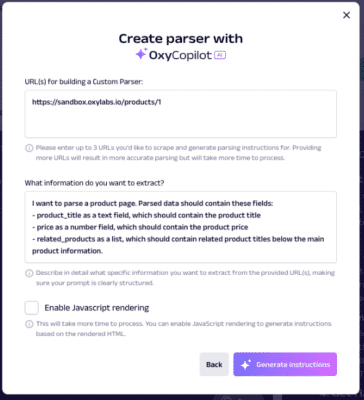
Step 1: Provide the URL and Prompt
- You can start by providing three URLs for which you’d like to generate the parsing instructions.
- OxyCopilot will use the HTML of these URLs to determine how best to extract the required fields.
- The prompt you put in plays a crucial role here–make sure that you describe the fields that need to be parsed as clearly as possible.
Step 2: Adjust Parsing Schema
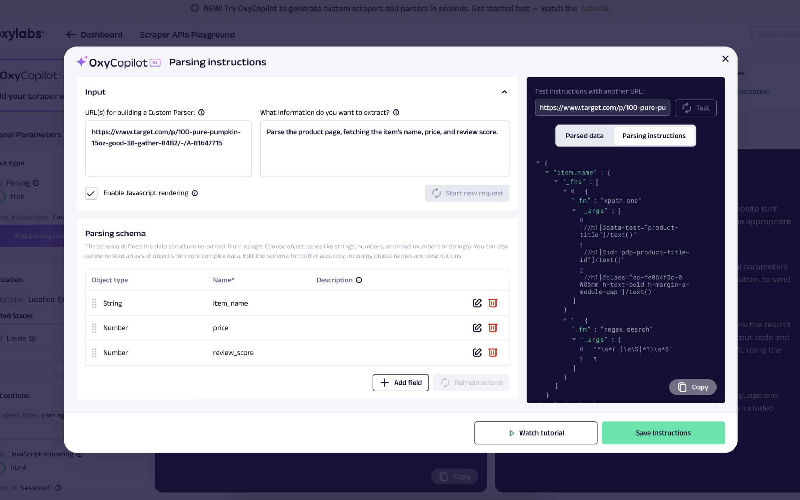
- This is an optional step where you can adjust the parsing schema so that your requirements can be met in a better way.
- You will see a table displaying the input used by AI to generate parsing instructions.
- The schema will define which field needs to be parsed and it will include various object types.
- Always bear in mind that each item in the schema should have a name and description.
- After making the required adjustments, you can click on the ‘Refresh output’ button to regenerate the instructions and preview the parsed data.
Step 3: Copy/Save the Instructions and Integrate into Scraping Jobs
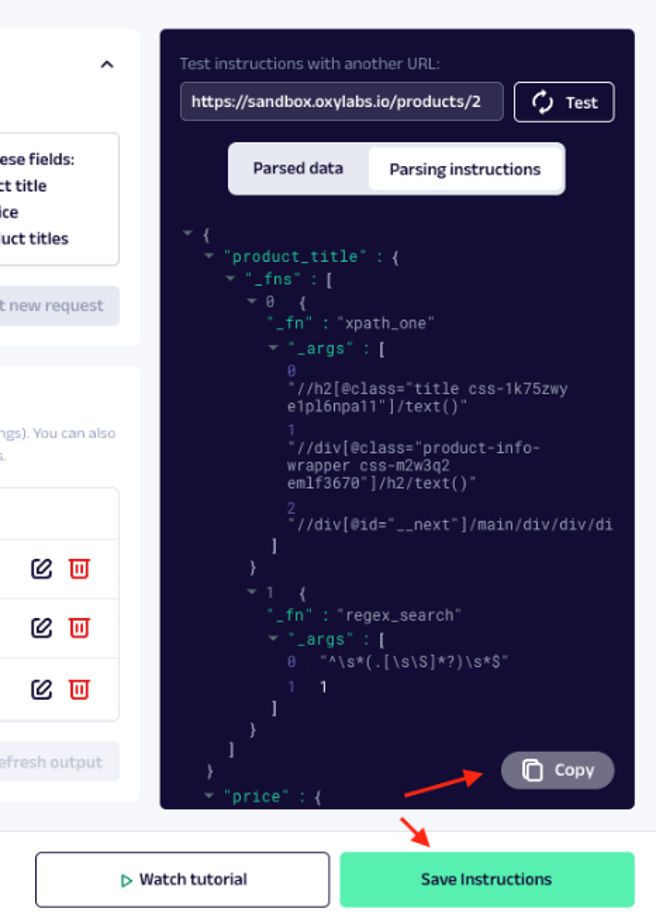
- If you are satisfied with the results, you can click on the ‘Copy’ button to copy-paste the instructions into your code.
- Alternatively, you can click the ‘Save’ button to save the instructions for your API Playground session. Then you can make further adjustments to the parameters and copy the complete request code in your preferred programming language.
Also read: Revolutionizing Web Scraping: How Oxylabs’ New Feature Can Be a Game Changer
Building a Scraper: Below are the step-by-step instructions on how to build a parser
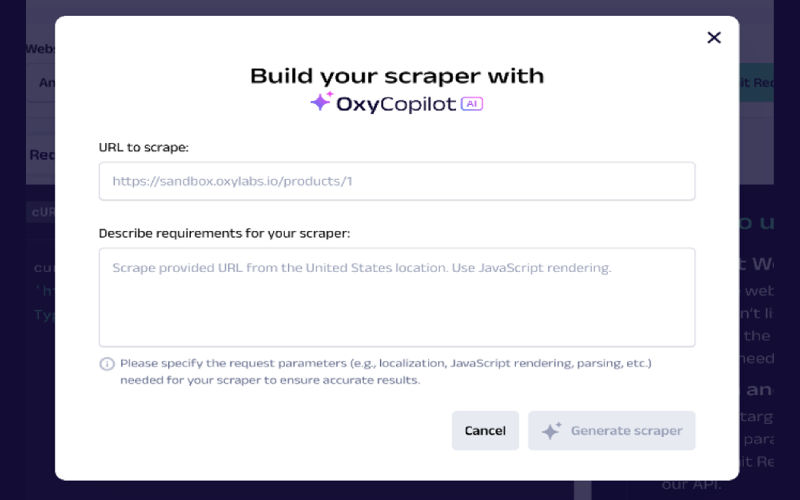
Step 1: Provide a URL and Prompt
- The first step to building a scraper is providing the specific URL for scraping.
- You also need to provide the prompt describing your requirements, such as localization, JS rendering, etc. in a clear and concise manner.
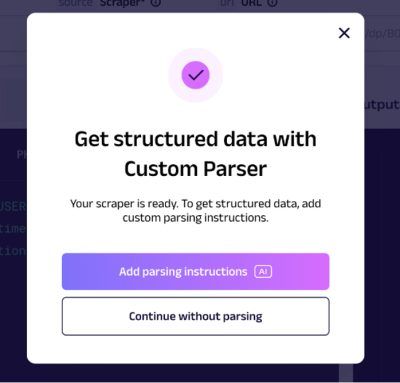
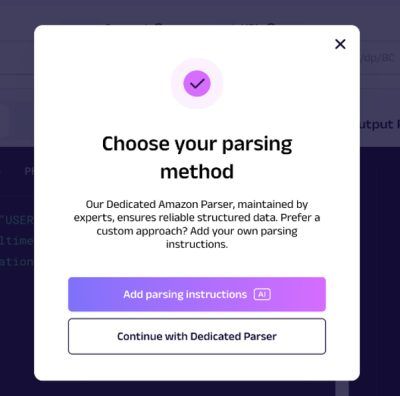
Step 2: Parsing
- There are three ways to handle parsing: custom, dedicated, and no parser.
- Custom Parser: Users can select the ‘Add parsing instructions’ option via the Custom Parser builder to create their own parsing logic.
- Dedicated Parser: If you want to use Oxylabs’ Dedicated Parser for the URL you provided, then choose the option ‘Continue with Dedicated Parser’.
- No Parser: You can go ahead without parsing if you are not looking for structured data.
Step 3: Review the Request
- Based on the prompt you provided, OxyCopilot will fill in the required details.
- Users will then be able to view the request code and parameters and make adjustments if needed.
Step 4: Submit the Request and Copy
- Once you are satisfied, the final step is to submit your request to view the output.
- Check thoroughly if everything is working as expected. If yes, you can go ahead and copy the request code.
- After copying the requested code, you can use it to scrape further tasks with Web Scraper API.
Web Scraper API Playground
Speaking in general terms, a web scraper API is software that uses an API call to retrieve data from a URL. It’s an all-in-one platform that covers all stages of web scraping. With a single API request, users can easily extract data from search engines, e-commerce sites, travel platforms, etc., typically without facing any of the complex website challenges.
Together, Oxylabs Web Scraper API and OxyCopilot offer an unparalleled AI-driven solution, enhancing web scraping processes, achieving faster and smarter data extraction, and empowering users to gain actionable insights effortlessly.
How to Use Web Scraper API Playground
Step 1: Log into the Oxylabs’ dashboard and click on “Scraper APIs Playground” under the Menu option.
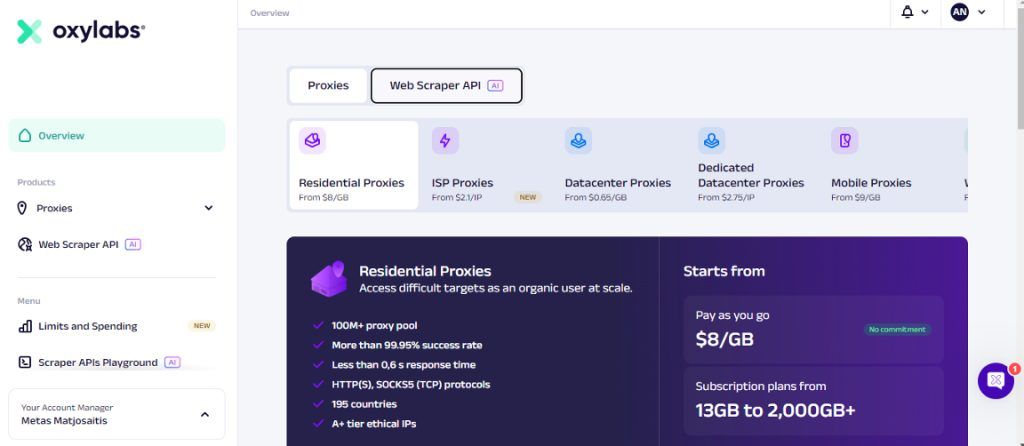
Step 2: When you click the Scraper APIs Playground option, you will be directed to the screen below:

Step 3: Click on the dropdown menu under “Website” to choose the website you wish to scrape. If the website is not listed, then you can choose “Other E-Commerce” or “E-Commerce”.
Step 4: Pick the appropriate scraper based on the type of your target.
Step 5: Next, enter the target URL (or query) and additional parameters to customize your request and click on ‘Submit Request’.
Step 6: The API will process your request and you can view the results in the ‘Output Preview’ tab. You can view both the output code and an HTML/PNG preview.
Step 7: Next, you can export the data by clicking the ‘Export results’ button in the upper right corner.
Step 8: The final step is to copy the input code in your preferred programming language and test it via the terminal.
Key Resources
To learn more about Oxylabs and its products, you can refer to the resources below:
Conclusion
Oxylabs’ mission is to create a future where all businesses have access to big data and business intelligence. With the introduction of OxyCopilot, they have ensured that users can experience seamless and efficient data extraction and gain actionable insights faster than ever. Thanks to this free AI-powered assistant, users can now easily request code generation and parsing instructions without any manual coding.
