

A file compression software is used to compress a single/multiple files into a single archive and reduce the file size at the same time. They are commonly referred to as file archivers or file compression software, but both are different. Archiving means a collection of files grouped into a single one with no change in file size, while compression means an archive with reduced file size.
Archives make your life easier when you send or transfer multiple files through the internet because it will save time working with smaller file sizes. Also, you can free up hard disk space on a computer. Compressing and reducing file size can also reduce your costs if you keep backups of files on cloud storage services where an extra amount of hard disk space is paid. So, File Compression software has become an essential tool for everyone to keep installed in their PC.
File Compression software offers a lot of features such as encryption with a password, split an archive automatically into multiple parts based on maximum file size, the creation of self-extracting archives that acts as an executable file, test an archive to find errors and repair the corrupted/damaged ones. Most popular archive formats are .zip, .rar, .7z, but there are also other archives like .cab, .lzh, .gz, .tar.gz, .zipx, etc. WinZip and WinRAR are the leading and popular file compression software which introduced the .zip and .rar formats, but they don’t support many of the latest formats.
How Open Source and Free File Compression Software Works?
Open Source File Compression Software: Open source File Compression software refers to the type where the software is available as a free downloadable package, which the user can download and install on their PC for personal or business use. The benefit of open source File Compression software is that you can make modifications in the codes and features to make it more suitable for your requirements. Also, these open source software are free to be edited and distributed.
Free File Compression Software: Free File Compression software means that the software is entirely free to use without any cost, but this kind of software cannot modify using the source code. Also, there are some limitations like it cannot be used for business purposes and distribution.
There is also another type – Freeware, in which the software is free for a limited period, and the user would have to pay a monthly/yearly subscription fee if they want to use it after the trial period ends.
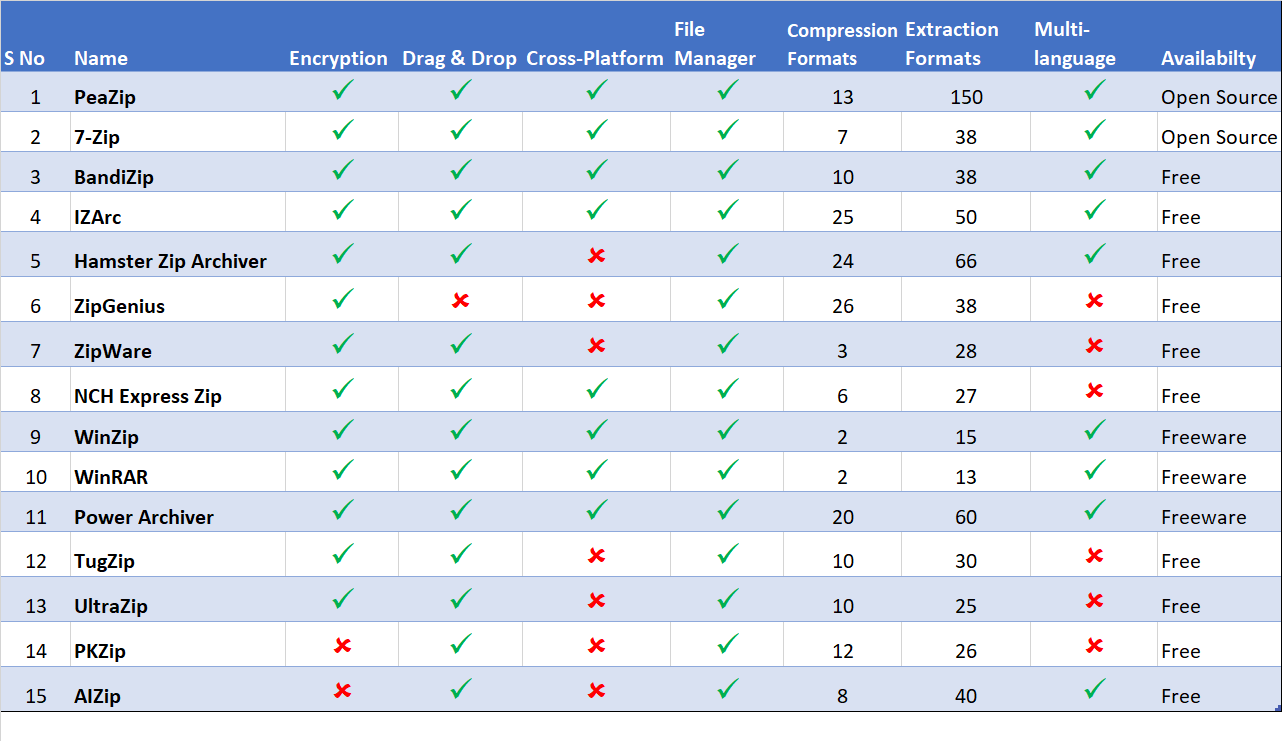
Any file compression software should be able to compress and extract files very fast. Also, it needs to support all popular and efficient formats for compression and extraction. File size reduction is made by creating an archive. The following criteria are used to evaluate different file compression software:
Compression Ratio and Speed, Compression & Extraction Formats, Encryption, File Manager, User Interface and Cross-Platform support.
Compression Ratio is almost standard in all file compressors with lossless quality, and Compression Speed is negligent since it only varies a few seconds.
The best File Compression software is first and foremost easy to use. They should come with a user interface that’s effortless to navigate. The extra tools in the feature set are just add-ons. We have compared all the latest and top File Compression software in the market now, and the best among them are listed below:
Top Open Source File Compression Software
Table of Contents
PeaZip

PeaZip is a powerful and an easy to use file compression software. It is open source which is available for free even for commercial use. PeaZip supports multiple formats for compression and extraction, nearly 150 plus file types. For Security reasons, PeaZip offers AES256-based encryption and two-factor authentication, as well as a password manager.
PeaZip might not be more popular than 7-Zip, but its clean interface and easy-to-use-file browser give it a clear advantage over 7-Zip. It is a cross-platform software, available in multiple languages that can also work with WinRAR to provide full RAR support.
7-Zip

7-Zip is one of the best open source software to compress large files. It has a powerful file manager for compression and decompression with plugin support. Apart from broad support for almost every format, 7-Zip comes with its file compression format .7z which are considered the best format to compress files. It supports 87 different languages.
Not only does 7-Zip lets you compress huge files (up to 16 billion GB, according to its developers), but also has an incredibly high compression rate. However, this leads to some sacrifices in the compression speed. The interface is very elementary and has a lot of added features for advanced users too.
Top Free File Compression Software
IZArc
Three words to describe this file compression tool would be Fast, Easy & Free. IZArc is one of the oldest and most flexible compression tools which is also available for free for commercial use without any cost. IZArc has a simple interface, best suited for both beginners and experts because of its extensive features and how well it guides you through the process. It also has built-in multi-language support.
IZArc supports pretty much every compression format. It can convert one file format into another with the help of its powerful converter that is ISO image to NRG and vice versa. It provides 256-bit encryption can also be configured to run as your preferred Anti-Virus scanner when you open any archives.
BandiZip

Bandizip is a straightforward and stylish File Compression tool. BandiZip is lightweight and lightning fast, thanks to its rapid Zip Compression algorithm, quick drag and drop functions, high speed archiving, and multi-core compression. The interface is different from regular file compression software, but thanks to its minimalistic appearance which can be welcoming to new users. The Explorer-based layout is handy while creating archives but Bandizip doesn’t provide a similar interface for extracting archives.
BandiZip has cross-platform and multilingual support, also offers extensive file type support when it comes to compiling and extracting archives. With many advanced features like High-Speed Archiving, multi-volume (split) archives, ZipCrypto, and AES 256 encryption algorithms, BandiZip is more suited for expert users.
Hamster Zip Archiver

Hamster Zip Archiver is another powerful software which is compatible with almost 70 different formats. Hamster Zip Archiver has a very healthy following thanks to its thoughtfully designed interface, excellent format support, and because it offers all this for free. With it’s easy to use tools and a colorful interface, it is best suited for beginners.
In addition to the 128-bit file encryption, there’s also cloud support which quickly uploads files to Dropbox, OneDrive, Google Drive or Yandex Disk and creates a shareable link automatically.
Power Archiver
PowerArchiver is a powerful freeware which offers hundreds of features, yet remains easy to use, small and extremely fast. It processes multiple files at a time when it comes to compression and extraction using batch tools and also has an integrated converter to modify archive formats quickly. PowerArchiver offers cross-platform, multi-lingual support, automated backups and file recovery system.
PowerArchiver is designed not only for compressing files and extracting archives, but also for connecting to cloud storage or FTP servers, as well as for burning discs. The default configuration is well suited for beginners, while experts prefer the in-depth customization preferences, explorer integration, multiple encryption methods, and advanced compression algorithms.
Conclusion
These are the top File Compression software that we have picked. Check them out and choose the one that fits your needs the best. If you feel that we missed any of the best software which should be on this list, please let us know, and we will update it soon.
