

Mass communication is a necessity for any business, be it small or large. This can be via social media, flyers, or websites. However, many times these need to be linked, for example, the posts on your social media can be posted on your website, and website screenshots can be posted on the former.
Table of Contents
What Screenshot Software should you use for your business?
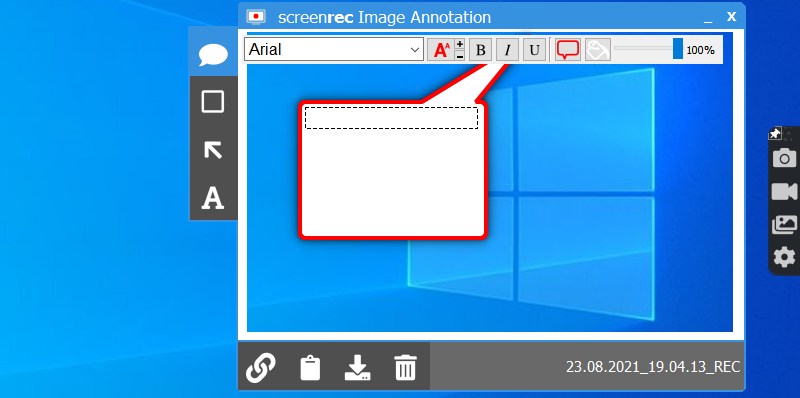
Taking website screenshots is also very necessary for following internet trends. They’re also taken in bulk to extract information from all over the Internet. Here are a few software that will help you to do so, especially if you’re the owner of a small business.
Gyazo
Gyazo is one of the best website screenshot software for small businesses out there in the market. Not just is it cheap, but it also provides a very hassle-free interface. It is mostly used by eSport teams and companies in the business and finance industries. It helps take screenshots and also make gifs. What’s better is that it can be run on both iOS and Android and can be run on your mobile and your computer too.
Here are a few salient features of Gyazo that you should keep in mind before buying a subscription for the software:
- Gyazo provides two kinds of plans, yearly and monthly. It also provides free plans, but if you want full access to all the features, it is highly suggested that you buy the plans.
- The monthly plan costs $4.99 per month, and the yearly plan costs $3.99 per month (Which makes it nearly $50 per year). Both plans offer the same features; it just depends on how long you need the software.
- The free version lets you capture 7 second HD gifs, whereas the paid version allows you to have 60-second HD gifs.
- The paid version allows you to have a lot of security over your data by password protecting it.
Gyazo is a very good screenshot software that lets you do a lot at a very minimal price.
FireShot
FireShot is an ingenious screenshot software that also allows the user to annotate on the captured images. It can be used for multiple purposes like capturing screenshots (its primary purpose), making training brochures, converting webpages to PDFs, and many such functions. It is a very easy-to-use screenshot software for windows and is a really good option if you’re an owner of a business.
Here are a few salient features of FireShot:
- It is a software for which you just need to pay once to get full access to its features. It costs $39.95 and is a one-time purchase.
- It helps convert live pages into helpful information by converting the important points into formats like JPEG, PNG, BMP, and other image formats.
- Once you buy it, the key can be used on 2 laptops and 2 PCs, and it will update for free.
- FireShot can act as an extension to your browser and hence has a very simple interface for you to use.
Browshot
Browshot is a very powerful API software that goes through multiple websites and web pages to take real-time screenshots. This software can be run on various devices, regardless of the size of the screen. Each server of this software can process up to 1000 screenshot requests at a time, which is very impressive. It is a free screenshot software that also provides free and custom plans to the users.
This is why you should consider using Browshot:
- It targets real-time browsers and can be run on the desktop, and it gives screenshots of sizes 1024×768 and 1600×1200. These are the features of the free plan.
- The premium plan provides the user with access via multiple devices and screenshots of sizes ranging from 360×480 to 1900×1200.
- The custom plan offers a wider variety of image size range (1×1 to 2000×2000) and can be used on any device.
Browshot is one of the best screenshot software out there in the market.
Grabzit
Grabzit is a software that helps convert HTML and web pages to word documents using API and screenshot capture tools. It also helps convert videos from various websites to gifs using the very same tools. It’s a very useful software to use for small businesses. This website screenshot service also enables the user to create icons for their websites or applications and render and create HTML pages.
Here are some of the salient features of Grabzit:
- It has four pricing plans depending on the level of your usage. These vary from $68 yearly to $627 yearly.
- The entry-level plan (which is $5.69 per month) offers the following features to use: 5000 screen captures per month, normal capture speed and support from the application, and high-quality captures without the GrabzIt watermark.
- The business plan that costs $28.49 per month offers 25000 captures per month, with prioritized support and high capture speed. If you are running a business that needs help in marketing, this plan is highly suggested for you.
PagePeeker
PagePeeker is a very cost-effective screenshot software that, apart from capturing screenshots, also provides an excellent thumbnail-creating service. It has a 99.9% up-time and is implemented very easily. Due to the very user-friendly interface and a very efficient software code, it renders many screenshots in less than 5 seconds. One of its unique selling points is that it provides unique screenshots that are quite high in quality too.
Here are the salient features of PagePeeker:
- It provides a free plan, a custom plan, and two paid plans. The free plan offers a lot, though, like API calls at 100,000 per month and a caching time of 20 days. The thumbnail branding will have PagePeeker, which can only be removed by the custom plan.
- It also renders thumbnails and screenshots in 30-60 seconds and makes thumbnails in the resolution 480×360.
- The custom plan offers a lot more, like conversion of HTML to PDF, SSL URLs, and your personal domain name.
ApiFlash
APIFlash is an API-based software (well, it has API in its name) that helps convert HTML pages to PNGs. It is built as an extension to Google Chrome, and it renders the screenshots at light speed. It also has a very stable infrastructure which lets it handle heavy workloads with relative ease. It also automatically captures screenshots from the best viewpoint so that it can get the best size.
Here are the salient features of APIFlash:
- It offers a free pricing plan that lets the user capture up to 100 screenshots per month. These screenshots are full-page screenshots on both computers and mobiles.
- It offers a $7 plan which increases the limit of the screenshots captured per month to 1000, and priority support is provided.
- There are other plans too, but these are the plans you should look into if you’re looking to buy a plan for a small business.
URL2PNG
URL2PNG provides a very reliable and speedy service to the user to capture and use the screenshots on their apps. It is highly efficient and helps render a lot of information like graphs, screenshots, and videos. It also provides a very high amount of security and keeps the user’s information encrypted.
Here are the salient features of URL2PNG:
- The starting price for this software is $29, and here are the features that come along with it. The software allows the user to take 5000 screenshots per month and gives them 10 dedicated workers. In case the user passes the limit of the given screenshots, they are charged $0.006 per extra screenshot.
- There are a few more plans, the most notable being the custom plan. The custom plan allows you to dictate how many screenshots you’ll be taking per month and gives you premium support and a customizable amount of dedicated workers.
PageLr
PageLr was one of the very first screenshot services created in the market. It is very useful as it can give partial or cropped screenshots. Although not built to take heavy loads, it is still very relevant to the current date for its niche users. It has been built from nothing on HTML and C++, making it an impressive software to use.
Here are the salient features of PageLr:
- It gives the user 20000 hits and 1000 captures for free. It has a 1 GB bandwidth, and it can screenshot an entire webpage or capture cropped screenshots.
- The captured screenshots can be saved in JPEG or PNG format, and it enables javascript.
- The premium features have the same usage but with more hits and screenshot capture limits, and premium support.
Conclusion
If you are the owner of any business, be it big or small, you should definitely have a website screenshot software for keeping up with the latest trends and keeping your social media up-to-date. This creates an interactive space where you can increase your reach and make more people aware of your business.
For more information on website screenshot software, check out SaaSworthy blog.
