

Did you know that stories on both Instagram and WhatsApp are viewed by more than 500million users daily?
That’s a staggering statistic and suggests that stories are here to stay. Considering that more and more people are loving this temporary form of posting which is automatically deleted after 24 hours, it’s not surprising to see that almost all the social networks are offering this feature. And after Facebook, Instagram, WhatsApp, Snapchat, the latest to join their ranks is Twitter. The microblogging social network has recently confirmed that it’s testing a new feature called Fleets.
Related read: 89 social media statistics in 2020 that will blow your mind
Table of Contents
What are Twitter Fleets?
The “story format” of posting has gained enough popularity ever since Snapchat rolled onto the scene in 2011. Seeing its rising popularity, Facebook and its group of apps, namely Instagram and WhatsApp, adopted the same.
People often tell us that they don’t feel comfortable Tweeting because Tweets can be seen and replied to by anybody, feel permanent and performative (how many Likes & Retweets will this get!?). Many of us can probably empathize with this: https://t.co/LW2xWlctZi
— Kayvon Beykpour (@kayvz) March 4, 2020
Twitter Fleets is the company’s own version of offering a similar functionality of the ability to post things that will disappear after 24 hours. According to the social network, this feature is currently being trialed in Brazil. Providing its reasoning behind Fleets, Twitter’s Product Lead Kayvon Beykpour mentioned that some users feel insecure to tweet because they are permanent and exhibit public engagement counts. Fleets on the other hand, gives users a place to share casual, everyday thoughts without stressing over the permanence of those engagements. The company came up with the name of Fleets to signify “Fleeting Tweets”.
How does Twitter Fleets work?
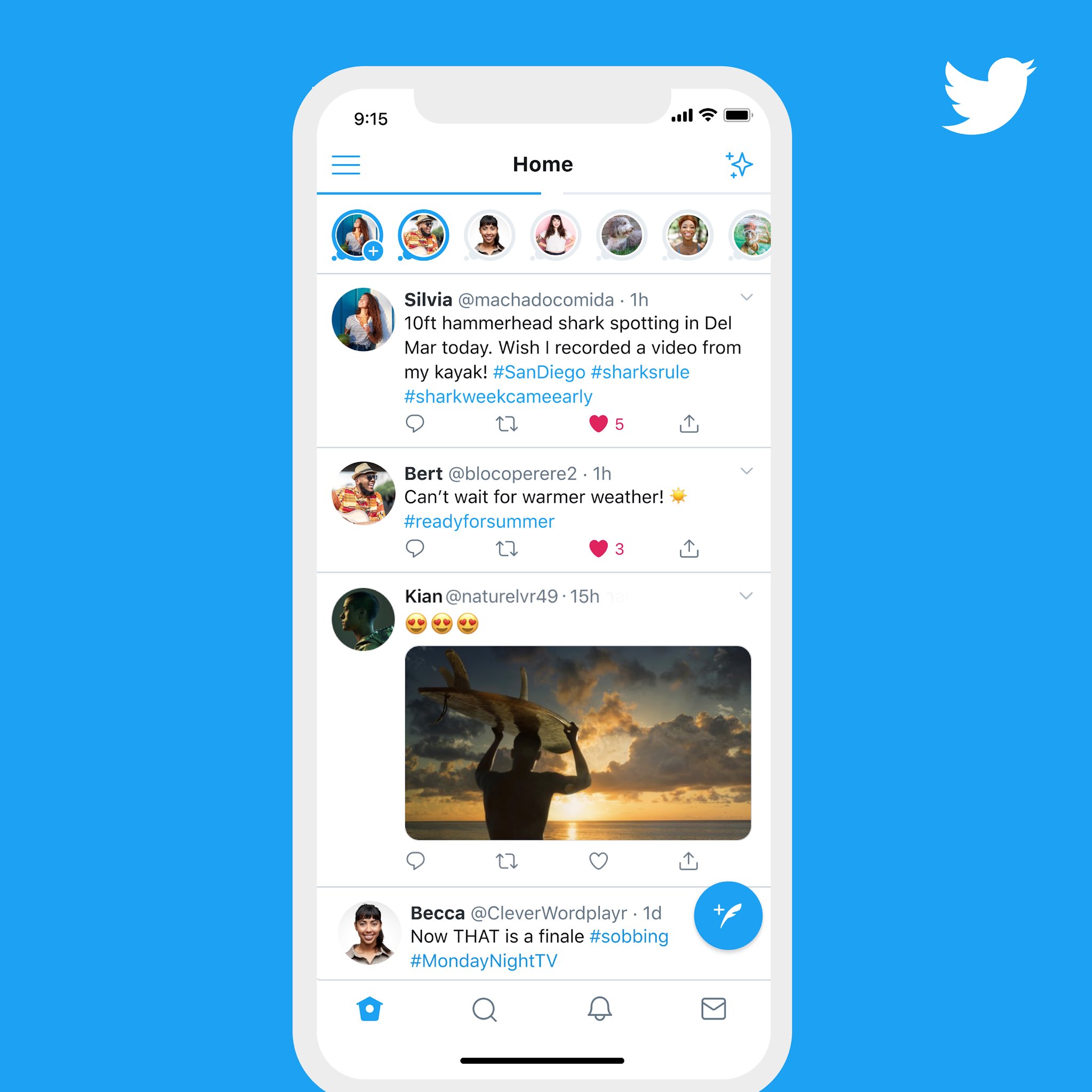
Following the footsteps of other social networks, Fleets are available at the top of the user’s Twitter feed. If the accounts that you follow have posted Fleets, then they will appear in their own round bubbles. In short, these vanishing posts are viewed by tapping on the user’s display picture. According to Twitter, one key use case for Fleets is to allow the users to share their posts in a way that isn’t overtly public.
What makes Fleets different from regular tweets?
Well, unlike regular Tweets, Twitter “Fleets” can’t get replies, likes or retweets and it disappears from the profile after 24 hours. The user’s Tweeted Fleets will appear at the top of their homepage and anyone who looks into your profile will also be able to find your Fleets. Moreover, if your DMs are open, then people can react to your Fleets with a text-based message along with emojis.
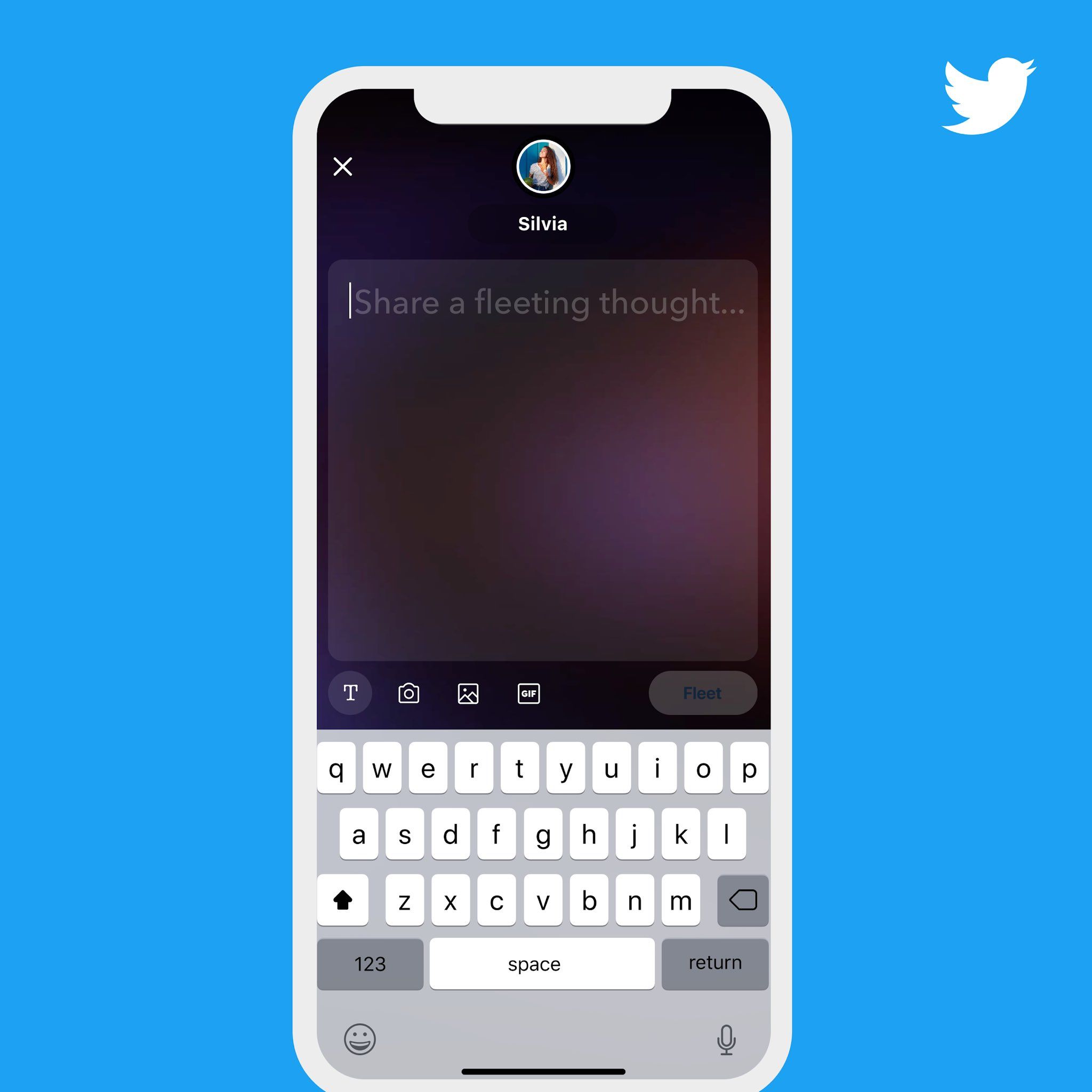
Apart from these features, Fleets has a limit of 280 characters, with the option of adding images, GIFs or videos – which is similar to the character limit imposed by tweets.
The company announced that if the test in Brazil is successful, then they have a plan to bring the feature to other countries as well.
How to share a Twitter Fleets
At this moment, Twitter Fleets are being tested in Brazil – so you may not have access to this feature yet. But if you are lucky enough to live in Brazil, here is how to post your first Twitter Fleet –
- Tap on your profile bubble with the ‘+’ icon.
- After doing this, you will be taken to the second screen.
- On the second screen, you can add texts (up to 280 characters), photos (of format JPEG, PNG, etc.), GIFs and videos which are quite similar to your tweet content options.
- Once you have completed creating your Fleets, you can now post it. After the post, it is now available to the public for viewing, and then you can add more Fleets to your story.
One of the main features is that Fleets accessibility will be based on your profile settings. So you can control who gets to see your Fleets.
We’ve been listening to this feedback and working to create new capabilities that address some of the anxieties that hold people back from talking on Twitter. Today, in Brazil only, we’re starting a test (on Android and iOS) for one of those new capabilities. It’s called Fleets. pic.twitter.com/6MLs8irb0c
— Kayvon Beykpour (@kayvz) March 4, 2020
And that is all you need to know. It is that simple. For the time being, Twitter is not offering more advanced features like those which are available on other social networks. However, with its recent acquisition of the Stories-focused team from Chroma Labs, you can expect such features to be upgraded soon.
Next comes the question of viewing. There is a significant variation (when compared to other platforms) in the way you view the Fleets. In cases where the user has posted multiple Fleets, instead of advancing through the Fleets horizontally with taps on the sides of the screen, you can swipe down. Meanwhile, if you want to view the next person’s Fleets, you just swipe to the left.
What Twitter Fleets mean for businesses
From Twitter’s announcement, it is quite clear that they hope their idea of Fleets will entice more users to engage on the platform – particularly those who aren’t as comfortable sharing regular permanent Tweets.
So for brands, it will offer a heap of new opportunities. One of the most interesting things about Fleets is that it will provide businesses a new way to connect with their audiences on Twitter, where many have already built significant followers. While on Instagram some companies find the art of marketing difficult to crack, the same companies, if they have a good Twitter presence, will have a ready-made audience for Fleets. Moreover, unlike tweets that are quite generic, Fleets will allow businesses the opportunity to connect with their followers at a more personal level. The audience would also be more likely to interact with Fleets by posting their reactions as compared to a tweet, which requires conscious effort to like or reply.
One of the key considerations for Fleets will undoubtedly be videos. Fleets offers users the ability to upload videos up to a length of 2:20 min (or 512 MB), while it allows some selected publishers to post longer videos – up to 10 minutes long. This will therefore, provide a new platform to companies to showcase their latest video content and will help you to spread product-related information to users more efficiently and effectively.
How does Twitter Fleets compare to stories on Snapchat, Facebook, Instagram, and WhatsApp?
While we have already answered that question above, we’ve created this handy chart to help you see how all these social platforms stack against each other with regard to stories. One clear difference that Twitter is offering is the focus on quality – both in terms of pictures and videos (since it allows lengthy clips).
|
Images |
GIFs |
Videos |
Viewing |
|
| Snapchat Story |
✔ (Quality is good) |
✔ (Only from the Snapchat library) |
✔ (10-sec video) |
Viewed by tapping on stories that appear on top of the app. To go to the next post, tap on the right side of the screen. |
| Facebook Story |
✔ (Quality Reduced due to compression) |
✔ |
✔ (60-sec video) |
Viewed by tapping on stories that appear on top of the screen. For the next post, tap on the right side of the screen. |
| Instagram Story |
✔ (Quality is good) |
✔ |
✔ (60-sec video) |
Viewed by tapping on stories that appear on top of the app. To go to the next post, tap on the right side of the screen. |
| Twitter Fleets |
✔ (Even HD quality pictures can be uploaded) |
✔ |
✔ (2:20 min video / 10 min video for selected publishers) |
Viewed by tapping on the rounded profile icon. Multiple Fleets can be viewed by swiping down. To go to the next Fleet tap on the right side of the screen. |
Bottomline
Truth be told, we all knew that this was coming considering users are becoming more familiar with stories than permanent posts. Twitter Fleets could be a complementary process to expand tweet interactions.
In addition to that, the social media platform is also seen lagging behind the others in terms of innovations since its last major product change was doubling the tweet count to 280 characters. If the Twitter Fleets become successful, they will certainly be a sign of thing to come from Twitter, while increasing the engagement on the app.
