

Xero has been ranking consistently among the top accounting platforms for small and mid-sized businesses globally for a good time now. Its clean interface, modular features, and deep bank reconciliation capabilities make it a go-to for companies looking to simplify bookkeeping without hiring an in-house accountant.
At SaaSworthy, we’ve analyzed hundreds of accounting tools, and Xero stands out for how well it balances ease of use with functional depth. From automated invoicing and efficient bill management to built-in project tracking and multi-currency handling, it’s a platform that scales as you grow. But is it the right fit for your business? Let’s explore Xero’s pricing, plans, and use cases to help you decide.
Table of Contents
Xero Pricing Plans Overview (2026)
95 % SW Score The SW Score ranks the products within a particular category on a variety of parameters, to provide a definite ranking system. Read more
What is Xero and how does it work?
Xero is an award-winning online accounting software for small scale businesses. Xero offers a variety of features to make your business function smoothly and efficiently. The software handles all the accounting transactions effectively. It permits unlimited users to get online at a time and work in collaboration over data which is accessible through a single ledger. Xero also provides Bank Reconciliation services by importing the various transactions from your bank accounts and matching them with your cash-book. Business finances and cash-flow statements are updated on a real-time basis, helping you to keep a track of all your expenses and transactions.
Read moreSW Score Breakdown
- Features 100%
- Reviews 60%
- Momentum 72%
- Popularity 70%
- Free Trial Available
- Starts at $29.00.
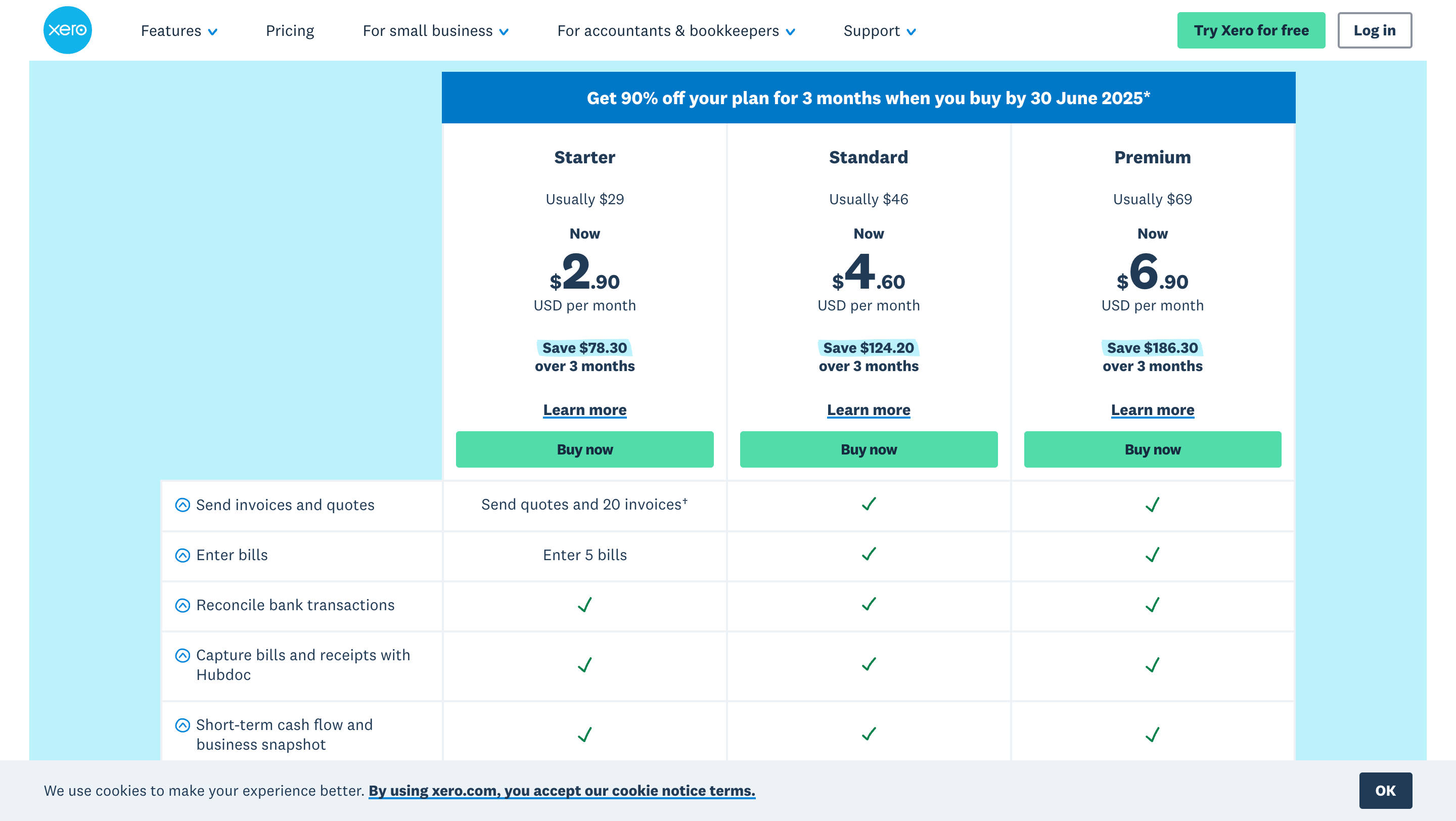
Xero’s core offering revolves around three distinct plans – Starter, Standard, and Premium. Each plan is thoughtfully designed to cater to different business sizes and complexities, yet all come equipped with fundamental accounting functionalities. The beauty of Xero’s pricing model is its flexibility: plans are billed monthly, with no long-term lock-in contracts, allowing businesses to scale up or down as their needs evolve. Beyond the core plans, Xero offers an array of optional add-ons for specialized functionalities like comprehensive project tracking, efficient expense claiming, and advanced financial analytics, all available at an additional, modular cost.
Every Xero subscription, regardless of the tier, inherently includes essential features like seamless bank reconciliation, professional invoice and quote generation, direct integration with Hubdoc for receipt capture, and real-time cash flow tracking. This foundational suite ensures that even the most basic plan provides significant value.
Xero Pricing Plan-by-Plan Breakdown
Understanding the nuances of each Xero plan is crucial for making an informed decision.
Starter Plan — The Launchpad for New Ventures & Freelancers
The Starter Plan is meticulously crafted for entrepreneurs just beginning their journey, freelancers managing their own finances, or sole proprietors with a relatively low volume of transactions. It provides the essential tools to get your financial house in order without overwhelming you with advanced features.
Key Transaction Limits (Important for Scalability):
- Invoices and Quotes: Limited to 20 per month.
- Bills: Limited to 5 per month.
Core Features Included:
- Professional Sales Management: Generate and send professional quotes and invoices to clients.
- Bill Management: Enter and track bills from your suppliers.
- Automated Bank Reconciliation: Connect your bank accounts for automatic feeds and effortless reconciliation, keeping your books accurate and up-to-date.
- Hubdoc Integration: Seamlessly capture, categorize, and publish receipts and bills directly to Xero, reducing manual data entry.
- Financial Snapshots: Gain quick insights into your cash flow and overall business performance with intuitive dashboards.
Best Suited For: Individual contractors, consultants, new solo founders experimenting with a business idea, or side hustles where transaction volume is predictably low. It’s an excellent starting point for those looking to move beyond spreadsheets for their basic accounting needs.
SaaSworthy Insight: While this plan is competitively priced, those limits can become restrictive even for a moderately active solo business. Many Xero users upgrade to Standard within 3–6 months as operations pick up.
Standard Plan — Xero’s Most Versatile and Popular Option
The Standard Plan is where Xero truly shines for the majority of small and rapidly growing businesses. It addresses the primary scaling challenge of the Starter plan by removing transaction limits, making it a robust choice as your operations expand and transaction volumes increase.
Features Included (Everything in Starter, plus enhancements):
- Unlimited Invoices and Bills: No more worrying about hitting transaction ceilings. This is a game-changer for businesses with growing sales and purchasing activities.
- Bulk Reconciliation: Streamline the reconciliation process further with tools designed for handling higher volumes of bank transactions efficiently.
- Full Hubdoc Access: Leverage Hubdoc to its full potential for automated document collection and data extraction from various sources.
- Enhanced Cash Flow Tracking: Benefit from more detailed cash flow reporting and forecasting tools, providing a clearer picture of your financial liquidity.
- Payroll Integration (US & UK): While not universally included in all regions, in key markets like the US and UK, the Standard plan often provides seamless integration with Xero’s own payroll solution or allows for easier connection to third-party payroll providers, simplifying employee compensation management. It’s crucial to verify regional payroll inclusions.
Best Suited For: Established small businesses, e-commerce stores with moderate transaction volumes, service-based businesses with multiple clients, or any company that has outgrown basic accounting software and requires a more comprehensive solution for managing their day-to-day finances.
SaaSworthy Insight: We recommend this plan for most SaaS startups and services businesses that handle multiple clients, recurring payments, or monthly vendor expenses. It offers the right balance between power and affordability.
Premium Plan — Engineered for Multinational Operations and Advanced Needs
The Premium Plan is the pinnacle of Xero’s core offerings, designed specifically for businesses with an international footprint or those that require advanced financial capabilities beyond typical small business needs. Its standout feature is robust multi-currency support.
Features Included (Everything in Standard, plus key additions):
- Multi-Currency Support: Manage transactions, bank accounts, and reporting in multiple currencies. This is indispensable for businesses dealing with international clients, suppliers, or operating in different countries. Xero automatically handles exchange rate conversions, simplifying international trade.
- More User Access: Often, the Premium plan provides a higher number of included users or simpler scaling for additional users compared to the lower tiers, catering to larger internal finance teams. Always check the specific user limits for your region.
- Enhanced Reporting: Access to more sophisticated reporting templates and customization options, allowing for deeper financial analysis and strategic decision-making.
Best Suited For: Growing companies with a global client base, businesses sourcing products internationally, companies with foreign bank accounts, or those with more complex financial reporting requirements. If you regularly engage in cross-border transactions, the Premium plan is essential.
SaaSworthy Insight: The Premium plan becomes cost-effective when you start operating internationally. If you’re receiving payments in EUR or GBP, or paying suppliers in multiple currencies, this plan will pay for itself in saved conversion headaches.
Xero Optional Add-Ons
One of Xero’s strengths is its modularity. Beyond the core plans, you can selectively add specialized functionalities that cater to unique business workflows. This “pay-for-what-you-need” approach allows businesses to scale their accounting software capabilities precisely as their operational needs grow.
Final Verdict: Is Xero Worth It in 2026?
From a SaaSworthy standpoint, Xero delivers exceptional value, especially for small to mid-sized businesses in their growth phase. The Standard plan is the sweet spot for most, while the Premium tier unlocks serious international capabilities.
More importantly, Xero’s interface is welcoming to non-accountants, which is a big plus for founder-led teams. The pricing is transparent, the features are deep, and the flexibility to scale with optional add-ons makes it one of the most SaaSworthy picks in the accounting category.
SaaSworthy Verdict: If you’re choosing between QuickBooks, FreshBooks, and Xero in 2026—Xero’s pricing model, global readiness, and ecosystem of features give it a definitive edge.
Xero Pricing FAQs
Can I try Xero for free?
Absolutely! Xero understands the need to “try before you buy.” They offer a free 30-day trial that provides full access to the features across all plans. This allows you to thoroughly test which plan best suits your operational rhythm and integrate it with a sample of your daily tasks.
Can I pay annually for a Xero subscription?
Currently, Xero maintains a monthly billing cycle for its core plans. You will receive an invoice at the end of each billing cycle for the preceding month’s usage. This offers maximum flexibility, as you’re not locked into a long-term commitment.
How secure is my financial data with Xero?
Xero places a paramount emphasis on data security. They adhere to industry best practices for cloud security, employing multi-layered security protocols, robust encryption for all data in transit and at rest, and regular data backups to ensure your sensitive financial information is always protected and available. Their data centers are designed with redundancy and physical security measures.
What if I need separate accounts for multiple companies or entities?
Each distinct legal entity or business that requires separate accounting records in Xero will necessitate its own separate Xero organization and corresponding plan. However, Xero does offer a convenience for subscribers managing multiple organizations: if you use the same subscriber email across these multiple organizations and regions, you may find streamlined management and potentially consolidated billing.
Will I be charged extra for optional add-ons like Projects or Expenses?
Yes, that’s correct. Add-ons such as “Claim Expenses,” “Track Projects,” and “Analytics Plus” are optional extras and are billed separately on a monthly basis. Their pricing is typically structured per active user or based on the specific features utilized within the add-on. This model ensures you only incur costs for the specific advanced functionalities your business actively uses.
What happens if I decide to cancel my Xero subscription mid-month?
Xero offers the flexibility to cancel your subscription at any time with one month’s notice. However, it’s important to note that Xero does not offer prorated refunds for partial months. If you cancel mid-billing cycle, your access to the service will typically continue until the end of that current monthly billing period, and you will not be charged for the subsequent month.
