

A floor plan is a calibrated design of a room observed from the top. The floor plan may represent a whole building, a single room or one floor of a building. It may also incorporate furniture, measurements, machines, or anything, which is essential to the goal of the plan. A floor planning software helps in generating a floor plan with ease. It is also an important tool for rental companies and real estate agents in promoting sell or rent. Moreover, floor plans can come handy while designing the wiring system, furniture layout and more. A floor plan creator is crucial as it increases the resale value and provides enjoyment of the home.
Table of Contents
Characteristics of a good floor plan
Here are some of the characteristics of an excellent floor plan:
- It should have a perfect balance between practical considerations and architectural details. Before getting attracted to good looking floor plans, you should always consider the safety of your family.
- Floor Plan should fit your personality and lifestyle. You should design it according to your budget, requirements and future plans.
- We don’t really know what the future holds. So one of the office spaces can also be used as a toddler’s living room. So, it is essential to make sure that the construction that is being done can do both and be an office room or a child’s bedroom.
- Whenever you are designing any room or hallway, think about the capacity of the specific place and how much room is needed for the people there to move from one place to another. Also, the furniture are to be kept in mind while planning any hallway or a room.
- It is of utmost importance that a house is planned well. People living in the bedroom won’t like it if the bedroom has an opening in the living room or the dining room. However, a kitchen which opens in a living room or a dining space can be a good idea so that the person who is cooking can also interact with the guests or the kids of the house who are playing in the same entertainment space.
Best floor planning software
There are a plethora of floor planning software available in the market and here are some of the top of that kind:
| Name | Free/Demo Version | 3D Feature
|
Photo Upload Feature |
Mobile App
|
| Sweet Home 3D | Yes | Yes | Yes | No |
| Floorplanner | Yes | No | Yes | No |
| SmartDraw | Yes | No | Yes
|
No |
| AutoCAD Architecture | No (Free version only for students) | Yes
|
Yes
|
No |
| SketchUp | No | Yes | No | No |
| RoomSketcher | Yes | Yes | Yes | No |
| Roomle | Yes | Yes | Yes | Yes (Only for iOS) |
| Planner 5D | Yes (basic version) | Yes | Yes | Yes |
| Homebyme | Yes (First three projects) | Yes | Yes | No |
| Civil 3D | No (free version only for students) | Yes | No | No |
1. Sweet Home 3D
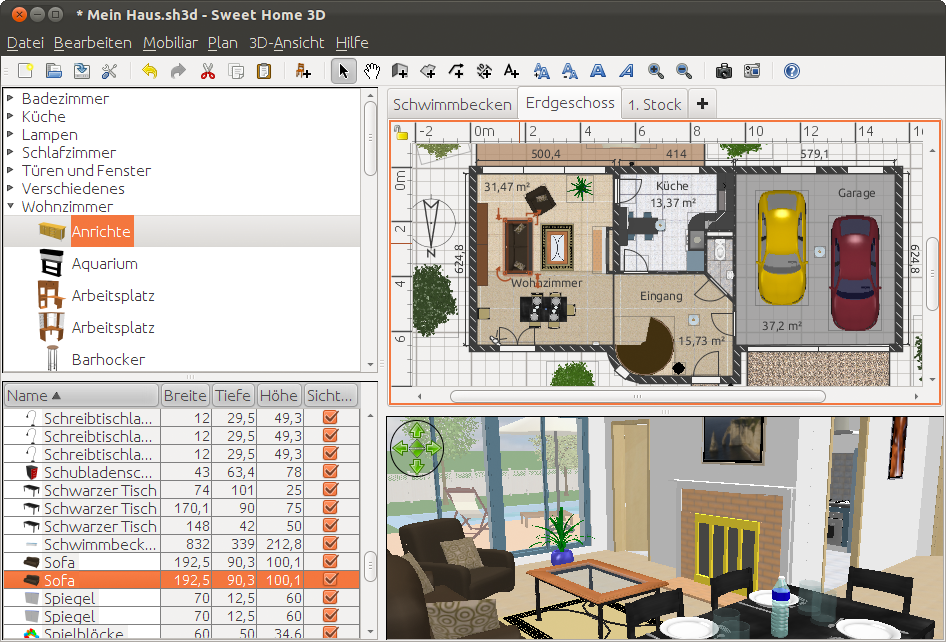
It is an floor plan software for beginners that assists you in creating a 2D plan of a house, with a 3D preview and also allows you to modify the exterior and interior according to your wishes, absolutely free of cost. One can even import and organise the furniture to generate a virtual environment. Sweet Home 3D can also be utilised to design blueprints of houses. With the help of this software, one can create photorealistic images and videos with numerous light sources. In addition to that, it allows you to observe all the changes concurrently from any point of view. This software comes with drag and drops feature, which can be applied on windows, furniture, and doors.
You can get rid of dull floor plans and use Sweet Home 3D to add texture, colours, and orientation of walls, furniture, ceilings and floors. If you run out of ideas, you can even import supplementary 3D floor plan and also export your floor plans. With the help of the software, users get the option of printing their floor plans. This software supports 27 different languages, which makes the user interface easy to use. To enjoy the benefit of this software, you just have to download it and run it offline. It supports Windows, Mac OS X, Linux and Solaris.
2. Floorplanner
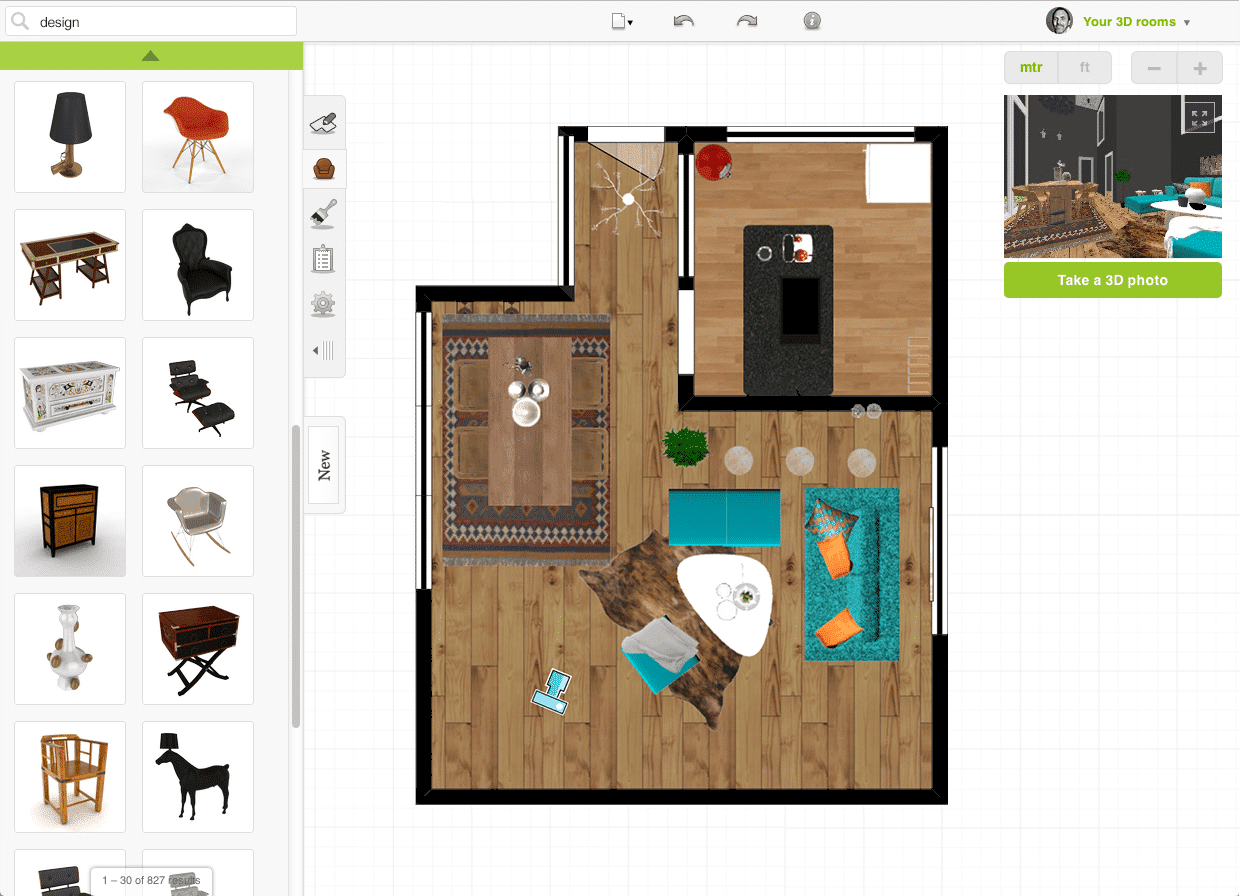
This floor planning software is one of the easiest ways to generate and export influencing floor plans online. A floor plan designer is considered to be useful only if it gives a precise and clear view of the property and Floorplanner is popular for that. With the help of this software, one can generate crystal clear floor plans without any hurdle. You can build a floor plan in minutes, thanks to the intuitive editor present in the software. One can decorate his floor plan drawing in just one click as it comes with the auto-furnish feature that furnishes your floorplan in a few clicks only. In addition to this, you can choose from 150,000 3D models that are present in their library.
With Floorplanner, you can generate mind-blowing images of your floor plan within few minutes. This floor plan maker features four projects level. Level one is the one for free users where the projects are restricted to a single design but within that design, you will enjoy the complete functionality of their art tool and utilise everything present in the libraries. Level two is aimed for professional users where all the designs can be exported in HD resolution. Level three offers VR and walkthrough features. Moreover, you can also create panorama at just one click. Lastly, level four will allow you to render your floor plans with photorealistic effects.
3. SmartDraw
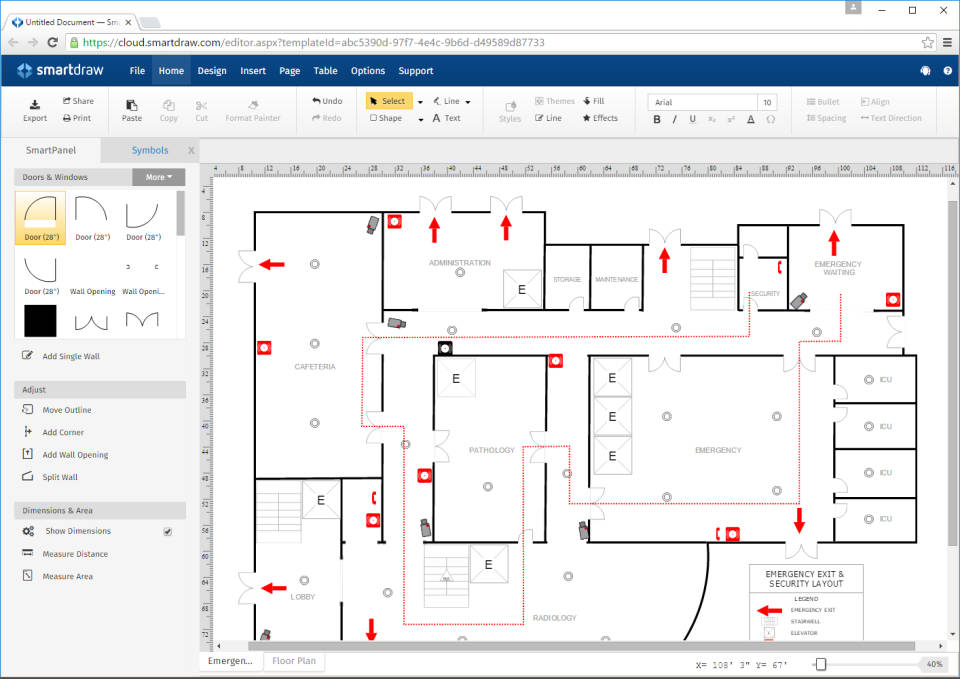
Floorplanning plays a vital role while designing and constructing a home. To increase the resale value and have a comfortable stay at home, a good floor plan sketch comes to play and to create it, SmartDraw can be used. With the help of the software, you can design and edit plans without any issue, thanks to its intelligent formatting engine. It offers professional results with the assistance of automatic alignment, spacing and colour schemes. It can easily integrate with Google Apps, MS Office, Jira and more. It comes equipped with over 4,500 templates and 34,000 symbols that give you the power to generate a floor plan according to your desire.
In addition to that, the software features standard engineering scales that help you to unleash the true CAD-like drawing abilities. It makes the process of importing and exporting more straightforward. With the help of SmartDraw, you can add, remove and shift shapes and the floorplan will get aligned automatically. This application allows you to collaborate with your team on the same plan and also share it with someone who is not using SmartDraw.
4. AutoCAD Architecture
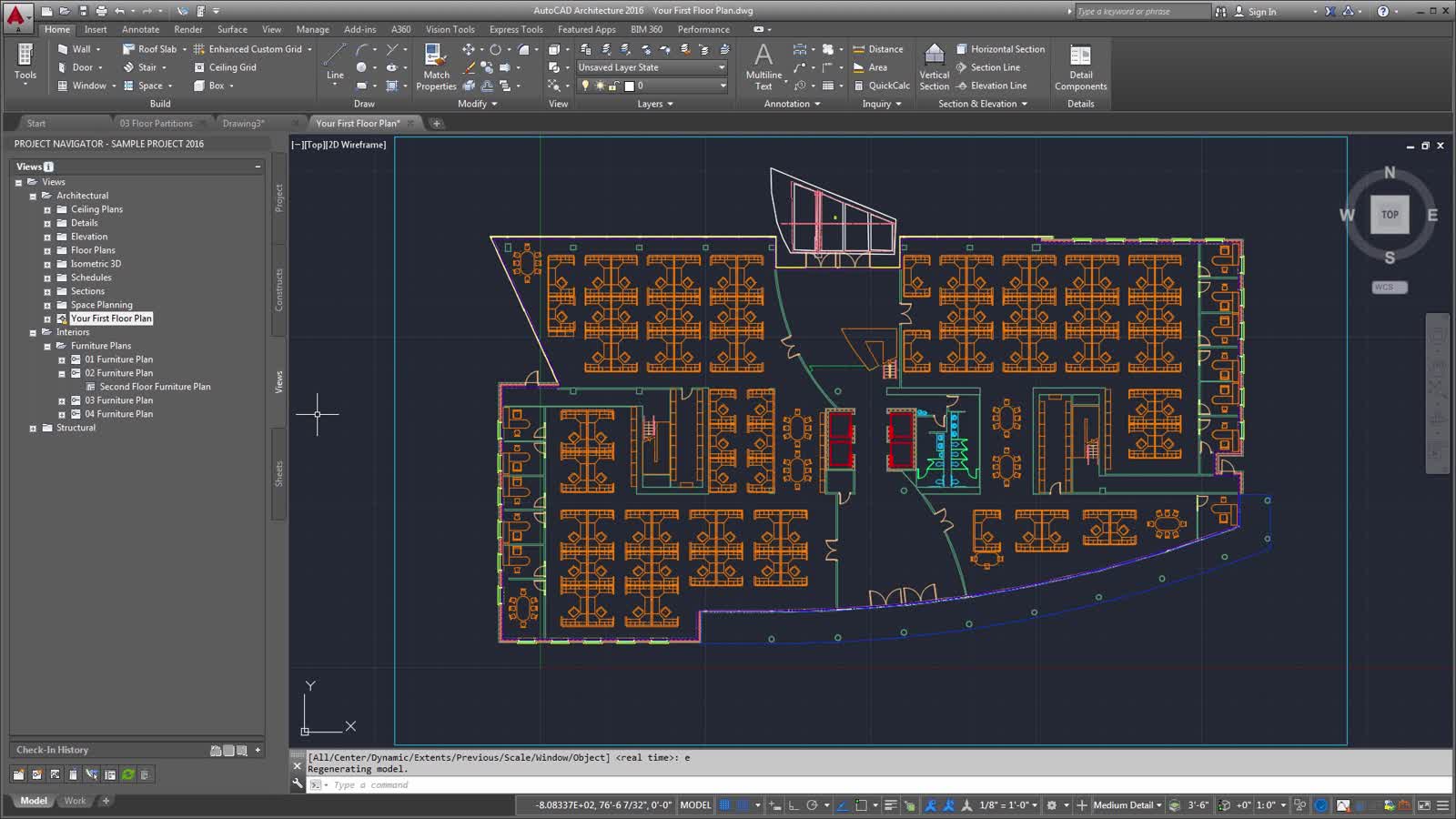
As the name suggests, it is a computer-aided design (CAD) software that helps you to create 2D and 3D floor plans. With the help of this software, you can also automate the floor plans. AutoCAD now offers features that are industry-specific for mechanical engineering, architecture, electrical design and more. This software is very versatile, and you can work from anywhere, thanks to the mobile app offered. With the aid of this app, one can edit, view and generate floor plans on the go using a mobile device. You can also use the web app of the software with no installation required. It allows you to create and edit floor plans swiftly in your local web browser.
In addition to that, you can obtain any DWG file with Autodesk’s cloud or any other leading cloud storage provider. For better efficiency, it comes with a recent blocks section where you can gain access to the most recently used blocks. You also get the option to publish your plans in a web browser and allow others to view and share their thoughts on it.
5. SketchUp
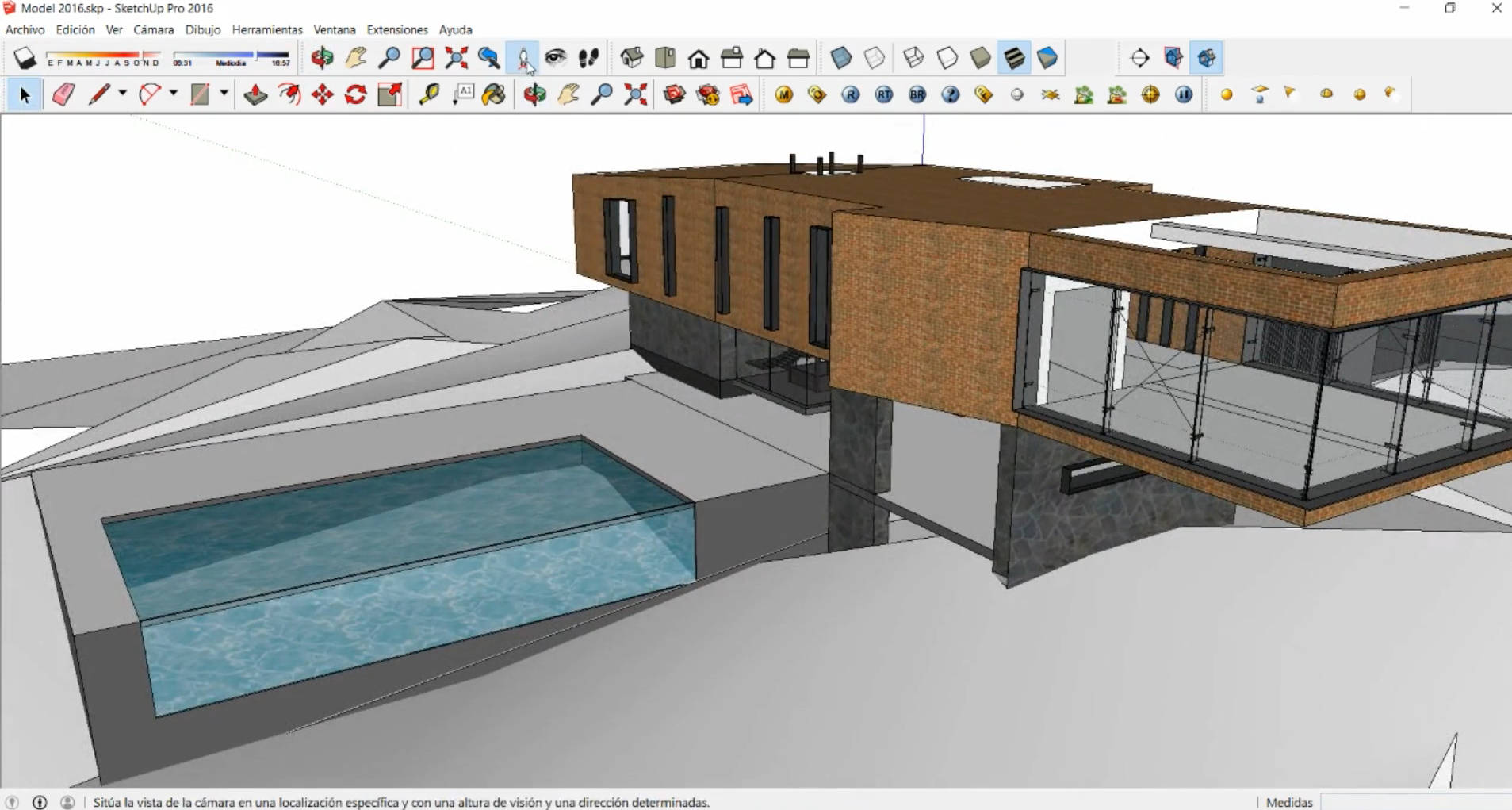
A 3D model is the best in terms of clarity of the floor plan, and SketchUp features 3D construction modelling software that helps you to build the most productive floor plan without putting many efforts. One can inspect their project before publishing to save the cost of revisions. The user can do the above with the help of SketchUp viewer, with a smartphone or even a VR device. You should stop spending your time recklessly on learning complex programming languages and utilise SketchUp’s most intuitive 3D drawing tool. With the help of this feature, your team can be more productive and generate better designs in less time.
Concluding everything, we can say that the planning is becoming essential with every passing day. With planning, corporate business firms can show how the building will look and will be able to impress investors. Further, floor planning can yield a realistic outline of the structure, and it makes changing and addition much easier, less time, money and energy-consuming and once a plan for a building is ready, the floor plan can help in moulding other things for the floor comparatively easier. So. it is better to use a floor planning software for a corporate firm while designing a building itself.
