

Managing multiple projects simultaneously is a complex task that demands a strategic approach, effective communication, and the right tools. As organizations strive for efficiency and productivity, the ability to juggle various projects while meeting deadlines and maintaining quality becomes essential.This article outlines key strategies for managing multiple projects effectively, along with practical tips, best tools, and best practices. Here are our top picks:
Table of Contents
Understanding the Challenges of Managing Multiple Projects
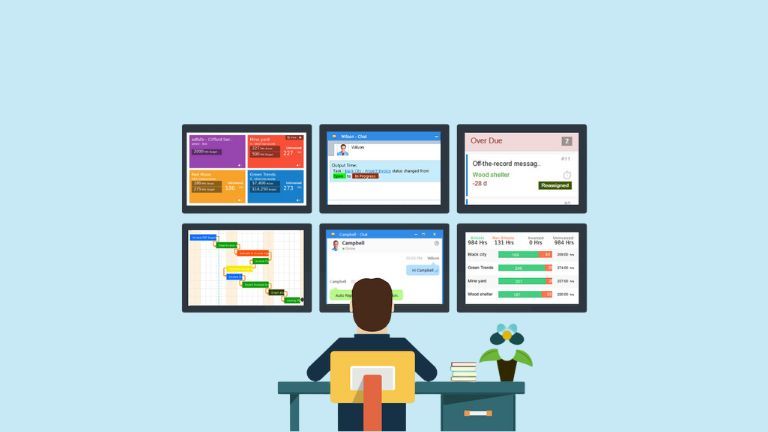
Managing several projects at once presents unique challenges, including:
- Resource Allocation: Multiple projects often compete for the same resources, leading to potential conflicts and over-allocation.
- Task Prioritization: Determining which tasks are most critical can be difficult, especially when deadlines overlap.
- Communication: Ensuring all team members are aligned and informed is crucial to prevent miscommunication and delays.
- Time Management: Balancing time across various projects requires careful planning and flexibility.
Key Strategies for Effective Multi-Project Management
1. Prioritize Tasks
Effective prioritization is fundamental when managing multiple projects. Use methods like the Eisenhower Matrix to categorize tasks based on urgency and importance:
- High Priority (A): Tasks that are critical and need immediate attention.
- Medium Priority (B): Important tasks that can be scheduled later.
- Low Priority (C): Tasks that are nice to have but can wait.
By prioritizing tasks, project managers can focus on what truly matters, ensuring that critical deadlines are met without sacrificing quality.
2. Utilize Project Management Tools
Leveraging technology is vital in managing multiple projects efficiently. Tools like Trello, Asana, or LiquidPlanner provide visual dashboards that help track progress, manage resources, and communicate effectively across teams. These tools allow project managers to:
- Centralize project information in one place.
- Visualize timelines and dependencies.
- Monitor team workloads and adjust as necessary.
3. Develop a Comprehensive Project Plan
Before initiating any project, it’s essential to create a detailed project plan that outlines objectives, timelines, resources, and potential risks. This plan should include:
- Clear deliverables for each project.
- Defined roles and responsibilities for team members.
- Contingency plans for unforeseen challenges.
Regularly reviewing and adjusting this plan based on progress helps maintain alignment with overall goals.
4. Delegate Wisely
Effective delegation is crucial when managing multiple projects. Identify team members’ strengths and assign tasks accordingly. Delegation not only lightens your workload but also empowers team members by giving them ownership over their tasks. Remember to:
- Provide clear instructions and expectations.
- Maintain oversight to ensure quality standards are met.
- Foster an environment where team members feel comfortable seeking guidance.
5. Maintain Open Communication
Communication is the backbone of successful project management. Establish regular check-ins with your team to discuss progress, address challenges, and realign priorities as needed. Effective communication strategies include:
- Setting up daily or weekly stand-up meetings.
- Using collaborative tools for real-time updates (e.g., Slack, Microsoft Teams).
- Encouraging transparency about workload and potential bottlenecks.
6. Monitor Progress Regularly
Tracking progress is essential to ensure that projects stay on schedule. Implement a system for monitoring key performance indicators (KPIs) related to each project’s success. Regularly assess:
- Time spent on tasks versus estimated time.
- Milestone achievements against deadlines.
- Resource utilization rates.
This ongoing evaluation allows for timely adjustments if any project is falling behind.
7. Be Flexible
Flexibility is vital when managing multiple projects since priorities can shift unexpectedly. Be prepared to adjust timelines or reallocate resources as needed based on changing circumstances or urgent demands from stakeholders.
Also read: 7 Best HR Software for Small Businesses in 2024 with Free Trials
Top 10 Project Management Tools
Detailed Overview of Each Tool
| Tool Name | Best Use Case | Key Features |
| monday.com | Best All-Around Performer | The highly visual interface, customizable workflows, and automation features. |
| Smartsheet | Best for Fast-Growing Teams | Real-time collaboration, Gantt charts, resource management. |
| Asana | Best for Remote Teams | Task assignments, project timelines, custom workflows. |
| Trello | Best for Smaller Projects & Teams | Visual Kanban boards, task cards, easy drag-and-drop functionality. |
| ClickUp | Best for Customization | Comprehensive features including task management and goal tracking. |
| Wrike | Best for Spreadsheet-Like Features | Flexible project tracking, Gantt charts, and built-in communication tools. |
| Jira | Best for Agile Teams | Scrum and Kanban boards, issue tracking, and extensive integration options. |
| Basecamp | Best for Collaboration | Integrated communication tools, to-do lists, and file sharing. |
| GanttPRO | Best Option for Beginners | User-friendly Gantt charts, and task management features. |
| Notion | Best for Creative Teams | Flexible workspace for notes, tasks, and databases in one platform. |
monday.com
- Best Use Case: All-around project management for teams of any size.
- Key Features: monday.com offers a highly visual interface that allows users to create customizable workflows tailored to their specific needs. It includes automation features that simplify task assignments and progress tracking.
Smartsheet
- Best Use Case: Fast-growing teams need secure and scalable solutions.
- Key Features: Smartsheet combines the familiarity of spreadsheets with advanced project management capabilities such as real-time collaboration, Gantt charts for timeline visualization, and resource management tools.
Asana
- Best Use Case: Remote teams looking to enhance collaboration and project tracking.
- Key Features: Asana provides an organized workspace where users can create tasks, assign responsibilities, and track progress through various views like lists and timelines.
Trello
- Best Use Case: Smaller projects or teams that benefit from visual task management.
- Key Features: Trello utilizes a Kanban board system where tasks are represented as cards that can be moved between lists (e.g., To Do, In Progress, Done), making it easy to visualize workflow stages.
ClickUp
- Best Use Case: Teams requiring extensive customization options.
- Key Features: ClickUp is an all-in-one platform that integrates task management with goal tracking and document sharing capabilities, allowing teams to tailor their workspace according to their specific needs.
Wrike
- Best Use Case: Teams that prefer spreadsheet-like interfaces for project tracking.
- Key Features: Wrike offers a flexible project tracking system with Gantt charts and built-in communication tools that facilitate collaboration among team members.
Jira
- Best Use Case: Agile development teams need robust issue tracking.
- Key Features: Jira is designed specifically for software development projects using Agile methodologies like Scrum or Kanban. It provides advanced issue-tracking capabilities and integrates seamlessly with other development tools.
Basecamp
- Best Use Case: Organizations focused on collaboration across projects.
- Key Features: Basecamp combines project management with integrated communication tools like message boards and group chats, making it easy for teams to collaborate effectively on tasks.
GanttPRO
- Best Use Case: Beginners needing straightforward project management tools.
- Key Features: GanttPRO focuses on user-friendly Gantt charts that help visualize project timelines while providing essential task management features suitable for novice users.
Notion
- Best Use Case: Creative teams looking for flexibility in managing projects.
- Key Features: Notion allows users to create a customizable workspace where they can manage tasks, take notes, and build databases all in one place.
Successfully managing multiple projects requires a combination of strategic planning, effective communication, and the right tools. By prioritizing tasks, utilizing technology, developing comprehensive plans, delegating wisely, maintaining open lines of communication, monitoring progress regularly, and remaining flexible, project managers can navigate the complexities of multi-project management effectively.
Key Takeaways
- Prioritize tasks using methods like the Eisenhower Matrix.
- Utilize project management tools for better organization and tracking.
- Develop comprehensive project plans with clear roles and contingencies.
- Delegate wisely to empower team members while maintaining oversight.
- Foster open communication within teams to address challenges promptly.
- Monitor progress regularly to ensure projects stay on track.
- Stay flexible to adapt to changing priorities or unexpected challenges.
FAQs
Q1: What tools are best for managing multiple projects?
A1: Tools like Trello, Asana, LiquidPlanner, or Microsoft Project are excellent for tracking progress and managing resources across multiple projects.
Q2: How do I prioritize tasks effectively?
A2: Use prioritization methods such as the Eisenhower Matrix or ABC categorization to determine which tasks require immediate attention versus those that can wait.
Q3: What should I do if my team is overwhelmed with work?
A3: Assess workloads regularly, delegate tasks appropriately, consider hiring temporary help if needed, or adjust project timelines if possible.

Saurabh is a seasoned SaaS expert with over eight years of experience, specializing in HR technology, payroll, and workforce management solutions. A PMP-certified professional and an alumnus of XLRI, he has collaborated with leading industry publishers, sharing his insights on ATS, payroll, employee engagement, HR software, benefits administration, compensation management, interview scheduling software, performance management systems, and employee recognition. With a deep understanding of SaaS trends, Saurabh continues to shape the future of HR tech through his thought leadership and expertise.