

Midjourney is a cutting-edge AI program that has revolutionized the way we create and perceive art. It’s a versatile tool that can transform simple text prompts into stunning visual masterpieces. This article will provide you with a step-by-step guide on how to use Midjourney to unlock your artistic potential.
Table of Contents
What is Midjourney?
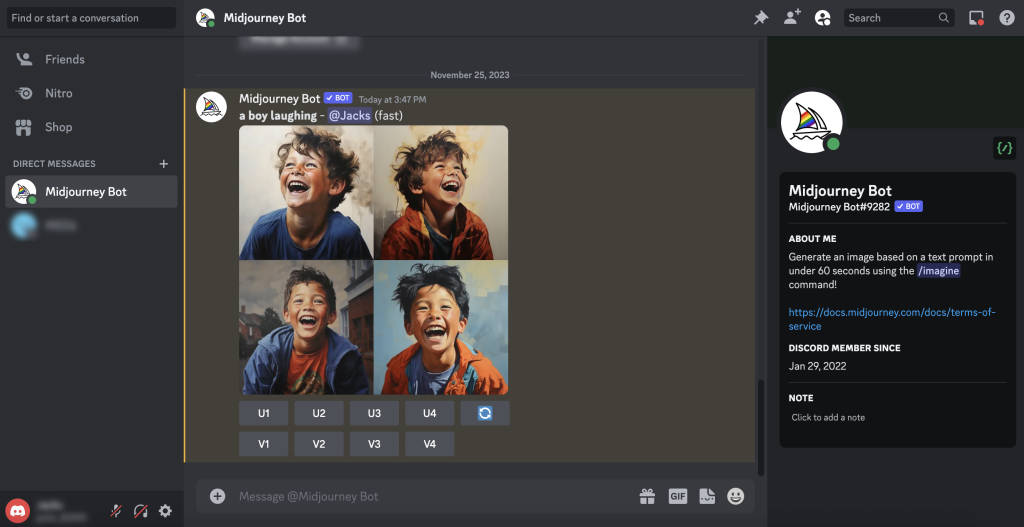
Midjourney is an AI-powered image generator that operates within the Discord platform. It leverages sophisticated machine learning algorithms to interpret text descriptions (prompts) and translate them into unique images. The possibilities are virtually endless, allowing you to create art in various styles, from realistic photographs to abstract paintings.
Getting Started with Midjourney
- Join Discord: If you haven’t already, create a Discord account and download the app. Discord is a communication platform where Midjourney resides.
- Join the Midjourney Server: Visit the Midjourney website and click on “Join the Beta.” This will direct you to the official Midjourney Discord server. Accept the invitation to join.
- Choose a Plan: Midjourney offers different subscription plans with varying levels of usage. Select a plan that suits your needs.
- Navigate to a Newbie Channel: Within the Midjourney server, you’ll find channels designated for beginners (e.g., #newbies-123). Join one of these channels to start experimenting.
Also read: How to Design the Correct YouTube Thumbnail
Creating Your First Image
- Use the /imagine Command: In the newbie channel, type “/imagine” followed by a space and your text prompt. For example, “/imagine a photorealistic image of a majestic lion in the African savanna.”
- Wait for the AI to Generate Images: Midjourney will process your prompt and generate four different image options based on your description. This usually takes about a minute.
- Upscale or Create Variations: You can choose to upscale one of the generated images to improve its resolution or create variations of the image you like best.
- Save Your Image: Once you’re satisfied with your creation, you can save the image to your device.
Tips for Effective Prompt Writing
- Be Specific: The more detailed your prompt, the better Midjourney can understand your vision. Include information about the subject, style, colors, lighting, and any other relevant details.
- Experiment with Styles: Try using different keywords to influence the artistic style of your image. For example, “oil painting,” “watercolor,” “pixel art,” or “cyberpunk.”
- Use Reference Images: You can include URLs of reference images in your prompt to guide Midjourney’s interpretation.
Exploring Advanced Features
Midjourney offers a variety of advanced features, such as:
- Image Weighting: This allows you to control the influence of a reference image on the generated image.
- Custom Models: You can train your own custom models to generate images with a specific style or theme.
Midjourney is a powerful tool that can unleash your creativity and empower you to create stunning artwork. With a little practice and experimentation, you’ll be able to master this AI-powered art generator and bring your imagination to life.
Disclaimer: While Midjourney is incredibly versatile, it’s important to be aware of its limitations. The AI is still under development and may sometimes produce unexpected results. Additionally, Midjourney is not a substitute for human creativity and artistic skills. It is a tool to enhance and augment your creative process.
FAQs
How do I write effective prompts for Midjourney?
Be as specific as possible in your descriptions. Include details about the subject, style, colors, lighting, and any other relevant details. Experiment with different keywords and reference images to achieve the desired results.
Can I use Midjourney for free?
Midjourney offers a limited free trial to new users. After that, you’ll need to subscribe to one of their paid plans to continue using the service.
What are some advanced features of Midjourney?
Midjourney offers several advanced features like image weighting (controlling the influence of a reference image), custom models (training AI on specific styles), and remix mode (combining multiple images).
