


A business process management software (BPMS) is a software that enables businesses to optimize their day-to-day processes and simplify the workflows. It allows businesses to improve their processes and execute management methodology through automation analysis, modeling, identification, and performance measurement. This automation tool plays a crucial role in eliminating any process holdups, making your daily work more efficient and effective, and controlling the company’s costs.
Features of BPMS –
a. Process monitoring
b. Case management
c. Process library
d. Process design and execution
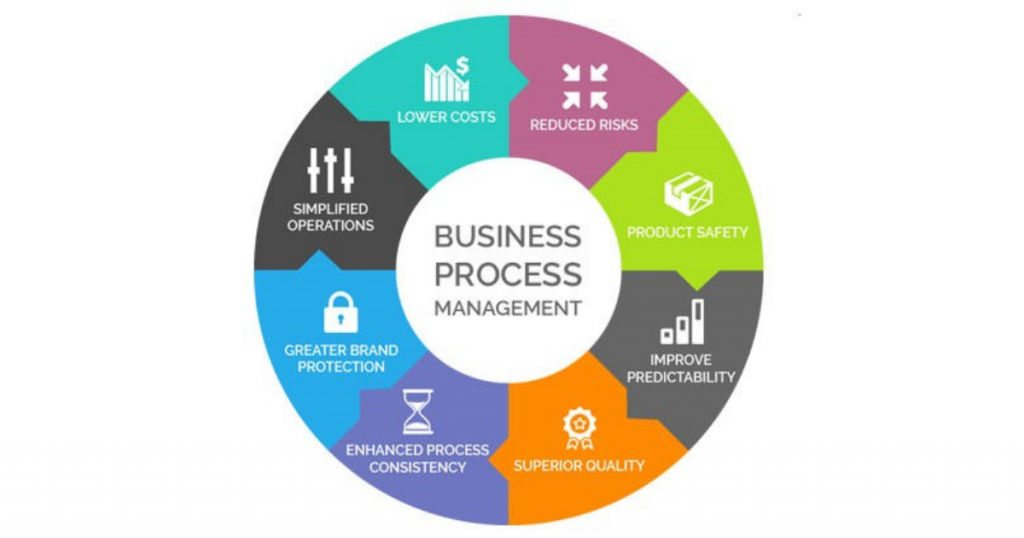
A business process management software has become an integral part of every business – small, medium, and large. It is crucial to invest in the right BPMS to ensure that it is the right fit for your business and its various processes. A quick search will result in several BPMS available in the market today, each with its own set of features, pros, cons, and pricing plans.
In this post, we will look at two of the popular BPMS – Kissflow and Integrify. We will compare both the software to understand which one of them has an edge over the other.
Table of Contents
What is Kissflow?
Kissflow is an automation software used by businesses to automate their business processes and measure performances. Kissflow offers several features to its users which has made it a popular BPMS for businesses of all sizes. Apart from taking advantage of the 45 pre-installed applications, users can also build their own applications depending upon their specific requirements. This tool allows its users to perform several functionalities, such as display your workflow, determine conditions, set deadlines, initiate process requests, and more.

This cloud-based workflow software enables its users to better streamline their processes and promote better efficiency.
What is Integrify?
Integrify is a workflow automation platform that enables businesses to better perform by automating their various business processes and creating effective workflows. This software is an effective alternative to various manual workflows and comes with a wide range of features. From tracking performances via dashboards to designing forms to increasing process visibility – you can do all this and more using Integrify. It also offers several advanced components, such as implementation, scalability, and interoperability.
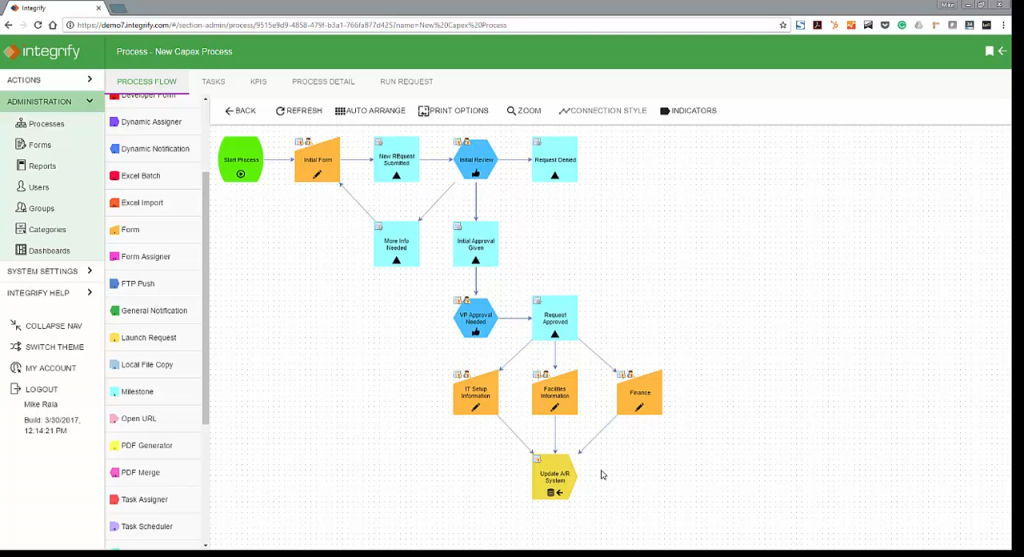
Integrify is a cloud-based software that provides several benefits, resulting in businesses improving their efficiency, audibility, job satisfaction, accuracy, and productivity.
Comparing Kissflow and Integrify
Kissflow and Integrify are both popular BPMS that enable their users to better restructure their various processes so that they can achieve maximum efficiency, productivity, and desired business goals. So, which among them is better? What are the factors that you should consider before declaring that one of them is better than the other?
Read on as we detail a thorough comparison between Kissflow and Integrify. Our comparison chart focuses on all the major categories, such as features, platform compatibility, integrations, pricing plans, top alternatives, and more. By the end of this comparison, you will have all the necessary information about both these software which will enable you to determine which of them will suit your business the best.
| Category | Kissflow | Integrify |
| Basic Information | Founded in 2003 | Founded in 2001 |
| Features | API Access Controls/Permissions Action Management Activity Tracking Audit Trail Case Management Collaboration Tools Communication Management Contact Management Custom Development Customizable Fields Customizable Forms Customizable Reports Customizable Templates Document Management Drag & Drop Email Management File Sharing Graphical Workflow Editor Mobile Access Monitoring Process Control Project Management Project Workflow Real Time Data Real Time Notifications Reporting Role-Based Permissions Surveys & Feedback Task Management Task Scheduling Third Party Integrations User Management Web Forms Widgets | API Access Controls/Permissions Action Management Activity Management Ad Hoc Reporting Alerts/Notifications Audit Management Audit Trail Budget Control CRM Calendar Management Change Management Collaboration Tools Compliance Tracking Configurable Workflow Customizable Dashboard Customizable Fields Customizable Forms Customizable Reports Data Synchronization Drag & Drop Event Logs Event Tracking File Storage Graphical Workflow Editor Incident Management Leave Tracking Multiple User Accounts No-Code Payroll Management Process Control Quality Assurance Real Time Analytics Real Time Notifications Reminders Secure Login Single Sign On Status Tracking Task Management Website Integrations Workflow Configuration Workflow Management |
| Desktop Platform | Windows Mac Web-based | Windows Mac Web-based |
| Mobile Platform | Android iPhone iPad | NA |
| Languages Supported | English Dutch German Portuguese Polish Turkish Swedish Spanish | English |
| Ideal For | Small Businesses Medium Businesses Large Enterprises | Medium Businesses Large Enterprises |
| Support | Email Phone Live Support Training Tickets | Email Phone Training Tickets |
| Training | Videos | In Person Videos Documentation Live Online Webinars |
| Integrations | Dropbox Google Calendar Google Drive Mailchimp PayPal Salesforce Sales Cloud Slack Zapier QuickBooks Shopify Stripe | With Integrify, you can create your own apps using the Integrify REST API. |
| Free Plan | No | No |
| Paid Plans | Starter Plan – $480/month/billed annually Features include: 30 users Drag and Drop SLAs, Deadlines, Escalations Webhooks and integrations Kanban board for project management Growing Plan – $690/month/billed annually Features include: 50 users All features of Starter Plan Custom user attributes Login enforcement Remote lookup Anonymous post and reply 1,000 API calls per month Enterprise Plan – $1,300/month Features include: 100 users All features of Growing Plan Free setup assistance of 40 hours Onsite workshop (on request) Dedicated account manager SAML EU cloud deployment | Custom Pricing Features include: Unlimited processes Unlimited storage of files and documents Unlimited audit trails Unlimited forms Unlimited transactions/requests Free workflow App starter templates Dedicated account manager Branded self-service portal Unlimited reports/dashboards API integration |
| Top Alternatives | Zoho Flow Chronos Workflow RunMyProcess Microsoft Flow Pipefy | Onspring monday.com Kinetic Data FlowForma Pipefy |
Frequently Asked Questions
1. Do these software offer API?
| Kissflow | Integrify |
| Yes | Yes |
2. Who can benefit from the software?
| Kissflow | Integrify |
| Kissflow can be used by small, medium, and large businesses. | Integrify is suitable for medium businesses and large enterprises. |
3. Is multi-user option available in the software?
| Kissflow | Integrify |
| Yes | Yes |
4. What is the software mainly used for?
| Kissflow | Integrify |
| Kissflow is an automated workflow tool allowing teams to effectively collaborate. It offers several BPM software benefits, such as saves time, improves efficiency, fast-tracks workflow, access to instant reports, and more. | Integrify is an automation workflow software which helps to eliminate manual workflows and improve the efficiency, productivity, accuracy, and job satisfaction. This software is loaded with several features, such as real-time data tracking and reporting, audit trail, customizable dashboards, and workflows and more. |
5. Is third-party integration possible?
| Kissflow | Integrify |
| Yes, you can integrate a number of third-party apps with ActiveCampaign, such as Dropbox, Mailchimp, Google Drive, Google Calendar, etc. | You can create your own apps using the Integrify REST API. |
6. What type of customer support does the software offer?
| Kissflow | Integrify |
| You can contact the Kissflow customer support team via Email, Phone, Training, Tickets, and Live Support. | The Integrify customer support team can be contacted via Email, Training, Phone, and Tickets. |
7. What are the different platforms with which the software is compatible?
| Kissflow | Integrify |
| ActiveCampaign is compatible with both desktop apps and mobile platforms. It is compatible with Android, iOS, Windows, and Mac. | Integrify is compatible only with desktop apps such as Mac and Windows. |
Pros and cons
Similar to all the other BPMS, Kissflow and Integrify also have their advantages and disadvantages. Before you take a call on which of these software will suit your business needs, you need to be aware of the pros and cons as well.
By comparing the pros and cons of both these software, you will be able to take a better decision about whetehr Kissflow suits your business needs the best or Integrify!
Kissflow pros
a. With Kissflow, you can design your own workflows.
b. Better collaboration with teams and peers resulting in improved efficiency and productivity.
c. Access to complete ticket history.
d. Automatic email notifications that help everyone to be on track.
Kissflow cons
a. Compared to some of the other BPMS, Kissflow’s interface is quite average.
b. Exporting reports to personal email is tough.
c. Compared to some of the other BPMS, Kissflow is not very user-friendly.
d. There is no copy-paste function available while creating workflows. This becomes a task when you need to create a couple of workflows with just minor changes.
Integrify pros
a. The drag and drop feature makes the software very user-friendly.
b. A streamlined and better data collection process due to the availability of forms with logic.
c. Excellent customer support.
d. Easy to follow and adjust the workflow diagrams.
Integrify cons
a. First-time users may find the software to be complex and will require some time and support to understand the platform and the benefits it offers.
b. The dashboard needs to be updated in terms of look and feel.
c. More flexibility needed while updating intake versions.
Conclusion
By now, keeping your business requirements in mind, you must be having a clear winner among both these software! However, the software that suits your business needs may not suit someone else’s business requirements.
Integrify may score over Kissflow in terms of features, but when it comes to integrations with third-party apps and pricing models, Kissflow certainly fares better than Integrify. We recommend that you check each feature, pros and cons, pricing plans, etc., of both the software and then decide whether you want to opt for Kissflow or Integrify as your preferred Business Process Management Software.
To read more such detailed comparisons between other SaaS tools, head on to SaaSworthy.
