

At SaaSworthy, we’ve seen Notion grow from a simple note-taking tool into a powerful all-in-one workspace over the years. In 2025, Notion is not just for jotting down ideas—teams use it to run meetings, track projects, document everything, and even build AI-powered workflows. But with all that growth comes more pricing options, and choosing the right plan can be tricky. That’s where we come in.
In this guide, we’ll break down Notion’s pricing plans, compare what each tier offers, and share what we’ve learned from tracking the product closely. But before we dive in, here’s a quick look at our shortlist of top productivity tools:
Table of Contents
Quick Snapshot of Notion Pricing (2025)
95 % SW Score The SW Score ranks the products within a particular category on a variety of parameters, to provide a definite ranking system. Read more

What is Notion and how does it work?
Notion is a comprehensive management tool that lets users write, plan, collaborate, and organize. It aims to eliminate the need for several tools by bringing multiple functionalities in one software. It offers features for notes and documents with lists made of checkable elements that also get struck out once checked. Notion even offers functionality to create and maintain a neat and categorized knowledge base for the team. Users can manage their tasks & projects using Kanban layout boards, a calendar, and list views. Tasks and issues can be created and maintained and their related info can be tracked. Statuses can be changed and team collaboration is possible. The tool also has the functionality to manage spreadsheets and databases. Users can also access several keyboard shortcuts using slash (/) commands. The UI is drag-and-drop friendly. Notion also embeds several other apps including Google Sheets, Docs, Drive, Maps, Figma, Invision, Framer, Twitter, and more.
Read moreSW Score Breakdown
- Features 60%
- Reviews 77%
- Momentum 60%
- Popularity 70%
- Free Trial Available
- Starts at $10.0. Offers Free-forever and Custom plan.
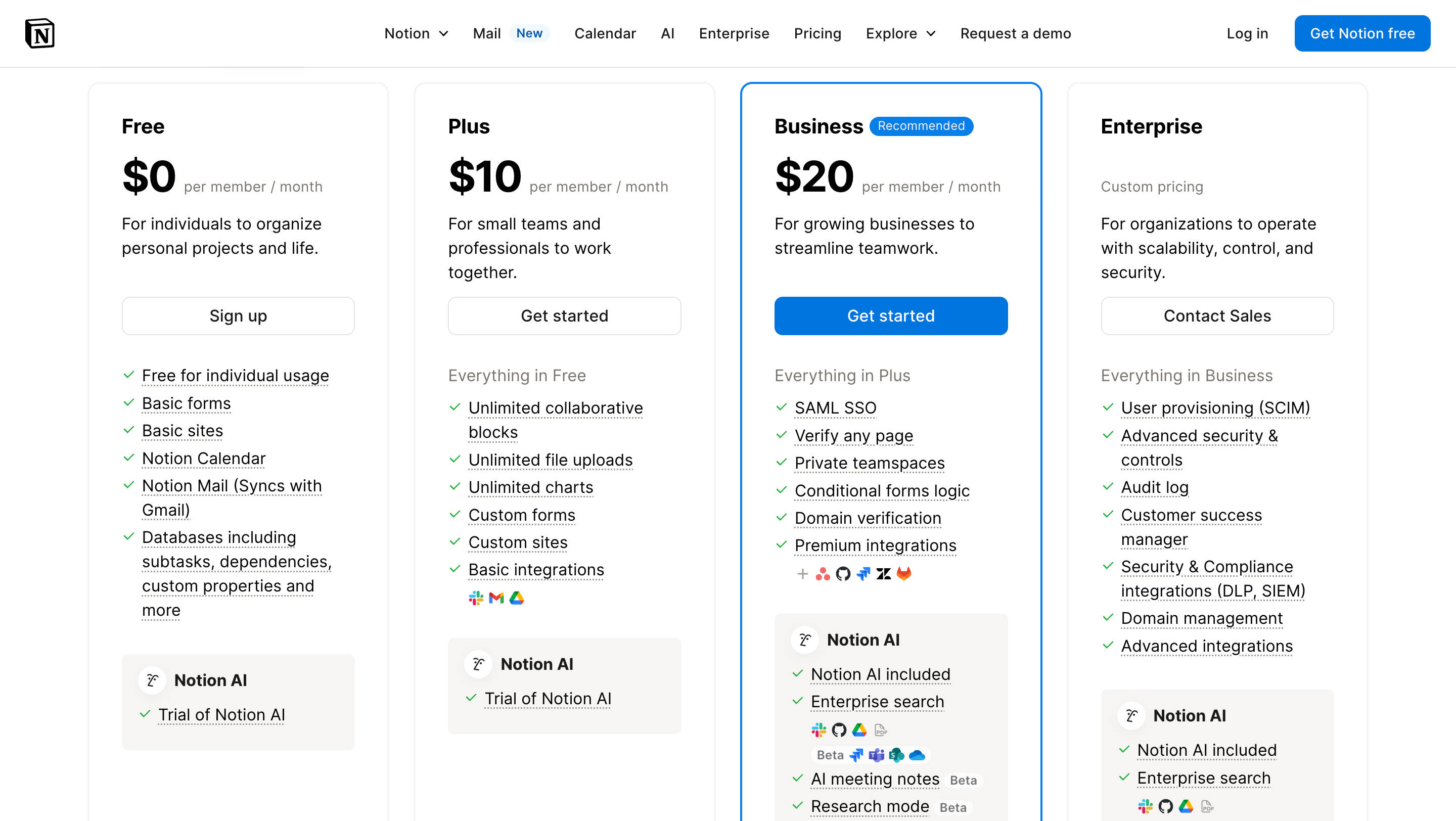
| Plan | Price (Billed Annually) | Price (Billed Monthly) | Best For |
|---|---|---|---|
| Free | $0 | $0 | Individuals managing personal projects |
| Plus | $8/user/month | $10/user/month | Small teams & freelancers |
| Business | $15/user/month | $20/user/month | Growing teams and businesses |
| Enterprise | Custom pricing | Custom pricing | Large orgs with security & governance needs |
How We Evaluated the Notion Pricing Plans
At SaaSworthy, we assess software pricing based on five key factors:
-
Feature-to-price ratio (40%): How much functionality you get for the cost
-
Scalability (20%): Whether the plan supports growing team needs
-
Ease of use (15%): How friendly the tools are for non-technical users
-
AI capabilities (15%): Value added by Notion AI at each level
-
Security and admin features (10%): Especially important at Business and Enterprise tiers
Notion Free Plan — Great for Getting Started
The Free plan is ideal for individuals using Notion as a personal productivity tool. You get unlimited blocks for solo work, basic file uploads, databases, and access to new tools like Notion Calendar and Notion Mail (Gmail sync).
Limitations kick in when you collaborate — block limits for teams, 5 MB file upload caps, and no advanced permissioning make this plan more of a sandbox than a scalable solution.
Best for: Students, freelancers, individuals
Not great for: Real-time team collaboration, secure sharing
Notion Plus Plan — Built for Small Teams
At $10/month (or $8 when billed annually), the Plus plan unlocks team features like:
-
Unlimited collaborative blocks
-
Unlimited charts
-
Unlimited file uploads
-
Custom forms and sites
-
Basic integrations
-
100 guest invites
It’s also where AI starts to make a bigger impact. You get trial access to Notion AI’s core tools like content generation, translation, and autofill — enough to test, but not to scale.
Best for: 2–10 member teams, startups testing Notion for workflows
Not great for: Compliance, page-level permissions, or private teamspaces
Notion Business Plan — Designed for Operational Complexity
Recommended by Notion itself, the Business plan ($20/user/month) is where teams truly begin to scale. It includes everything in Plus, with big unlocks:
-
Private teamspaces
-
SAML SSO
-
Domain verification
-
Conditional logic in forms
-
Notion AI fully included
-
Premium integrations (e.g., GitHub, Jira, etc.)
-
250 guest seats
-
Page-level analytics
With advanced sharing and security controls, Business is perfect for multi-team orgs where workspace hygiene, permissioning, and automation become essential.
Best for: Mid-size orgs (10–200 users), cross-functional projects
Not great for: Org-wide governance, legal compliance, deep API needs
Notion Enterprise — Secure, Scalable, and Highly Configurable
Notion’s top-tier plan comes with custom pricing and is packed with features needed by global teams and regulated industries:
-
SCIM user provisioning
-
Audit logs, DLP, SIEM integrations
-
Domain management and workspace analytics
-
Managed users and security governance
-
Enterprise-grade admin roles
-
AI capabilities like AI Meeting Notes, Enterprise Search, and Research Mode
Enterprise is also the only plan offering workspace consolidation and support from a Customer Success Manager.
Best for: Enterprises with >250 users, compliance-heavy verticals, multi-entity organizations
Not great for: Startups or small teams not ready to commit to sales-led onboarding
Notion Pricing Plans – Feature Comparison Table
| Feature | Free | Plus | Business | Enterprise |
|---|---|---|---|---|
| Unlimited blocks (solo use) | ✅ | ✅ | ✅ | ✅ |
| Team collaboration | Limited | ✅ | ✅ | ✅ |
| File uploads | 5MB | Unlimited | Unlimited | Unlimited |
| Charts | 1 chart | Unlimited | Unlimited | Unlimited |
| Forms | Basic | Custom | Conditional | Conditional |
| Notion AI access | Trial | Trial | Full access | Full access |
| Guests | 10 | 100 | 250 | 250+ |
| Private teamspaces | ❌ | ❌ | ✅ | ✅ |
| SAML SSO | ❌ | ❌ | ✅ | ✅ |
| Admin roles & workspace controls | ❌ | ❌ | ✅ | ✅ |
| Audit logs, DLP, SIEM | ❌ | ❌ | ❌ | ✅ |
| Workspace analytics | ❌ | ❌ | Page-level | Org-level |
What About Notion AI Pricing?
Notion AI is included in Business and Enterprise plans by default. For Free and Plus plans, users get a limited trial, but can’t use features like AI Meeting Notes, Research Mode, or Enterprise Search.
Want to explore more? Notion AI is evolving fast — and now handles:
-
Content generation and rewriting
-
Data extraction from pages or emails
-
Real-time summarization and translation
-
Enriching project data with external context
We expect AI usage-based pricing or credit packs to arrive by late 2025.
SaaSworthy Verdict: Which Notion Plan Should You Choose?
-
Just starting out or organizing your personal stuff? Stick with the Free plan.
-
A 3–10 person startup? Go with the Plus plan — it’s the best value tier for small teams.
-
Need robust permissions, AI, and SSO? Upgrade to Business.
-
Running a 200+ person org or need advanced security? Talk to sales about Enterprise.
Notion’s pricing has become more modular, but we see a clear shift in how they’re positioning the tool — not just as a workspace, but as an operating system for work.
Frequently Asked Questions
Is Notion really free to use?
Yes, Notion offers a completely free plan for individuals. It includes unlimited pages and blocks (for solo use), access to basic forms, Notion Calendar, and even a trial version of Notion AI. However, team collaboration is limited, and features like private workspaces or advanced analytics are reserved for paid plans.
How much does Notion cost per user?
-
Plus Plan: $10/month or $8/month when billed annually
-
Business Plan: $20/month or $15/month when billed annually
-
Enterprise: Custom pricing based on organization size and needs
Guests are free and can only access pages they’re invited to — they don’t count toward your paid seat total.
What is a paid seat in Notion?
A paid seat refers to a full member of your Notion workspace. Each paid user is charged per billing cycle (monthly or annually). You can swap members freely — removing someone frees up a paid seat that can be reassigned without extra cost.
How does Notion handle billing when adding or removing users?
If you add a user mid-cycle, Notion charges a prorated amount based on the remaining billing period. Removing users doesn’t generate a refund, but it does free up a paid seat you can reassign. Your total bill adjusts at the start of each new billing cycle.
How does Notion AI use my data?
Notion AI does not use your content to train models unless you explicitly opt in. All AI processing is done securely via subprocessors under strict contractual agreements. Your data remains encrypted and private.
What’s included in Notion AI?
Notion AI includes tools to:
-
Generate and rewrite content
-
Extract structured data from pages, emails, and documents
-
Translate text
-
Summarize meetings or research
-
Enhance task management with autofill and smart suggestions
It’s included in Business and Enterprise plans and offered as a limited trial on Free and Plus plans.
What happens if I exceed the block limit on the Free plan?
Solo users on the Free plan can add unlimited blocks. But if your workspace has more than one member, you’ll hit a block limit. Once you do, you can continue reading and editing content — but not add new blocks — until you upgrade to a paid plan.
What are the differences in analytics across plans?
-
Free & Plus: Basic analytics — page views, top viewers, view trends
-
Business: Adds editor history
-
Enterprise: Adds workspace-wide analytics, user-level insights, and search tracking
Do you offer student discounts on Notion?
Yes. Students and educators with valid school emails can get the Plus Plan for free (1-member limit). This unlocks larger uploads, better version history, and more guests than the Free plan.
What payment methods does Notion accept?
Notion accepts all major credit and debit cards. You can update your payment method anytime in the Billing section of your workspace settings.
Where can you find Notion invoices?
Admins can go to Settings & Members → Billing → Invoices to view or download PDF versions of past invoices.
What happens if a payment fails?
If your credit card fails, Notion will retry payment up to 8 times over the next 30 days. If payment still fails, your workspace will be downgraded to a limited Free plan after a grace period.
How do refunds work with Notion?
You’re eligible for a full refund if you cancel within:
-
3 days of starting a monthly plan
-
30 days of starting an annual plan
For changes in seat count or accidental additions, refunds may also be granted if you contact support within 3 days of the invoice date.
Can I cancel or downgrade my Notion subscription anytime?
Yes. You can downgrade anytime — the change takes effect at the end of your billing cycle. Upgrades apply immediately with prorated charges based on remaining days in the current cycle.
Are there regional refund policies (e.g., EU customers)?
Yes. Users in the EU, UK, or regions with mandatory refund policies may be eligible for full refunds even beyond the 3-day window — for example, EU residents have a 14-day right of withdrawal for monthly subscriptions.
