


Mind mapping tools are of great advantage for both personal and professional use. These tools can be used to create visualized concept charts with related sub-topics and ideas. It is the best tool for understanding the complete picture and an amazing platform for brainstorming.
Mind mapping tools are used by business professionals for visually organizing information. It often helps in tracking the status and progress of complex operations. Project managers and group leaders can make use of mind mapping tools to prioritize and monitor tasks, deadlines, and resources. This helps in effective troubleshooting and on-time delivery.
There are several tools available online for mind mapping. There are both free and paid options for the users to choose from. Based on the requirement, the scale of application, and complexity, users should choose the best-suited software. This will help them attain maximum productivity. In this article, we will discuss the top mind mapping software, both paid and free mind mapping software, that users can explore. But first, let’s discuss the features that users should look for while choosing a mind mapping tool.
Table of Contents
What to look for in a mind mapping software?

While choosing a mind mapping software for personal or professional use, users should keep the following checklist in mind. These are the standard features of any mind mapping software.
• Diverse features
A mind mapping software should provide a wide range of techniques for designing a mind map. Features like text inclusion, image support, and color-coding should be supported for making the mind map appealing to users. These features are important for stimulating visual thinking and promoting a problem-solving attitude. These features are also very helpful in troubleshooting and productive brainstorming sessions.
• Templates
The mind mapping software should provide a set of pre-defined templates. This is extremely helpful, especially for beginners. Templates can be further customized based on the needs and complexity of the project. However, having a basic template helps to kick start the process and it saves a lot of time.
• Export and import functionality
Being able to share a mind map with the team is as important as designing it. Mind mapping software should support different file formats for easy sharing, modifications, and edits. The most common file formats supported by the mind mapping software are PowerPoint, Microsoft Word, Microsoft Excel, and Microsoft Project, images, PDFs. Export/import functionality enables the unhindered exchange of information between multiple users.
Top mind mapping software in 2021
Following are the top mind mapping software available in the market for professional and personal use.
1. Cacoo
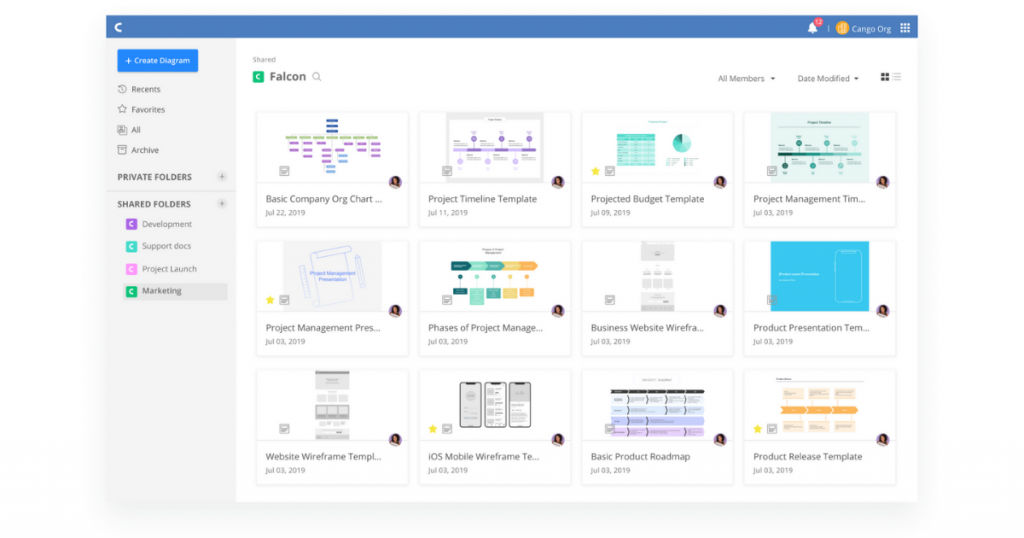
Cacoo is a collaborative tool used for creating and editing diagrams. It allows simultaneous multi-user login to facilitate real-time sharing and editing. It offers a wide variety of mind map templates that are user-friendly and easy to use.
Cacoo is best used for brainstorming, note-taking, and troubleshooting. It can also be used for creating wireframe mock-ups, flowcharts, Venn diagrams, and network diagrams. It supports .csv, .PDF, .SVG, PowerPoint, and PostScript files format. The current version of Cacoo works in integration with some of the big players in the market including MS Office, Dropbox, and Abode Creative cloud.
Key features
- Multi-user collaboration
- Organization charting
- Data import/export
- Drag-and-drop functionalities
- Pre-designed templates
- 24/7 customer support
- API integration
- Cloud-based
- Scalable
Pricing
Cacoo offers a freemium plan for public use. In addition, it offers paid subscription plans starting at $5/month with a free trial.
2. MindMeister
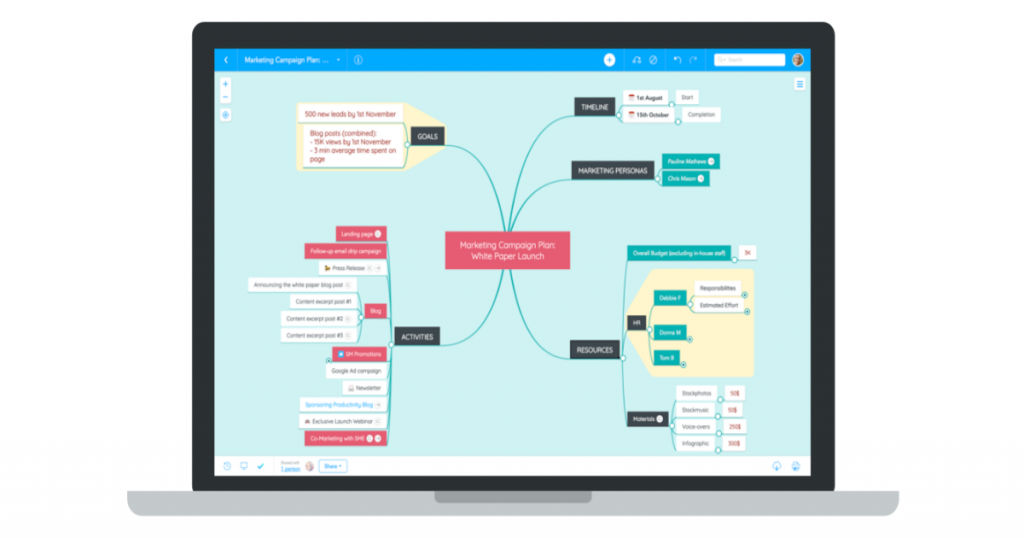
MindMeister is a cloud-based main mapping tool. It is beneficial for both professional and personal use. It is most commonly utilized by artists, businessmen, teachers, and students. In fact, it is one of the best mind mapping software for students because of its easy-to-use features and user-friendly interface. Users can create visually appealing mind maps and easily export them in PowerPoint and MS Word format. This allows easy sharing and editing of diagrams.
MindMeister records and stores the history of corrections or modifications made in a mind map to allows users to track progress. Users are allowed to add links, images, and notes to a mind map. MindMeister offers a set of pre-designed templates for users to utilize. They can be customized further based on the complexity of the process at hand. Users can also generate shareable links for making real-time modifications to the diagrams.
Key features
- PowerPoint and Word export
- Customizable templates
- Compliance back-ups
- Task widget
- Project management
- Real-time collaboration
- PNG, TXT, and PDF format support
- Third-party integrations like Dropbox, Confluence, and Evernote
- iOS and Android compatibility
- 24/7 customer support
- API integration
- Scalable
Pricing
MindMeister offers a freemium plan for public use. In addition, it offers paid subscription plans starting at $4.99/month with a free trial option.
3. Mindomo
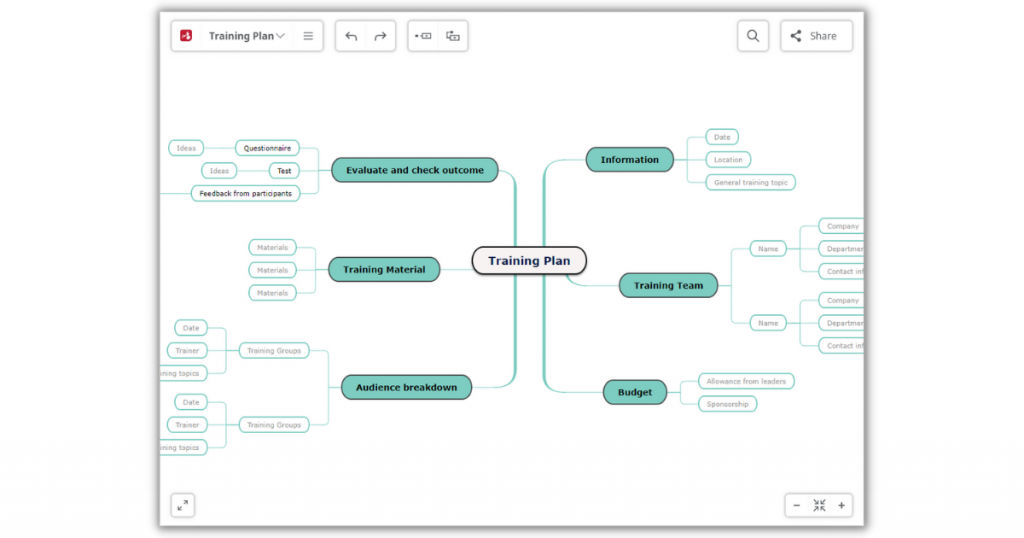
Mindomo is a collaborative tool for designing mind maps, outlines, and Gantt charts. It is used for idea management by professionals and businessmen. It offers an all-in-one visual tool with diverse formatting features. It allows users to customize mind maps in terms of fonts, themes, and more.
MindMeister has a user-friendly UI. It offers web image search functionality and allows users to add images from the internet. It also supports the drag-and-drop feature that can be used to add multiple files, images, and links to the mind map online. It is compatible with mobile devices as well, both iOS and Android. It currently works in integration with Canvas, Clever, Blackboard, Moodle, and Schoology.
Key features
- PPT, TXT, PDF, XML, and HTML file format support
- Direct audio recording
- Rainbow palette
- Hashtag feature
- Offline sync support
- Android, iOS, Windows, and Mac compatibility
- Scalable
Pricing
Mindomo offers a freemium plan. Paid subscription plans with advanced features start at $6/month.
4. Canva
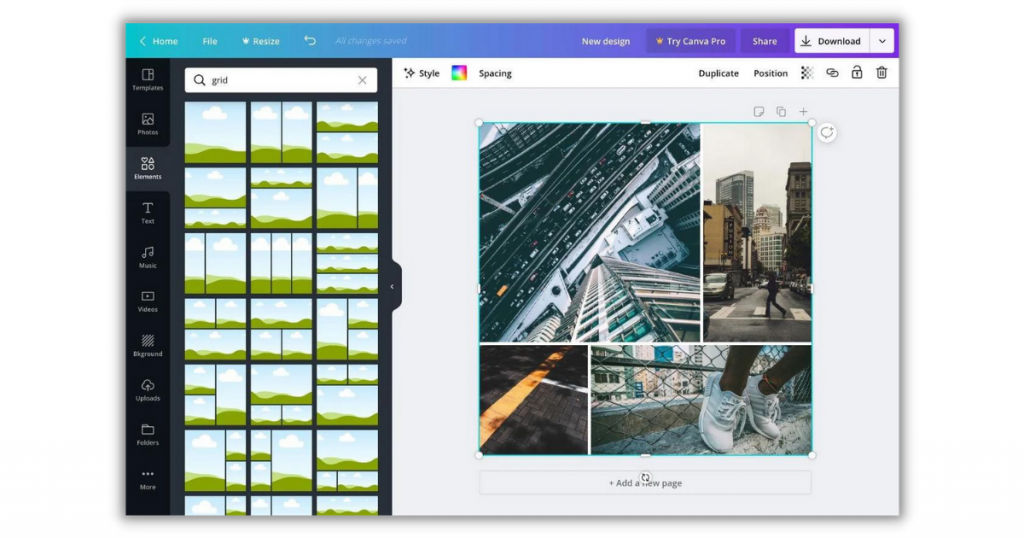
Canva is a cloud-based visual collaboration tool. It is one of the best free mind mapping software. It can also be used for graphic design. It is compatible with both web and print media mapping. It offers a range of templates for users to choose from. Professionals often use Canva to create bar graphs, pie charts, T-charts, etc.
Canva supports the drag-and-drop functionality that allows users to add multiple files, images, and links in the mind map with one simple click and slide. It offers additional wireframes and grids that can be used in advanced and complex map designing. Canva also has a media library that users can use to search relevant images for the mind maps.
Key features
- Collaborative tool
- Transparency tool
- Image editor
- Built-in templates
- In-built speech bubble maker
- Text overlay
- PowerPoint compatibility
- Infographics support
- Android, Windows, and Mac compatibility
- Scalable
- API integration
Pricing
It offers both freemium and subscription plans. Paid subscription plans of Canva start at $9.99/month with a free trial option.
5. SimpleMind
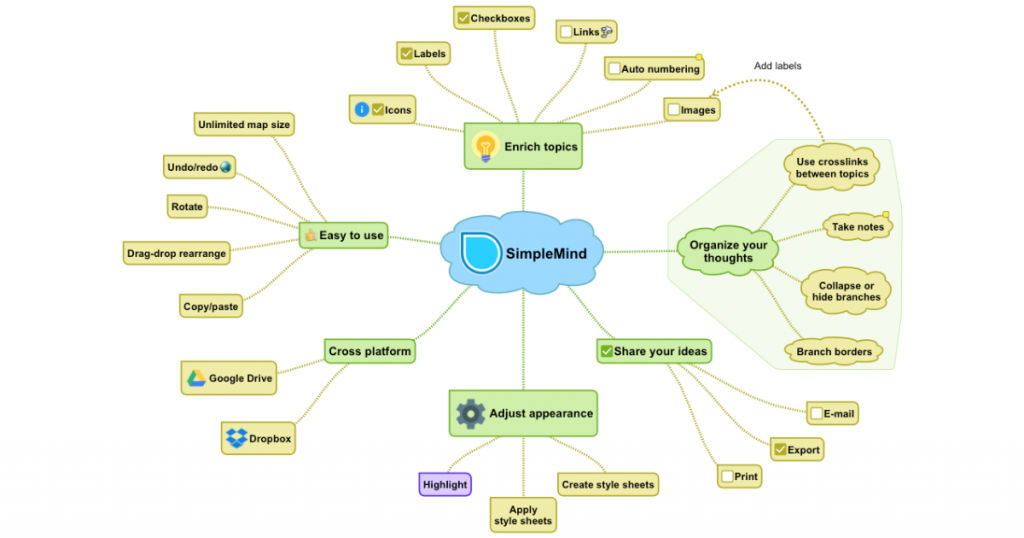
SimpleMind is a cross-platform mind mapping tool. It offers an intuitive UI with an automatic map layout. Professionals use this software for project and task management. It offers an impressive range of features like progress bars, auto-numbering, stock icons, live checklist, custom color palette, map summary, etc that makes it more appealing. Users can also add voice memos and video recordings to mind maps by using this software. This can make the maps more engaging and informative.
Key features
- Custom color palette
- Intuitive UI
- Automatic map templates
- Task management
- Multi-map design
- Third-party integration with Dropbox and Google drive
- API integration
- Online customer support
- API integration
- Scalable
- Android and iOS support
Pricing
SimpleMid offers a freemium plan. For advanced plans, users have to request for quotation. SimpleMind also offers a free trial for all its paid plans.
Conclusion
Mind mapping tools can be extremely helpful in prioritizing and troubleshooting tasks. Professionals and businessmen can use this software to keep track of deadlines, process changes, and output over the years. They can use it to optimize operations, increase productivity, and improve revenue generation. In this article, we have discussed the top mind mapping software to help you choose the best. But if wish to explore more options, you may connect to us at SaaSworthy.
Also read:
• 5 Best Business Intelligence Software for Mac: A Comprehensive Guide
