

Trello has long held a reputation as one of the easiest project management platforms for individuals and small teams. With its signature Kanban-style interface and intuitive drag-and-drop task cards, it makes project tracking approachable even for non-technical users. But as we enter 2025, many are wondering: is Trello still worth it? Or have competitors like ClickUp, Teamwork, and monday.com surpassed it in value and functionality?
In this comprehensive guide, we’ll cover everything you need to know about Trello pricing in 2025, what you get at each plan tier, any hidden costs to be aware of, and how it compares to top alternatives. Whether you’re new to Trello or considering an upgrade, this guide will help you make the right choice. But before you dive deep, have a look at our shortlist of our top project management software:
Table of Contents
Trello Pricing Plans Overview
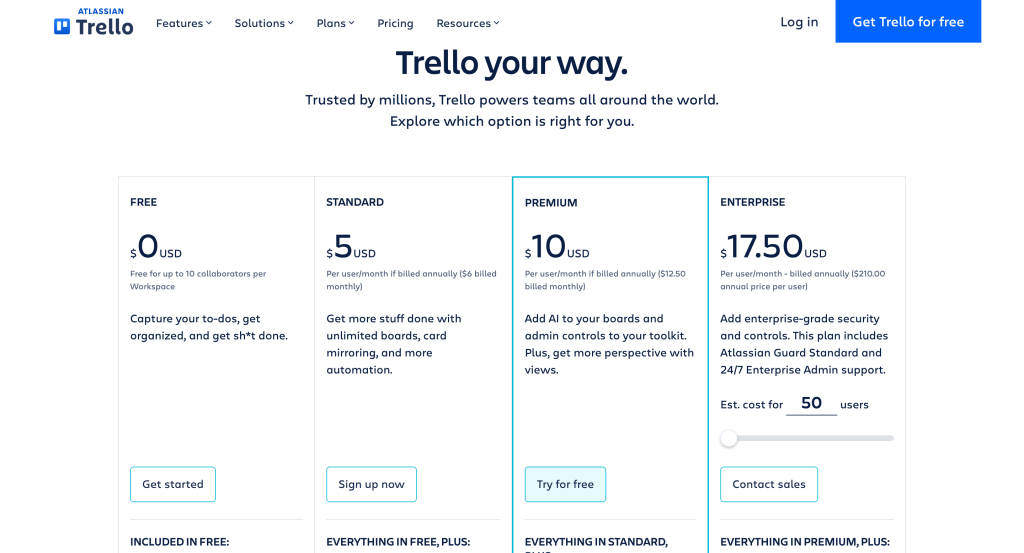
Trello offers four main pricing tiers:
| Plan | Best For | Price (Annually) | Key Highlights |
|---|---|---|---|
| Free | Solo users & hobby projects | $0 | 10 boards, 1 Power-Up per board, basic automation |
| Standard | Small teams with simple needs | $5/user/month | Unlimited boards, guests, advanced checklists |
| Premium | Admin control & better views | $10/user/month | Timeline, calendar, dashboard, priority support |
| Enterprise | Large businesses & governance | $17.50/user/month* | Org-wide controls, SSO, unlimited workspaces |
*Enterprise pricing starts at 50 users and decreases with volume.
Trello’s plans are relatively affordable compared to other tools, especially for startups and smaller teams that don’t need a full Work OS like monday.com or Wrike.
Trello Free Plan: Decent for Starters, but Lacking for Teams
Yes, Trello offers a robust free plan that’s excellent for personal use or very small teams.
What You Get with Trello Free:
- Up to 10 boards per workspace
- Unlimited cards and lists
- 1 Power-Up per board
- 250 automation command runs/month
- Basic integrations (Google Drive, Slack, etc.)
The free tier is generous, but it quickly shows limitations once you scale beyond solo use. For example, you can’t access timeline or calendar views, and team collaboration is restricted by board and Power-Up caps. While ClickUp and Teamwork also offer free plans, theirs include more advanced features out of the box.
SaaSworthy Tip: Use Trello’s Free plan to manage personal to-dos or single-project workflows. For even slightly complex needs, explore ClickUp or Teamwork’s free tiers, which offer more functionality.
Trello Standard Plan: Best Value for Small Teams
At $5 per user/month billed annually, the Standard plan is one of the most affordable paid options for task management. It includes everything in the Free plan, plus:
- Unlimited boards and cards
- Advanced checklists with assigned subtasks and due dates
- Custom fields
- 1,000 automation runs per month
- Unlimited Power-Ups
- Guest access
This plan is perfect for small teams that want to streamline workflows without paying a premium. Compared to Wrike’s Team plan ($9.80/user/month) or monday.com’s Basic plan ($9/user/month), Trello offers more flexibility and core features at nearly half the cost.
However, it lacks native reporting dashboards or multiple board views, so while it works for basic task tracking, teams with complex workflows might find it limiting.
SaaSworthy Insight: If you’re a small team that collaborates often on recurring workflows, this plan balances simplicity and cost well. You’ll only feel limitations if you start needing visual views or admin-level control.
Trello Premium Plan: Administrative Controls & Views
Trello Premium is priced at $10/user/month (billed annually) and is geared toward growing teams that need visibility across multiple projects.
Notable Additions:
- Multiple board views: Timeline, Calendar, Dashboard, Map, and Table
- Admin and security controls
- Advanced templates
- Workspace-level command runs
- 24/5 priority support
For teams juggling multiple projects or needing better workload visualization, Premium adds crucial functionality. The Timeline view in particular makes it easier to manage task dependencies and deadlines across teams.
On the downside, you’ll still need Power-Ups for features like Gantt charts, time tracking, or team workload views then tools like ClickUp or monday.com offer natively at similar price points.
SaaSworthy Tip: Consider Premium if you’re coordinating across departments. However, for $2 more, ClickUp’s Business plan provides more advanced features like time tracking, workload charts, and goal-setting tools.
Trello Enterprise Plan: Control at Scale
Starting at $17.50/user/month for 50 users, Trello’s Enterprise plan is built for larger businesses needing more structure, security, and support.
Enterprise Benefits:
- Unlimited workspaces and boards
- Org-visible boards and advanced permission settings
- Multi-board guests
- Enterprise-grade security: SSO, DLP, attachment permissions
- Onboarding assistance and 24/7 premium support
Trello’s Enterprise plan is priced lower than many competitors’ business offerings. For instance, Wrike Business starts at $24.80/user/month and Asana’s Business plan starts at $24.99/user/month. However, they include more robust built-in functionality without the need for third-party Power-Ups.
Good For: Large organisations with simple task workflows and strict permission controls.
SaaSworthy Insight: If your organization uses other Atlassian tools like Jira or Confluence, Trello Enterprise makes sense. Otherwise, monday.com or Wrike offer stronger built-in capabilities for large project workflows.
Hidden Costs to Consider
Trello’s biggest drawback is its reliance on Power-Ups—add-ons that extend Trello’s core functionality. While some are free, many useful ones are paid.
Examples of Paid Power-Ups:
- Gantt Charts (Planyway, Elegantt)
- Time Tracking (Everhour, Clockify)
- Reporting (Bridge24, Screenful)
- Workload management (TeamGantt)
This modular approach keeps Trello lightweight, but the total cost of ownership can rise quickly if your team needs multiple premium Power-Ups.
SaaSworthy Warning: You may end up spending more than you’d expect just to achieve basic PM functionality. Compare your Power-Up costs against tools like ClickUp, which bundle most capabilities in their core plans.
Key Features Across All Trello Pricing Plans
95 % SW Score The SW Score ranks the products within a particular category on a variety of parameters, to provide a definite ranking system. Read more

What is Trello and how does it work?
Organizes your projects and day-to-day tasks through creating notecards on dashboard. The software can also be used as a trip planner, a side project, a community bulletin, an event or an idea repository. Tasks and ideas can be noted on the Trello cards. Alongside, the work progress can also be tracked. The user can sort and organize these cards based upon their categories. A quick overview is displayed on the front of the cards, flipping which, the user can dive into more detailed information such as checklists, due dates, comments, attachments etc. There is a progress meter that adds a checklist to organize your to-do list. You can also attach documents and multimedia files to the cards.
Read moreSW Score Breakdown
- Features 100%
- Reviews 69%
- Momentum 60%
- Popularity 65%
- Free Trial Available
- Starts at $5.0. Offers Free-forever plan.
Here are some of Trello’s most popular features:
1. Kanban Board Interface
- Drag-and-drop task cards
- Customizable columns (To Do, In Progress, Done, etc.)
2. Automation (Butler)
- Automate repetitive actions like due date reminders, card movements, and assignments
3. Integrations
- Connect with Slack, Google Calendar, Microsoft Teams, Dropbox, and more
4. Templates
- Pre-built workflows for Agile, Content Creation, Onboarding, and more
5. Email-to-Board
- Send emails directly to Trello boards as tasks, great for managing inbound requests
What’s New in Trello (2025)
Trello’s 2025 updates are aimed at productivity and AI:
- Trello Inbox: Capture tasks via voice, Slack, or email
- Trello Planner: Connects with Google Calendar to drag tasks directly onto your schedule
- Atlassian Intelligence: Smart recommendations & summaries (Premium+ only)
SaaSworthy Take: These are positive moves but still lag behind rivals like Notion AI and ClickUp AI, which offer deeper automation and content generation.
Switching to Trello: Migration & Setup
Trello supports CSV imports, making it relatively easy to migrate from tools like Asana or monday.com. Most project management platforms allow export in CSV format, so transferring boards and task details is fairly painless.
There may be a learning curve for automations and Power-Ups, but the interface is intuitive enough for most users to get started quickly.
Trello on Reddit: What Are Users Saying?
Redditors appreciate Trello’s simplicity but often voice concerns over its scalability:
- r/Productivity: Users love Trello for basic to-do lists and personal projects. Several suggest pairing it with Google Calendar or Todoist.
- r/ProjectManagement: Teams moving from Trello to ClickUp or monday.com cite reasons like better dashboards, fewer third-party add-ons, and time tracking.
- r/SaaS: Developers and early-stage startups use Trello initially but tend to outgrow it quickly as needs scale.
SaaSworthy Insight: The Reddit consensus mirrors our verdict: Trello is fantastic for early use cases but not built for complex team workflows.
Trello vs Top Alternatives
| Tool | Starting Price | Best For | Standout Feature |
| ClickUp | $7/user/month | Feature-packed free plan | Native docs, dashboards, automations |
| Teamwork | $10.99/user/month | Agencies & client work | Time tracking and billing |
| monday.com | $9/user/month | Visual project planning | Timeline view, automations |
| Wrike | $9.80/user/month | Complex workflows | Resource and workload management |
| Smartsheet | $9/user/month | Spreadsheet-style planning | High data control, great for enterprises |
Trello excels in simplicity and cost, but its feature limitations become more apparent as teams scale.
Final Verdict: Who Should Use Trello in 2025?
Trello remains a strong choice in 2025, especially for freelancers, individual users, or small teams that want a clean, Kanban-style task management tool without a hefty price tag.
Choose Trello if:
- You’re a solo user or a startup with basic project tracking needs
- You value simplicity and ease of use
- You only need lightweight automation and simple boards
Consider alternatives if:
- You need native Gantt charts, time tracking, or detailed reporting
- You manage complex workflows with dependencies and resource planning
- You don’t want to rely on third-party Power-Ups for core functionality
For many, Trello’s Free or Standard plan will be more than enough. But if you’re scaling fast or working on data-heavy projects, tools like ClickUp or monday.com provide more value even if they come at a slightly higher cost.
Trello FAQs
Is Trello free forever?
Yes. Trello’s Free plan has no time limits, though it comes with feature caps like 10 boards per workspace and 1 Power-Up per board.
What’s the difference between Trello Standard and Premium?
Standard is good for small teams and includes core features. Premium adds timeline views, admin controls, and better support.
Can Trello be used for agile project management?
To some extent, yes, but not out-of-the-box. You’ll need Power-Ups or integrations to make it fully agile-compatible.
Does Trello support time tracking?
Not natively. You’ll need Power-Ups like TimeCamp or integrations with tools like Harvest.
Is Trello better than ClickUp?
For simplicity, yes. For long-term team productivity and features, ClickUp offers better value.
