get-free-advice
Clara Icon MEET CLARA - THE AI BEHIND SMARTER SOFTWARE CHOICES
Get Started
Browse Software
/*
Loading...
*/

92% SW Score The SW Score ranks the products within a particular category on a variety of parameters, to provide a definite ranking system. Read more

Kapwing logo
Video Editing Software

3 2 user ratings

View Details

89% SW Score The SW Score ranks the products within a particular category on a variety of parameters, to provide a definite ranking system. Read more

Clideo logo
Video Editing Software

4.7 2,093 user ratings

View Details
Featured

92% SW Score The SW Score ranks the products within a particular category on a variety of parameters, to provide a definite ranking system. Read more

VEED logo

VEED

Video Editing Software

4.7 298 user ratings

Visit Website
Featured

96% SW Score The SW Score ranks the products within a particular category on a variety of parameters, to provide a definite ranking system. Read more

Promo.com logo

Promo.com

Video Editing Software

4.4 206 user ratings

Visit Website

Overview

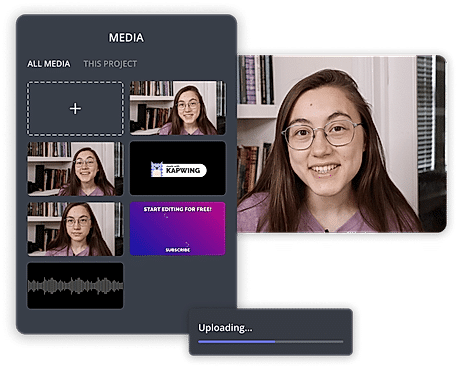
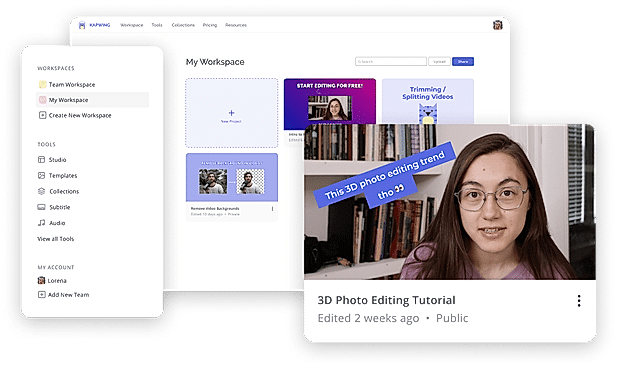
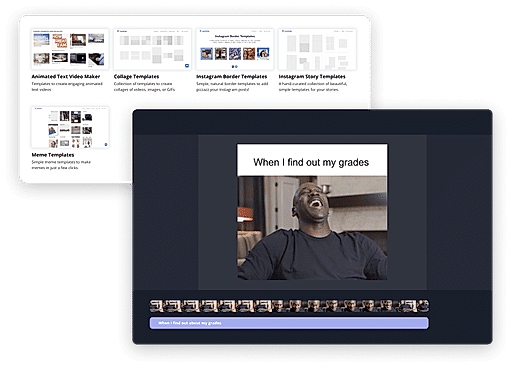
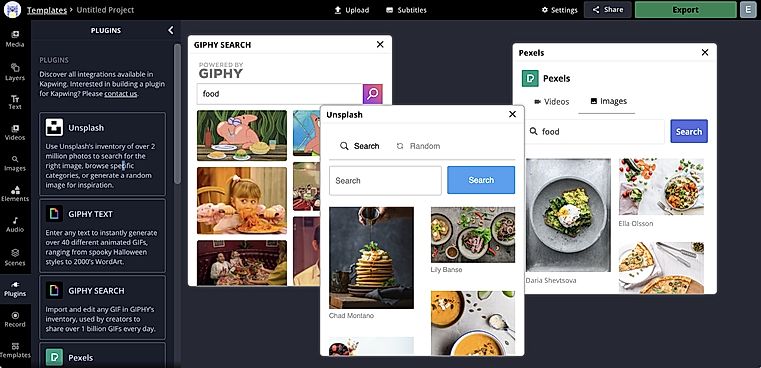
Description Kapwing is an online tool for editing images, GIFs and videos which can additionally function as a meme generator. Useful for trimming videos and even adding subtitles, Kapwing can be used by anyone who has at least an idea of video production. With Kapwing, you are able to edit your videos as much as your creativity allows. Videos can be looped, resized, trimmed and filtered. You can also add audio to video and adjust it for the perfect sync, images can also be converted to videos and can be watermarked. Kapwing is also able to make slideshows and montages. Kapwing’s major selling point is how easy it can be used, since it is suitable for both amateur and professional video producers. Kapwing provides an option to share your videos after working on them, to other sites like YouTube etc. Kapwing is easy to install and can be used by almost anyone to perform their tasks in just a few clicks. It is accessible on both Android and iOS mobile devices and on computers too. Read more Clideo is a unique platform that makes it easy to create and edit all video files GIFS, and images all in one place. The tool comes with a versatile set of video editing features like merging, compressing, resizing, slideshow, crop, rotate, and much more. To make videos standout, users can add music or text and attract relevant audiences. The video editor platform supports various video formats like MP4, AVI, MPG, VOB, WMV, MOV, and more. Everything can be done completely online and there’s no need to download or install any application at all. All video files are well-protected at all times with the premium security encryption that comes with it. Users can choose from a variety of formats, resolutions, and other features to create amazing videos instantly. The tool comes with a variety of options to play with like stop motion, reverse, speed, loop, flip, and memes. Read more Veed is an online video editing tool that enables anyone to create impactful videos and grow their audiences. It sports some handy features such as the ability to trim videos and filter them according to various looks. Users can even add images to the videos, crop them, add text, or draw on them. Veed also functions as a social media video creating tool that can create videos according to the channel that it will be posted on. They can even experiment with tools such as rotate, trim, add images, stickers, emojis and more. Users can even make video memes online through the tool up uploading a target video, editing them according to various features, and downloading the edited video after quick rendering. By leveraging creative storytelling, Veed makes it super easy and swift to make online video adverts that drive campaigns with personalized branding and call(s)-to-action. Read more Promo.com is an advanced online video making platform serving the needs of real estate, marketing, travel, recruiting & HR, eCommerce business and Saas companies. It can be used to create Instagram Ads, LinkedIn Ads, Facebook Ads, Promo Videos and Youtube Ads. Tools hosted by Promo.com includes Image resizer, online collage maker, photo to video maker, social media calendar and Facebook video covers. Moreover, users can avail of 4000+ top graded templates or can also design their own. Promo.com’s visual library comprises 100M HD quality photos and videos. A five star rated customer support team helps users get their queries resolved and generate the best videos possible. About 2.5 million professionals from all around the globe trust Promo.com to get their job done. It possesses active partnerships with renowned platforms like YouTube, Instagram, gettyimages, Triple Scoop Music and Facebook Marketing Partners. Read more
Pricing Options
  • Free Trial Not Available
  • Starts at $16.00. Offers Free-forever plan.
  • Free Trial Not Available
  • Starts at $6.00.
  • Free Trial Available
  • Starts at $12.0. Offers Custom plan.
  • Free Trial Available
  • Starts at $99.00.
SW Score & Breakdown

92% SW Score The SW Score ranks the products within a particular category on a variety of parameters, to provide a definite ranking system. Read more

  • Features The Feature Score % is calculated using the weighted average method, where core features hold more weight in the final calculation. Read more
    98%
  • Reviews
    60%
  • Momentum
    71%
  • Popularity
    92%

89% SW Score The SW Score ranks the products within a particular category on a variety of parameters, to provide a definite ranking system. Read more

  • Features The Feature Score % is calculated using the weighted average method, where core features hold more weight in the final calculation. Read more
    88%
  • Reviews
    84%
  • Momentum
    63%
  • Popularity
    70%

92% SW Score The SW Score ranks the products within a particular category on a variety of parameters, to provide a definite ranking system. Read more

  • Features The Feature Score % is calculated using the weighted average method, where core features hold more weight in the final calculation. Read more
    99%
  • Reviews
    78%
  • Momentum
    66%
  • Popularity
    87%

96% SW Score The SW Score ranks the products within a particular category on a variety of parameters, to provide a definite ranking system. Read more

  • Features The Feature Score % is calculated using the weighted average method, where core features hold more weight in the final calculation. Read more
    98%
  • Reviews
    82%
  • Momentum
    67%
  • Popularity
    94%
SaaSworthy Awards # 2 Fastest Growing # 5 Most Popular
Not Available
# 5 Fastest Growing # 12 Highly Rated # 13 Fastest Growing

Features

Total Features
11 Features
8 Features
12 Features
11 Features
Common Features for All
    Audio Tools Allows incorporating audio tools to help to add sound elements to the video creation
    Brand Overlay Enables the users to upload images/logos of their choice & overlay those onto the video player for better brand popularization.
    Collaboration Helps you safely share data with only those who matter and enhances your teamwork
    Media Library Helps in managing the videos, images, audio and as such other media files all in one place.
    Merge video Allows merging two or more video footages for better video creation
    Social Sharing Offers excellent marketing opportunities and helps to promote the brand or digital content on social media sites
    Split Video Allows splitting video into parts, delete the unnecessary ones for better video creation
    Supports HD Resolution Helps in improving the picture quality and clarity to make the video look crisp & clear.
    Text Overlay Enables the users to superimpose one or multiple text elements of varying color & fonts over a video stream.
    Video Capture Allows recording videos as well besides helping in editing them
    Video Speed Controller Helps in adjusting the speed of the video clips
    Video Stabilization Helps in stabilizing the shaky or blurred video images
  • + 8 More - Show Less
    • Audio Tools Allows incorporating audio tools to help to add sound elements to the video creation
      Brand Overlay Enables the users to upload images/logos of their choice & overlay those onto the video player for better brand popularization.
      Collaboration Helps you safely share data with only those who matter and enhances your teamwork
      Media Library Helps in managing the videos, images, audio and as such other media files all in one place.
      Merge video Allows merging two or more video footages for better video creation
      Social Sharing Offers excellent marketing opportunities and helps to promote the brand or digital content on social media sites
      Split Video Allows splitting video into parts, delete the unnecessary ones for better video creation
      Supports HD Resolution Helps in improving the picture quality and clarity to make the video look crisp & clear.
      Text Overlay Enables the users to superimpose one or multiple text elements of varying color & fonts over a video stream.
      Video Capture Allows recording videos as well besides helping in editing them
      Video Speed Controller Helps in adjusting the speed of the video clips
      Video Stabilization Helps in stabilizing the shaky or blurred video images
  • + 5 More - Show Less
    • Audio Tools Allows incorporating audio tools to help to add sound elements to the video creation
      Brand Overlay Enables the users to upload images/logos of their choice & overlay those onto the video player for better brand popularization.
      Collaboration Helps you safely share data with only those who matter and enhances your teamwork
      Media Library Helps in managing the videos, images, audio and as such other media files all in one place.
      Merge video Allows merging two or more video footages for better video creation
      Social Sharing Offers excellent marketing opportunities and helps to promote the brand or digital content on social media sites
      Split Video Allows splitting video into parts, delete the unnecessary ones for better video creation
      Supports HD Resolution Helps in improving the picture quality and clarity to make the video look crisp & clear.
      Text Overlay Enables the users to superimpose one or multiple text elements of varying color & fonts over a video stream.
      Video Capture Allows recording videos as well besides helping in editing them
      Video Speed Controller Helps in adjusting the speed of the video clips
      Video Stabilization Helps in stabilizing the shaky or blurred video images
  • + 9 More - Show Less
    • Audio Tools Allows incorporating audio tools to help to add sound elements to the video creation
      Brand Overlay Enables the users to upload images/logos of their choice & overlay those onto the video player for better brand popularization.
      Collaboration Helps you safely share data with only those who matter and enhances your teamwork
      Media Library Helps in managing the videos, images, audio and as such other media files all in one place.
      Merge video Allows merging two or more video footages for better video creation
      Social Sharing Offers excellent marketing opportunities and helps to promote the brand or digital content on social media sites
      Split Video Allows splitting video into parts, delete the unnecessary ones for better video creation
      Supports HD Resolution Helps in improving the picture quality and clarity to make the video look crisp & clear.
      Text Overlay Enables the users to superimpose one or multiple text elements of varying color & fonts over a video stream.
      Video Capture Allows recording videos as well besides helping in editing them
      Video Speed Controller Helps in adjusting the speed of the video clips
      Video Stabilization Helps in stabilizing the shaky or blurred video images
  • + 8 More - Show Less
  • Technical Details

    Organization Types Supported
    • Individuals
    • Freelancers
    • Large Enterprises
    • Medium Business
    • Small Business
    • Individuals
    • Freelancers
    • Large Enterprises
    • Medium Business
    • Small Business
    • Individuals
    • Freelancers
    • Large Enterprises
    • Medium Business
    • Small Business
    • Individuals
    • Freelancers
    • Large Enterprises
    • Medium Business
    • Small Business
    Platforms Supported
    • SaaS/Web/Cloud
    • Mobile - Android
    • Mobile - iOS
    • Installed - Windows
    • Installed - Mac
    • SaaS/Web/Cloud
    • Mobile - Android
    • Mobile - iOS
    • Installed - Windows
    • Installed - Mac
    • SaaS/Web/Cloud
    • Mobile - Android
    • Mobile - iOS
    • Installed - Windows
    • Installed - Mac
    • SaaS/Web/Cloud
    • Mobile - Android
    • Mobile - iOS
    • Installed - Windows
    • Installed - Mac
    Modes of Support
    • 24/7 (Live rep)
    • Business Hours
    • Online
    • 24/7 (Live rep)
    • Business Hours
    • Online
    • 24/7 (Live rep)
    • Business Hours
    • Online
    • 24/7 (Live rep)
    • Business Hours
    • Online
    API Support
    • Available
    • NA
    • Available
    • NA

    Reviews & Ratings

    User Rating
    3/5 2 user ratings
    4.7/5 2,093 user ratings
    4.7/5 298 user ratings
    4.4/5 206 user ratings
    Rating Distribution
    • Excellent

      50%
    • Very Good

      0%
    • Average

      0%
    • Poor

      0%
    • Terrible

      50%
    • Excellent

      89.5%
    • Very Good

      4.4%
    • Average

      1%
    • Poor

      0.8%
    • Terrible

      4.3%
    • Excellent

      79.9%
    • Very Good

      16.1%
    • Average

      2.3%
    • Poor

      0.3%
    • Terrible

      1.3%
    • Excellent

      65.5%
    • Very Good

      23.3%
    • Average

      5.3%
    • Poor

      1.5%
    • Terrible

      4.4%
    User Sentiments
      Not Available

      Ease of use, Fast processing speed, User-friendly interface, Good quality output

      Watermark on output, Limited free plan features, Occasional audio distortion, Occasional slow processing speeds

      Not Available
      Not Available
    Review Summary
    Not Available

    Reviewers commend Clideo's user-friendly interface, finding it easy to navigate and use, even for those with limited technical skills. The platform's wide range of features, including video editing, compression, and conversion, are praised for their effectiveness and efficiency. Additionally, Clideo's customer support is frequently lauded for its responsiveness and helpfulness, with reviewers highlighting the team's ability to resolve issues promptly and provide valuable assistance.

    VEED.io is a popular video editing platform lauded for its user-friendly interface, making it accessible to both novice and experienced editors. Users consistently praise its automatic subtitling feature, which significantly saves time and effort. VEED.io also offers a rich library of stock videos, music, and sound effects, enhancing content quality. Users appreciate the platform's constant updates and improvements, though some note occasional bugs and lagging issues. Overall, VEED.io is a valuable tool for creating engaging and accessible video content, particularly for social media and short-form videos.

    Not Available
    Pros & Cons
    • Easy to use interface suitable for both beginners and professionals
    • Wide range of editing features including trimming, resizing, filtering, and adding audio
    • Ability to create slideshows, montages, and memes
    • Option to share videos directly to other platforms
    • Accessible on multiple devices including computers, iOS, and Android
    • Limited advanced editing features compared to professional software
    • May experience performance issues with complex projects
    • Lacks collaboration tools for team projects
    • Limited integration with other software
    • Watermark on exported videos
    • Versatile video editing features including merging, compressing, resizing, and adding text
    • Supports various video formats and allows for easy conversion
    • User-friendly interface with a wide range of customization options
    • No need for software installation or downloads
    • Premium security encryption for data protection
    • Limited advanced editing capabilities compared to professional software
    • May experience performance issues with large video files
    • Lacks collaboration tools for team projects
    • Limited integration with other software
    • Watermark on exported videos
    Not Available
    Not Available
      Read All User Reviews Read All User Reviews Read All User Reviews Read All User Reviews

    AI-Generated from the text of User Reviews

    Pricing

    Pricing Options
    • Free Trial Not Available
    • Starts at $16.00. Offers Free-forever plan.
    • Free Trial Not Available
    • Starts at $6.00.
    • Free Trial Available
    • Starts at $12.0. Offers Custom plan.
    • Free Trial Available
    • Starts at $99.00.
    Pricing Plans
    Monthly Plans Annual Plans

    Free Free

    Pro $16.00 $20.00 per month

    For Teams $16.00 $20.00 per user / month

    Clideo Pro $6.00 $9.00 per month

    Lite $12.00 $24.00 per month

    Pro $29.00 $55.00 per month

    Enterprise Custom

    Annual Agency $99.00 $199.00 per month

     
    View Detailed Pricing
    View Detailed Pricing
    View Detailed Pricing
    View Detailed Pricing

    Have Questions? We can help!

    Get personalized recommendations from our experts on call

    Call Me

    Trusted by more than 5 Million users across the globe.

    Thank you for the enquiry. One of our software analysts will contact you soon.

    Screenshots & Videos

    Screenshots Media Library screenshot
    + 3 More
    Not Available Not Available Publish video
    Videos Video Thumbnail
    + 2 More
    Not Available Video Thumbnail
    + 3 More
    Video Thumbnail
    + 3 More

    Vendor information

    Company Details Located in: San Francisco, California Founded in: 2017 Located in: Larnaca, Cyprus Located in: London, United Kingdom Founded in: 2017 Located in: Tel Aviv, Israel
    Contact Details

    Not available

    https://www.kapwing.com/

    Not available

    https://clideo.com/

    Not available

    https://veed.io/

    Not available

    https://promo.com/

    Social Media Handles

    Not available

    FAQs

    What are the key differences between Kapwing and Clideo?

    Kapwing is a user-friendly video editing tool suitable for both beginners and professionals, while Clideo is a comprehensive video creation and editing platform with a wide range of features.

    What are the alternative products to Kapwing?

    The top alternatives to Kapwing are ClipChamp, Filmora, VEED, Adobe Premiere Pro, and Vidds.

    What are the alternative products to Clideo?

    The top alternatives to Clideo are Kapwing, WeVideo, Wave.video, Pixiko, and Create.

    Which product is better for creating and editing GIFs?

    Both Kapwing and Clideo offer features for creating and editing GIFs, but Kapwing has a more user-friendly interface and a wider range of templates.

    Which product offers more advanced video editing features?

    Clideo offers a wider range of advanced video editing features, such as color correction, green screen, and motion tracking.

    We understand SaaS better

    SaaSworthy helps stakeholders choose the right SaaS platform based on detailed product information, unbiased reviews, SW score and recommendations from the active community.

    icon

    Buyers

    Looking for the right SaaS

    We can help you choose the best SaaS for your specific requirements. Our in-house experts will assist you with their hand-picked recommendations.

    icon

    Makers

    Want more customers?

    Our experts will research about your product and list it on SaaSworthy for FREE.

    Get Listed