MEET CLARA - THE AI BEHIND SMARTER SOFTWARE CHOICES



Robin |
98% SW Score The SW Score ranks the products within a particular category on a variety of parameters, to provide a definite ranking system. Read more 
View Details
|
75% SW Score The SW Score ranks the products within a particular category on a variety of parameters, to provide a definite ranking system. Read more 
View Details
|
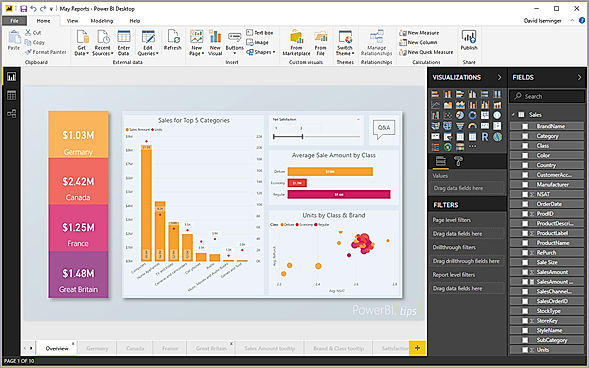
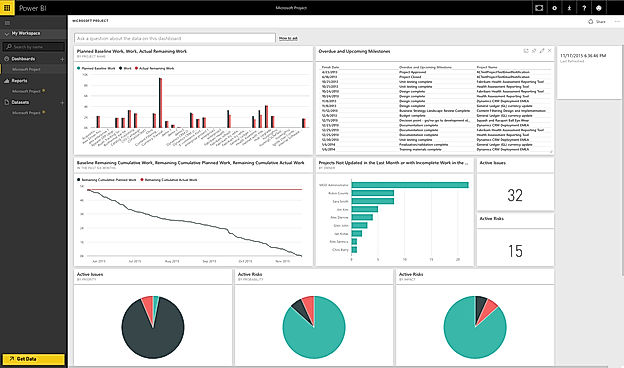
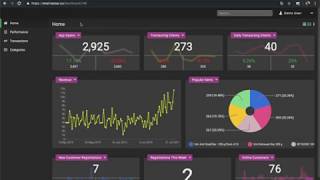
| Description | Microsoft Power BI is a data visualization platform that enables its users to create a data-driven culture equipped with business intelligence. The software helps its users to allow their employees at different organizational levels to use the up to the minute analytics in order to make quick and confident decisions. Users can share and create interactive data visuals throughout the data centers around the world, including the national clouds to hence meet the regulation and compliance requirements of the organization. Power BI allows its users to apply sensitivity labels that are recognizable through Office 365 apps such as Excel, Word, Outlook, and PowerPoint. The software allows its users to use the oversight of sensitive data through Microsoft Cloud App Security to ensure better compliance of regulatory and privacy requirements. Users can extend the governance and protection policies along with the exported data to the software with the help of Microsoft Information Protection. One can block risky user activities in real-time to prevent the exposure of sensitive data. Read more | Kato by JungleWorks is a geospatial analytics software designed to speed up and simplify the journey of business analytics. The software accelerates the process from data collection and preparation to analytics dashboard and then to predictive insights. Businesses usually use the software to help them find hidden business opportunities lying in the data and use that to utilise high-value insights to full effect. Kato enables the users to visualise the data and go deeper into the charts, reports, graphs and dashboard. The JungleWorks Kato benefits the user with features such as analytics dashboard through which users can find hidden insights and opportunities and business can be driven forward since users have a better understanding of the data. It also helps the users to visualise the data in different ways that are all visually comprehensible. Communication and collaboration are also encouraged by the software, whether it is between team members, stakeholders and colleagues hence resulting in improved productivity and efficiency. Read more |
| Pricing Options |
|
|
| SW Score & Breakdown |
98% SW Score The SW Score ranks the products within a particular category on a variety of parameters, to provide a definite ranking system. Read more
|
75% SW Score The SW Score ranks the products within a particular category on a variety of parameters, to provide a definite ranking system. Read more
|
| SaaSworthy Awards | # 2 Most Worthy # 1 Highly Rated |
Not Available
|
| Total Features |
10 Features
|
3 Features
|
| Common Features for All |
Ad hoc Analysis
Ad hoc Query
Ad hoc Reports
Benchmarking
Dashboard
Data Analysis
Key Performance Indicators
Profitability Analysis
Strategic Planning
Trend Indicators
|
Ad hoc Analysis
Ad hoc Query
Ad hoc Reports
Benchmarking
Dashboard
Data Analysis
Key Performance Indicators
Profitability Analysis
Strategic Planning
Trend Indicators
|
| Organization Types Supported |
|
|
| Platforms Supported |
|
|
| Modes of Support |
|
|
| API Support |
|
|
| User Rating |
|
|
| Rating Distribution |
|
|
| User Sentiments |
Data Visualization Capabilities, Extensive Data Source Integrations, Intuitive and User-Friendly Interface, Data Sharing and Collaboration Mobile App Functionality, Occasional Software Bugs, Pricing Model Limitations, Complex Interface for Beginners |
Not Available
|
| Review Summary |
Users appreciate Power BI's user-friendly interface, extensive data visualization options, and seamless integration with other Microsoft products. Many reviewers highlight its ability to transform raw data into insightful reports and dashboards, aiding in better decision-making. Additionally, Power BI's collaboration features and mobile accessibility receive positive feedback. However, some users mention occasional performance issues and a learning curve for advanced features. While praised for its affordability and value for money, certain users suggest enhancements in customer support. |
Not Available
|
| Read All User Reviews | Read All User Reviews |
AI-Generated from the text of User Reviews
| Pricing Options |
|
|
|
Pricing Plans
Monthly Plans
Annual Plans
|
Free Account Free Power BI Pro $10.00 $10.00 per user / month Power BI Premium Per User $20.00 $20.00 per user / month Power BI Embedded Custom |
Pro $69.00 $69.00 per month Business $249.00 $249.00 per month Enterprise Custom |
|
View Detailed Pricing
|
View Detailed Pricing
|
Get personalized recommendations from our experts on call
Trusted by more than 5 Million users across the globe.
Thank you for the enquiry. One of our software analysts will contact you soon.
| Screenshots |
+ 6 More
|

|
| Videos |

+ 4 More
|
|
| Company Details | Located in: Redmond, Washington Founded in: 2014 | Located in: Seattle, WA |
| Contact Details |
Not available https://www.microsoft.com/en-us/power-platform/products/power-bi/ |
+1 206-257-2964 |
| Social Media Handles |
|
Not available |

Looking for the right SaaS
We can help you choose the best SaaS for your specific requirements. Our in-house experts will assist you with their hand-picked recommendations.

Want more customers?
Our experts will research about your product and list it on SaaSworthy for FREE.